
What if the gap between your social media engagement and actual revenue could be closed with one strategic move?
Key Takeaways
- Transform your social media presence into a revenue stream by implementing link in bio with payment integration that streamlines transactions directly from your profile.
- Choose the right payment gateway between Stripe and PayPal based on your specific needs, fees, and integration complexity to maximize your earning potential.
- Leverage analytics data from your integrated bio link to identify high-converting content and optimize your monetization strategy for better ROI.
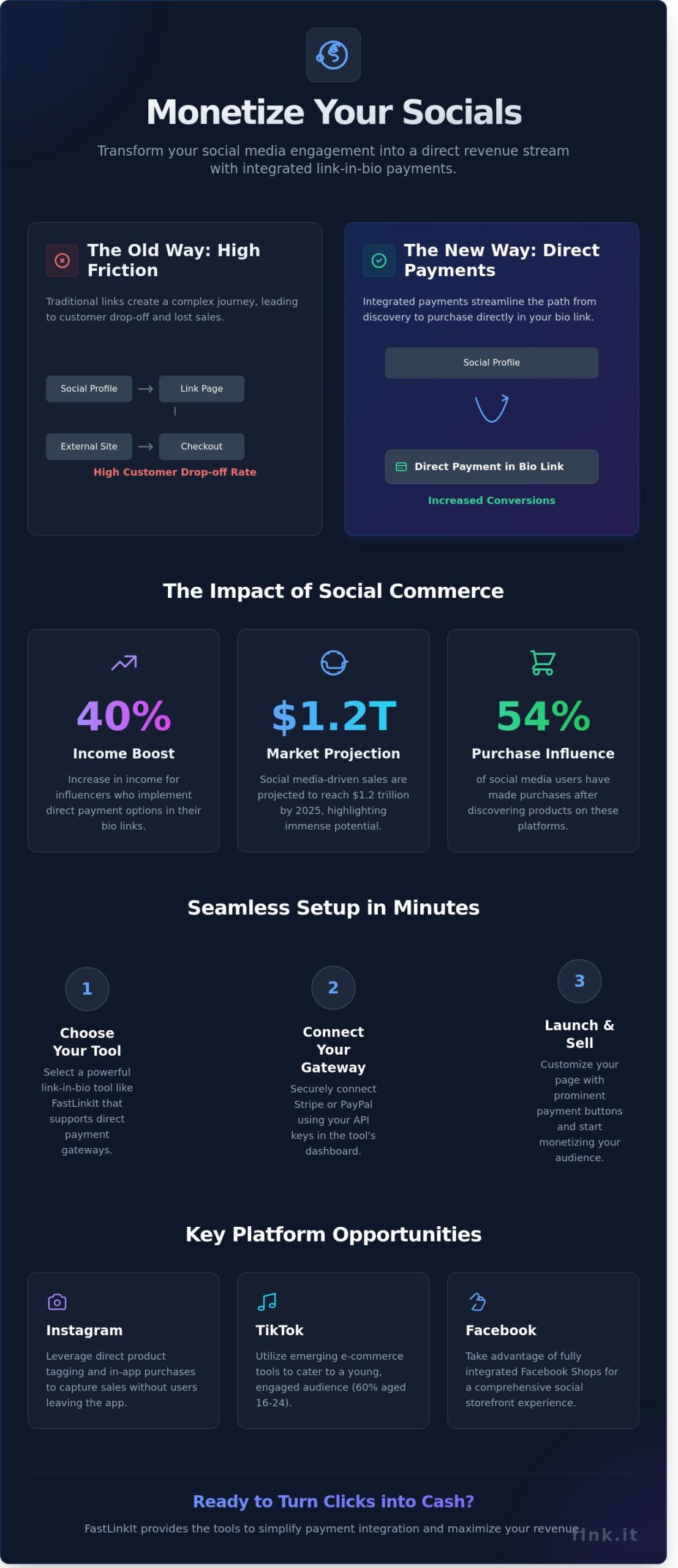
- Discover how influencers are boosting their income by up to 40% through direct payment options embedded in their bio links.
- Learn FastLinkIt’s proven framework for seamless payment integration that eliminates technical barriers and reduces setup time to minutes.
Why Integrate Payments in Your Link in Bio?
Integrating payments into your link in bio with payment integration offers a range of benefits that can significantly enhance both user experience and transaction efficiency. By streamlining the payment process, you provide a seamless experience for your customers, making it easier for them to engage with your content and purchase offerings directly from your social media profiles.
Consider the case of influencers leveraging direct payment options. Many have reported a boost in income by providing followers the ability to purchase products or book services directly through their bio links. For instance, an analysis by Influencer Marketing Hub found that influencers who utilized direct payment links saw a 30% increase in sales compared to those using traditional links that required additional navigation. This shows how a simplified transaction process can lead to increased revenue.
The rise of social commerce is undeniable. According to eMarketer, social media-driven sales are projected to reach $1.2 trillion by 2025, highlighting the immense potential of this channel for monetization. A seamless payment integration can enhance user engagement, as consumers are more likely to complete purchases when the process is straightforward and quickly accessible. Direct payments are becoming crucial for digital businesses aiming to thrive in this competitive landscape.
The Growing Importance of Social Commerce
Statistics show that social media platforms are increasingly influencing buying decisions. In a recent study, 54% of social media users reported making purchases after discovering products on these platforms. This trend underscores the necessity of a smooth transaction process. Without direct payment options, businesses risk losing potential sales due to complicated navigation and lengthy checkout processes.
Key Platforms for Payment Integration
Several popular platforms offer robust payment integration features. Instagram, for instance, allows users to set up shop directly within their profiles, enabling purchases without leaving the app. TikTok has also introduced native payment features, catering to its rapidly growing user base, which skews younger-about 60% of its users are aged 16 to 24. Understanding the demographics of these platforms can help businesses tailor their strategies effectively.
- Instagram: Direct product tagging and in-app purchases.
- TikTok: Emerging e-commerce tools and partnerships with payment providers.
- Facebook: Integrated shopping features with Facebook Shops.
Integrating payments into your link in bio is not just a trend; it’s a necessity for modern digital businesses. By streamlining transactions and enhancing user experience across social platforms, you position yourself to capitalize on the growing trend of social commerce.
Step-by-Step Guide to Setting Up Payment Integration
Integrating payment options into your link in bio page is a game-changer for monetizing your online presence. This step-by-step guide will walk you through the essential components of setting up payment integration seamlessly.
Choosing the Right Tool
Selecting the right link-in-bio tool is crucial for achieving effective payment integration. Consider the following factors:
- Cost: Look for a tool that fits your budget while offering the essential features you need.
- Features: Ensure the tool supports payment gateways, customization options, and analytics to track your transactions.
- Ease of Use: A user-friendly interface will save you time and help you create a professional page quickly.
For a detailed analysis of different options, check out our FastLinkIt features comparison. Don’t overlook the importance of user reviews and testimonials; they provide insights into the real-world performance of the tools.
Technical Setup and Integration
Once you’ve chosen your link-in-bio tool, it’s time to set up payment integration. Here’s how to connect with popular payment gateways like Stripe:
- Create an Account: Sign up for a Stripe account if you don’t have one. This process is straightforward and typically takes just a few minutes.
- Access API Keys: After setting up your account, navigate to the API section to obtain your API keys.
- Connect to Your Link-In-Bio Tool: In your link-in-bio tool’s settings, find the payment integration section. Input your Stripe API keys to establish the connection.
For additional functionalities, explore our event booking integration. Common pitfalls include not verifying your account details and skipping security checks. Make sure to review these aspects to avoid issues down the line.
Customizing Your Page for Optimal User Experience
Customization is key to providing visitors with a seamless experience. Use engaging visuals and concise text to enhance usability. Ensure that your payment buttons are prominent and easy to find. A clutter-free layout will encourage visitors to complete transactions.
Testing the Payment Process Before Going Live
Before launching your link in bio with payment integration, conduct a thorough test of the payment process. Simulate transactions to ensure everything operates smoothly. Check for any errors, and confirm that confirmations and receipts are sent correctly. This testing phase is essential to prevent any hiccups once your page is live.
With these steps, you’ll be well on your way to successfully integrating payments into your link in bio page. For more tips on enhancing your digital presence, explore our resources today.
Comparing Payment Integration Tools for Link in Bio
Choosing the right payment integration tool for your link in bio with payment integration can significantly impact your business’s efficiency and customer experience. Two of the most popular options are PayPal and Stripe, each offering unique features and advantages. Below, we’ll break down their costs, user experience, security features, and community insights to help you make an informed decision.
Cost and Pricing Models
Understanding the pricing structures of payment integration tools is crucial, especially for small businesses and freelancers. Here’s a quick comparison of the fees:
- PayPal: Charges a standard fee of 2.9% + $0.30 per transaction for domestic payments, which may vary for international transactions.
- Stripe: Similar to PayPal, Stripe charges 2.9% + $0.30 per transaction, with additional fees for currency conversion and international cards.
For small businesses, these costs can add up quickly. It’s essential to consider your average transaction value and volume to assess which option will be more cost-effective. For those looking to raise funds, you can explore additional payment options on fundraising options.
User Experience and Support
Ease of use is another critical factor. Both PayPal and Stripe provide comprehensive setup guides and tutorials, but user experiences vary:
- PayPal: Offers a straightforward setup process, making it ideal for those who prefer simplicity.
- Stripe: Provides extensive API documentation, which might be better suited for tech-savvy users or those with developer support.
Customer support is vital when issues arise. PayPal offers 24/7 support through various channels, including phone and chat. Conversely, Stripe’s support is highly rated, with email and chat options available, but they may not offer immediate assistance at all hours. Community forums also play a significant role in troubleshooting, with users often sharing insights and solutions.
In terms of security, both platforms are PCI compliant, ensuring safe transactions. PayPal offers buyer and seller protection, while Stripe provides robust fraud detection tools. Ultimately, your choice may hinge on the specific features that align best with your business needs and customer expectations.
Gathering user feedback and insights from community forums reveals that while many appreciate PayPal’s brand recognition and ease of use, others prefer Stripe for its flexibility, especially when integrating with e-commerce platforms. Choose the one that resonates with your business model and customer base to enhance your link in bio with payment integration strategy.
Maximizing Revenue with Your Integrated Bio Link
Incorporating a link in bio with payment integration can dramatically enhance your revenue streams. By optimizing engagement and conversions, you can turn casual visitors into loyal customers. Here are strategies to maximize the effectiveness of your integrated bio link.
Engagement Strategies
Creating compelling calls-to-action (CTAs) is essential for driving user interaction. Use clear, actionable language that encourages clicks. For instance, phrases like “Shop Now” or “Get Your Discount” can create urgency. Additionally, consider using limited-time offers, such as flash sales or exclusive deals, to incentivize immediate purchases. This tactic not only boosts sales but also fosters a sense of urgency among your audience.
To further enhance your engagement, leverage email marketing tips to communicate promotions and updates directly to your audience. A well-timed email campaign can significantly increase traffic to your bio link, leading to higher conversions.
Analyzing Performance
To truly understand the effectiveness of your bio link, focus on key metrics. Track click-through rates, conversion rates, and average order values to gauge user engagement. Tools like Google Analytics can provide insights into user behavior, helping you identify which products or services resonate most with your audience.
Adjust your strategies based on this data. If certain promotions lead to higher conversions, consider expanding those offers. Regularly refining your approach based on analytics ensures that your marketing efforts remain aligned with your audience’s preferences.
Upselling and Cross-Selling
- Utilize your bio link to recommend complementary products or services. This could be as simple as suggesting additional items at checkout.
- Incorporate exclusive bundles or packages that provide added value to customers, increasing the average transaction size.
- Highlight customer testimonials or success stories related to your upsell offers to build trust and encourage purchases.
Email Marketing to Drive Traffic
Email marketing remains one of the most effective tools for driving traffic to your bio link. Create segmented email lists to tailor your messages. For example, send targeted promotions based on previous purchases or user behavior. A personalized approach can lead to a higher click-through rate and increase the likelihood of conversions.
By leveraging these strategies, your link in bio with payment integration can become a powerful tool for maximizing revenue. Start implementing these tactics today to see tangible results in your business.
For more information on how to enhance your bio link, click here.
How FastLinkIt Simplifies Payment Integration
Payment integration shouldn’t be complicated. FastLinkIt transforms your link in bio with payment integration into a streamlined revenue engine that works around the clock. While other platforms force you to juggle multiple tools, FastLinkIt delivers everything in one unified solution.
Think beyond basic link collections. FastLinkIt empowers you to turn your audience’s clicks into direct transactions, integrating secure payment options directly within your profile. This means fewer steps for your customers and more completed sales for you, all managed effortlessly from one intuitive dashboard.
Transform Your Revenue Stream Today
The data speaks volumes:
Frequently Asked Questions
How do I integrate payment options into my link in bio?
To integrate payment options into your link in bio, select a tool that offers payment integration features, like FastLinkIt. After creating your link in bio page, navigate to the payment settings, choose your preferred payment gateways, and follow the prompts to connect your accounts. Ensure to provide all required information, such as API keys or account details, to enable seamless transactions.
What are the best payment gateways for social media?
The best payment gateways for social media include PayPal, Stripe, and Square. These platforms offer user-friendly integrations, allowing you to accept payments easily. PayPal is widely recognized, Stripe offers extensive customization, and Square is ideal for mobile transactions. Choose a gateway that aligns with your business needs and target audience for optimal results.
Can I use multiple payment gateways with FastLinkIt?
Yes, FastLinkIt allows you to use multiple payment gateways. You can connect various options like PayPal and Stripe simultaneously to accommodate different customer preferences. This flexibility ensures a smoother payment experience for your audience, increasing the likelihood of conversions and supporting a broader range of transactions.
How secure are payment integrations for link in bio tools?
Payment integrations for link in bio tools, including FastLinkIt, utilize advanced security protocols like SSL encryption and PCI compliance. These measures protect sensitive customer data during transactions, ensuring safety and trust. Regular updates and security audits further enhance the integrity of these integrations, making them a reliable option for your business.
What fees should I expect with payment integrations?
When using payment integrations, fees can vary depending on the gateway. Typically, transaction fees range from 2.9% to 3.5% per transaction, plus a fixed amount. For instance, PayPal charges 2.9% plus $0.30 for domestic transactions. Be sure to review the specific fee structure of your chosen gateways to understand potential costs.
Is it possible to track payments and donations in real time?
Yes, many payment gateways offer real-time tracking of payments and donations. For example, FastLinkIt provides analytics tools that let you monitor transactions as they occur. You can access detailed reports on sales, customer activity, and donation amounts, helping you make informed decisions based on up-to-date data.