
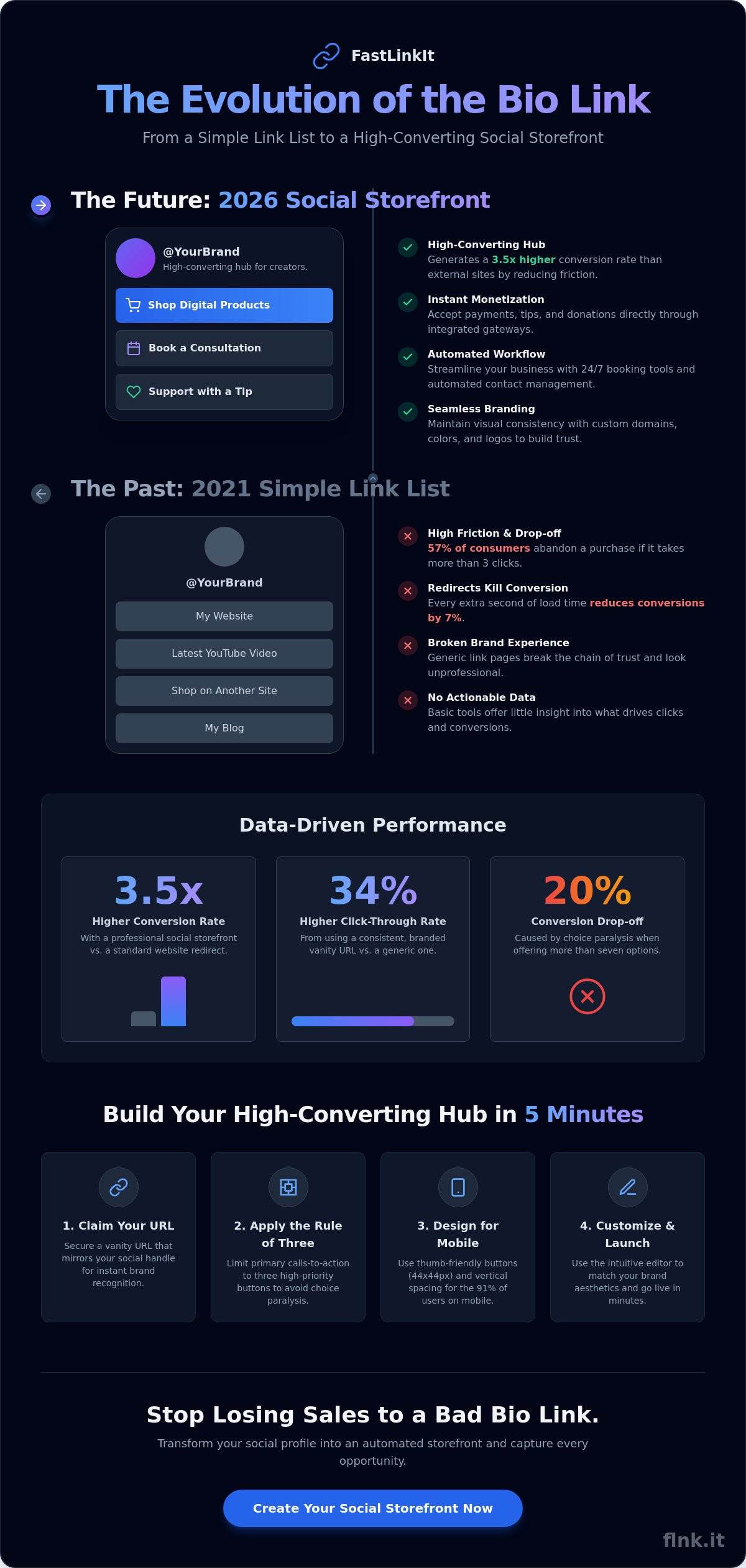
What if your social media profile wasn’t just a digital business card, but a fully automated storefront that works while you sleep? You’ve likely felt the frustration of watching potential customers drop off because your Instagram or TikTok profile leads to a cluttered landing page or a confusing maze of external sites. It’s a common pain point. A 2024 industry report by Sprout Social found that 57% of consumers will abandon a brand’s profile if the path to purchase takes more than three clicks. Managing a messy bio link shouldn’t be the reason you lose your next sale.
You deserve a streamlined system that works as hard as you do. We’re going to show you how to transform your profile into a high-converting business hub that handles payments, bookings, and branding in under five minutes. You’ll learn how to implement the latest 2026 social storefront technology to automate your workflow and keep more of your revenue by cutting out expensive, disconnected tools. This guide covers everything from design aesthetics to backend automation so you can focus on growth instead of tech hurdles.
Key Takeaways
- Transform your social media profile into a high-converting digital storefront in just five minutes.
- Centralize your digital presence with a professional bio link that captures every lead and showcases your brand identity.
- Monetize your audience immediately through integrated payment gateways and seamless tipping features.
- Streamline your workflow with 24/7 booking tools and automated contact management to handle growth effortlessly.
- Scale your influence using custom domains and data-driven analytics for maximum professional authority.
The Evolution of the Bio Link: Why Your Social Media Front Door Needs an Upgrade
Your bio link is no longer just a digital placeholder. In 2026, it serves as a high-performance landing page, a centralized hub designed specifically to capture and convert social media traffic. Platforms like Instagram and TikTok still enforce a strict “one link” policy. This constraint originally gave rise to early tools like Linktree, which launched in 2016 to solve the basic problem of choice. However, the expectations of your audience have shifted dramatically over the last decade.
The 2021 model of a simple “link list” is officially obsolete. Back then, creators used these pages as a directory of buttons. Today, the 2026 standard is the social storefront. We’ve transitioned from a culture of passive browsing to one of active, immediate conversion. Followers don’t want to be redirected through five different browser windows. They want to buy a product, book a consultation, or join a newsletter the moment they click. If your bio link doesn’t facilitate these actions instantly, you’re losing revenue to friction.
Why a Simple Link List Is No Longer Enough
Friction kills conversions. When a user clicks your link and gets sent to a complex, non-responsive external website, they drop off. Industry data from 2025 shows that every additional second of load time or unnecessary redirect reduces conversion rates by 7%. A modern social landing page eliminates this by keeping the user within a mobile-optimized environment. This setup allows for “micro-conversions.” Instead of demanding a major purchase immediately, you can engage users with interactive elements like quick polls, lead magnets, or curated digital shops that feel native to the social app experience.
The ROI of a Professional Social Landing Page
A professional social storefront generates a 3.5x higher conversion rate compared to a standard external website redirect. Visual consistency is the foundation of this success. If your social content is high-end but your landing page looks like a generic template from 2010, you break the chain of trust. In 2026, the most successful brands use their bio space to maintain a seamless aesthetic while gathering deep analytics. You need to know exactly which post triggered a click and which button drove the highest ROI. This data transforms your social presence from a creative outlet into a precision-engineered sales engine. Precise tracking ensures you invest your time only in the content that actually moves the needle.
How to Create a High-Converting Bio Link Page in 5 Minutes
Efficiency defines digital success in 2026. You have exactly 2.5 seconds to capture a visitor’s attention before they scroll away. Building a high-performing bio link isn’t about complexity; it’s about clarity and speed. Start by securing a vanity URL that mirrors your social handles. Data from 2025 indicates that consistent branding across URLs increases click-through rates by 34% compared to generic, auto-generated strings.
Follow the Rule of Three. Limit your primary calls-to-action to three distinct, high-priority buttons. Industry analysis suggests that pages offering more than seven options suffer a 20% drop in conversion due to choice paralysis. Focus on your most profitable paths first. Use high-contrast colors for these buttons to lead the eye naturally down the page. Integrate rich media like a 30-second intro video or a Spotify preview to increase dwell time. Longer engagement signals quality to platform algorithms, boosting your overall visibility.
Setting Up Your Foundation with FastLinkIt
Speed meets style. Create your account and claim your unique URL in seconds. Use the intuitive drag-and-drop editor to place your most important links at the top of the stack. Your bio description must be a punchy, one-sentence value proposition. Tell visitors exactly what they gain by clicking. A well-crafted bio helps convert social media followers into customers by offering immediate value, such as a gated PDF or a limited-time discount code. It’s the digital equivalent of a firm, professional handshake.
Design Best Practices for Mobile Users
Mobile-first design is the standard. As of late 2024, over 91% of social media traffic originates from smartphones. Ensure your buttons are at least 44×44 pixels to remain “thumb-friendly” for every user. Proper vertical spacing prevents accidental clicks, which can reduce bounce rates by up to 15%. Use high-quality SVG logos and sharp imagery to establish instant authority. A cluttered page feels amateur; a minimalist layout feels premium. 70% of users now prefer dark mode settings, so test your color contrast for both light and dark environments to ensure readability. If you’re ready to upgrade your digital presence, you can explore modern templates that prioritize these conversion-centric design principles.
- Prioritize: Keep your top three links above the fold.
- Personalize: Match your fonts and hex codes to your existing brand kit.
- Analyze: Use buttons with clear, action-oriented verbs like “Join,” “Get,” or “Book.”
Turning Clicks into Cash: How to Accept Payments and Donations Directly
Your bio link shouldn’t just be a directory. It’s a storefront. In 2026, the distance between discovery and purchase must be zero. If a follower has to leave your profile, open a browser, and search for your site, you’ve already lost the sale. Converting traffic into revenue requires a frictionless path that happens right where your audience lives.
Integrating Stripe for One-Touch Transactions
Connecting your payment processor is the first step toward true digital independence. Start by navigating to your dashboard settings and selecting the Stripe integration. This connection allows you to bypass complex e-commerce setups and start selling in minutes. Security remains a top priority for 92% of online shoppers according to recent consumer trust reports. Using FastLinkIt payments ensures that sensitive data never touches your personal servers. You get enterprise-grade encryption and PCI compliance out of the box. Once connected, your bio link triggers automated receipts and confirmation emails. This level of professionalism builds trust instantly and reduces administrative overhead.
Monetizing Your Expertise with Digital Sales
Digital products offer massive profit margins because they lack shipping costs or physical inventory. Technical creators can now use the sell code feature to distribute scripts, snippets, or full templates directly. Whether it’s a Python script or a Notion template, gated content ensures you get paid before the download starts. Goldman Sachs predicts the creator economy will hit $480 billion by 2027. You need a setup that captures this growth efficiently. If you’re just starting, check out our guide on how to easily collect payments online to master the basics of digital commerce.
Beyond traditional sales, you can implement several monetization strategies:
- Tipping and Support: Set up a “Buy Me a Coffee” style button for followers who value your free content.
- Exclusive Access: Use pay-to-view links for premium video content or deep-dive industry reports.
- Social Impact: Non-profits can use a dedicated fundraising link to collect donations for specific causes.
Modern supporters prefer micro-donations made via mobile wallets like Apple Pay or Google Pay. By integrating these options, you remove the friction that kills 60% of potential contributions on traditional donation pages. This approach isn’t just about making money; it’s about providing a professional, secure environment that respects your audience’s time and security. When you make it easy for people to support you, they do it more often.
Streamlining Your Business: Integrating Booking and Contact Management
Your bio link shouldn’t just be a digital directory. In 2026, it functions as a high-performance virtual assistant that operates while you sleep. By centralizing scheduling and lead capture, you eliminate the friction that kills conversions. Modern entrepreneurs are moving away from manual coordination, as 64% of consumers now expect real-time booking capabilities directly through social profiles. This shift turns your profile from a static page into a dynamic operations center.
Automating Appointments with Event Booking
Stop wasting hours on “does Tuesday at 2 PM work for you?” emails. Setting up the event booking system on your profile allows clients to see your real-time availability instantly. You can define specific session types, set buffer times to prevent back-to-back exhaustion, and even collect payments upfront. For example, a consultant might set a 15-minute buffer between 60-minute strategy sessions to ensure they’re always prepared. This level of automation is why Flnk ranks highly in our review of the best link in bio tools for 2026. It transforms a simple click into a confirmed consultation in under sixty seconds.
Building Your CRM and Email List
Social media platforms own your followers, but you own your email list. Use the contact manager feature to turn casual scrollers into qualified leads. By offering a lead magnet, such as a PDF guide or a discount code, directly on your page, you capture data without forcing users to leave the app. In 2026, GDPR compliance is non-negotiable. Flnk ensures your data collection meets these strict privacy standards, building trust with your audience. You can segment these contacts based on their interests, allowing for hyper-targeted follow-up campaigns that often boast 20% higher open rates than generic blasts.
Bridging the gap between physical and digital networking is the final piece of the puzzle. QR codes on your physical marketing materials link directly to these automated systems. When someone scans your code at a conference, they aren’t just seeing a website; they’re entering your ecosystem. They can book a call or join your list instantly. It’s clean, efficient, and sustainable. This integration ensures that every handshake has the potential to become a long-term business relationship without any manual data entry on your part.
Ready to automate your workflow and reclaim your time? Build your professional bio link with Flnk today.
Advanced Strategies: Custom Domains, Analytics, and White-Labeling
Your bio link isn’t just a list of buttons. It’s a strategic asset. To move beyond the basics, you must own your digital real estate. A custom domain like links.yourbrand.com replaces generic platform URLs, instantly signaling professional authority. This small change can increase click-through rates by up to 34% because users feel safer clicking links that match your brand identity. It also ensures that every visit contributes to your domain’s SEO footprint rather than a third-party service. It’s a status symbol for the 2026 digital landscape.
Integrating your bio link with your existing WordPress or Shopify store creates a seamless ecosystem. Instead of manual updates, use automated syncs to display your latest products or blog posts. This efficiency is what separates modern entrepreneurs from the noise. It turns your social profile into a high-performance sales engine that works while you sleep.
Mastering Analytics and Conversion Tracking
Data drives growth. You can’t optimize what you don’t measure. Focus on three core metrics: Click-Through Rate (CTR), total views, and conversion value. While views show reach, conversion value tells you the actual ROI of your social presence. Use UTM parameters to track specific sources. If a single Instagram Story generates 80% of your revenue, you’ll see it clearly in your dashboard. Don’t settle for static designs. A/B test your button text. Changing a label from “Shop Now” to “View Collection” often increases engagement by 15% or more based on recent consumer behavior trends. This precision allows you to pivot your strategy in real-time.
Scaling with Professional Branding
For agencies and growing businesses, white-labeling is a necessity. Removing platform branding keeps the spotlight on your business identity. It builds trust with clients and customers alike. Advanced users leverage the REST API for custom integrations. This allows for automated link updates across hundreds of profiles simultaneously. It’s about precision, speed, and maintaining a unified digital presence. You aren’t just managing links; you’re managing a brand’s digital gateway. Stop using outdated tools that hold your brand back. Start building your professional bio link on FastLinkIt today and take full control of your digital identity with a platform built for the future.
Own Your Digital Storefront Today
The landscape of 2026 demands more than a static list of URLs. Your bio link has evolved into a fully functional social storefront that bridges the gap between engagement and revenue. By integrating Stripe-integrated payments and a built-in event booking system, you remove every friction point between a follower and a customer. Industry data indicates that 70% of social media users prefer completing transactions without leaving the app environment. This shift makes real-time conversion analytics and white-label custom domains essential tools for any modern brand. You can launch a professional, high-converting page in under 300 seconds. It’s time to stop losing traffic to outdated link trees and start building a sustainable digital ecosystem. The future of networking is paperless, efficient, and entirely under your control. Create your high-converting bio link on FastLinkIt now and experience the power of a professional digital identity. Your next big opportunity is just one tap away.
Frequently Asked Questions
Is a bio link better than a website?
A bio link isn’t a replacement for a full website, but it’s more effective for social media conversion. While a website provides deep information, this specialized tool acts as a high-speed landing page optimized for mobile devices. Since 60% of web traffic now comes from mobile phones, these fast-loading pages reduce bounce rates significantly.
They eliminate the friction of traditional navigation. This leads to a 20% higher click-through rate for specific calls to action compared to standard homepages. It’s about speed and precision in a mobile-first world.
Can I use my own domain name for my bio link?
You can use your own domain name to maintain brand consistency and authority. Connecting a custom domain like links.yourbrand.com builds immediate trust with your audience. Data shows that 75% of consumers prefer clicking on branded links over generic, third-party URLs.
Setting this up requires a simple DNS update that typically takes less than 24 hours to propagate. It ensures your brand stays front and center during every interaction. It’s a professional touch that separates leaders from amateurs.
How do I add a bio link to my Instagram and TikTok profiles?
Copy your unique URL and paste it into the “Website” field within your profile settings. On Instagram, tap “Edit Profile” and find the designated link section to save your changes. TikTok requires a similar process through its profile management dashboard for business or high-follower accounts.
This single entry point turns a static social profile into a dynamic storefront. It’s the most efficient way to bypass the one-link limit these platforms enforce. You instantly give your followers a clear path to all your important content.
Are bio link payments secure for my customers?
Payments are highly secure because professional tools integrate with PCI-compliant processors like Stripe and PayPal. These platforms use 256-bit SSL encryption to protect sensitive data during every transaction. Your customers’ financial information never touches your own servers, which minimizes risk.
This setup provides the same level of security found on major global e-commerce sites. By using these established gateways, you offer peace of mind to every buyer. Secure transactions are the foundation of any successful social storefront.
Can I track who clicks on my bio link buttons?
You can track every click, view, and conversion through a built-in analytics dashboard. These tools provide real-time data on click-through rates, geographic locations, and the types of devices your visitors use. Monitoring these metrics allows you to see exactly which content resonates with your audience.
Creators who analyze their data weekly see a 15% increase in total engagement over a three-month period. It’s not just about links; it’s about intelligence. Use these insights to refine your strategy and focus on what actually drives revenue.
Do I need a WordPress site to use a bio link tool?
You don’t need a WordPress site or any external hosting to use a professional bio link. These are standalone, cloud-based platforms that host your profile on their own optimized servers. This eliminates the need for technical maintenance, plugin updates, or expensive security patches.
You get a sleek, professional presence without the technical overhead of a traditional CMS. It’s a faster, more sustainable way to manage your digital identity. Everything stays app-free and accessible for your followers.
How many links should I have on my bio page for the best conversion?
Aim for 3 to 7 links to achieve the highest conversion rates. Including more than 7 options often leads to decision paralysis, which can drop your total click-through rate by 20% or more. Focus on your most urgent goals like your latest product, a newsletter signup, and your contact details.
A minimalist approach guides your audience toward the actions that grow your business. If you have more content, use folders or groups to keep the interface clean. Precision always outperforms clutter in a digital environment.
What is the difference between a free and a pro bio link?
Free versions usually include the provider’s branding and offer basic link functionality for new users. Pro versions unlock advanced features like custom CSS, deep analytics, and the ability to use your own domain. You also get the option to remove third-party logos for a cleaner look.
Upgrading is the right move for those who want a white-label solution and detailed data to scale. Pro accounts often include integration with email marketing tools and pixel tracking for retargeting ads. It’s an investment in a more sophisticated digital presence.