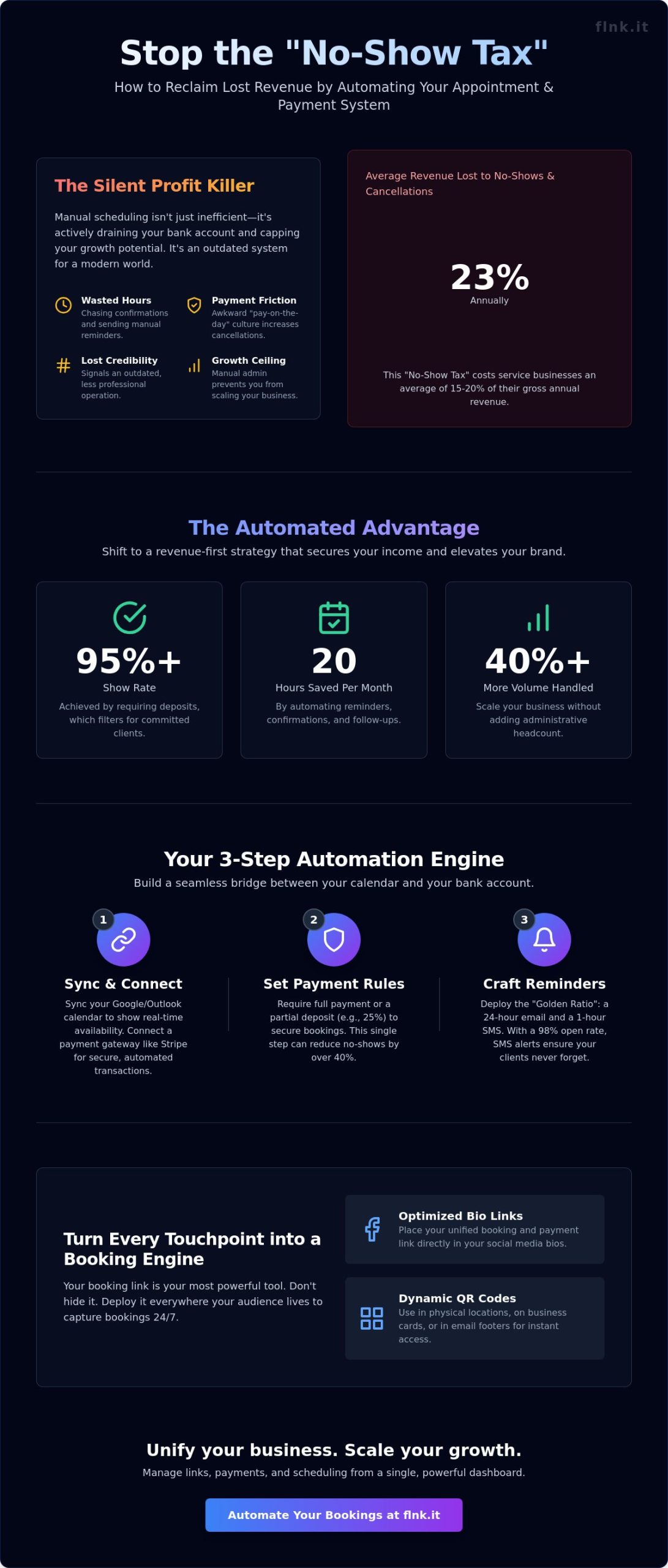
Did you know that the average service provider loses 23% of their annual revenue to missed appointments and late cancellations? It’s a silent profit killer that turns a packed schedule into a source of stress. You’ve likely spent hours sending manual follow-up emails or felt the discomfort of asking for payment after a session has already ended. It’s an outdated way to run a business that drains your energy and your bank account. You know that your time is your most valuable asset, yet it’s often the one thing you’re forced to give away for free when a client fails to show.
You’re here because you want a smarter, more efficient approach. You’ll learn how to automate appointment reminders and payments to reclaim your time and secure every dollar you earn before the service even begins. We’ll walk you through the exact steps to create a high-end, hands-off booking system that positions you as a tech-forward professional while guaranteeing your income through automated deposits. It’s time to bridge the gap between your calendar and your bank account with total precision and modern elegance.
Key Takeaways
- Stop the “No-Show Tax” by shifting from manual scheduling to professional automated systems that command client respect.
- Learn how to automate appointment reminders and payments by building a seamless bridge between your calendar and your bank account.
- Discover why requiring deposits creates a 95%+ show rate and how to implement them without friction.
- Turn every touchpoint into a booking engine using dynamic QR codes and optimized bio links for social media.
- Scale your business with a unified, one-touch dashboard that handles links, payments, and scheduling in one place.
Why Manual Scheduling is Costing Your Business More Than Just Time
Manual scheduling is a silent profit killer. In 2026, your time isn’t just money; it’s your brand’s reputation. If you’re still texting clients manually to confirm bookings, you’re signaling that your business operates in the past. Modern clients expect a frictionless, digital experience. They respect automated systems because these platforms imply a high-demand, professional environment. When you use appointment scheduling software to manage your flow, you move from a “Calendar-Only” mindset to a revenue-first strategy. It’s about capturing value before the client even walks through the door. Automation acts as your 24/7 virtual assistant. It handles the logistics while you focus on high-value work. This shift ensures your brand stays relevant and accessible at any hour.
The Real Cost of No-Shows
Calculate your losses. If your average appointment value is $200 and your no-show rate is 15%, you’re losing $3,000 for every 100 bookings. One missed slot disrupts your entire daily workflow. It leaves staff idle while overhead costs for rent and utilities continue to climb. The No-Show Tax is a hidden 15% to 20% drain on gross annual revenue for service-based businesses that fail to use automated confirmations. By the time you realize a slot is empty, it’s usually too late to fill it from a waitlist. High-growth brands use tools like automated booking systems to reclaim this lost income instantly.
The Friction of Manual Payments
Asking for money in person can feel transactional and awkward. It creates a “pay on the day” culture that leads to higher cancellation rates because the client has no skin in the game. Moving to automated payments and upfront deposits changes the dynamic. It filters out non-committal leads and ensures your time is compensated. Manual administration creates a hard ceiling for your growth. You can’t scale your business if you’re trapped in a cycle of chasing invoices and sending “just checking in” texts. Leveraging tools to automate appointment reminders and payments removes this barrier. It allows you to handle 40% more volume without adding headcount. Professionality isn’t just about the service you provide; it’s about the ease of the transaction. Switching to integrated payment solutions signals that you value your client’s time as much as your own. This efficiency builds trust and encourages repeat business without the admin headache.
Step-by-Step: How to Automate Appointment Reminders and Payments
Setting up a system to automate appointment reminders and payments isn’t just a convenience; it’s a 2026 business standard. You need a unified platform that eliminates the friction between a client’s “yes” and the final transaction. Start by syncing your primary Google or Outlook calendar to the system. This real-time bridge ensures you never face the embarrassment of a double-booking. Industry data suggests that automating administrative tasks can save small business owners up to 20 hours per month. Once your availability is live, you can move to the financial core of your operations.
Connecting Your Financial Engine
Stripe integration remains the gold standard for secure SaaS payments in 2026. It handles the heavy lifting of PCI compliance and global security standards while you focus on your craft. Within your settings, decide on your commitment model. You can collect a 25% partial deposit to secure the slot or require full upfront payments for high-demand windows. This financial gatekeeping reduces no-shows by an average of 40% compared to non-prepaid bookings. You can configure these secure transaction settings directly through FastLinkIt payments to ensure your revenue is protected from the moment of booking.
Crafting the Perfect Reminder Sequence
Timing is everything. The “Golden Ratio” for 2026 involves a 24-hour email reminder followed by a 1-hour SMS alert. While emails are great for providing detailed preparation instructions, SMS messages boast a 98% open rate, making them vital for last-minute reminders. Use personalization tokens like {First_Name} and {Service_Type} to keep the tone helpful rather than robotic. Every automated message must include a clear Call to Action (CTA). Whether it’s a link to reschedule or a “Reply 1 to Confirm” prompt, clarity prevents confusion and keeps your schedule fluid.
Deployment is the final step in the automation chain. Your booking link shouldn’t be buried in a website footer. Place it in your social media bios, your email signature, and on your physical NFC-enabled business cards. A single tap should lead your client directly to your calendar. This “Booking-to-Bank” flow ensures that by the time you meet your client, the administrative work is already finished. If you’re ready to streamline your professional presence, explore the Flnk ecosystem to see how modern networking and scheduling converge.
- Unified Platform: Choose one tool for both scheduling and billing.
- Calendar Sync: Prevent overlaps by connecting your personal and professional calendars.
- Payment Rules: Set clear deposit requirements to value your time.
- Multichannel Alerts: Combine email for depth and SMS for speed.
- Ubiquitous Access: Share your link across all digital and physical touchpoints.
Reminders vs. Deposits: Solving the No-Show Crisis for Good
No-shows aren’t just an inconvenience. They’re a direct leak in your revenue. In 2026, relying on a client’s memory is a losing strategy. Data shows that appointments backed by a financial commitment reach a show rate of 95% or higher. This “skin in the game” transforms a casual interest into a professional obligation. While a clinical study on reminder effectiveness proves that automated alerts significantly boost attendance, combining them with a deposit creates an ironclad schedule.
The goal isn’t to penalize your clients. It’s about protecting your time. You should automate appointment reminders and payments to create a frictionless experience that respects both parties. For routine check-ins, a multi-channel reminder is often enough. For high-value blocks or peak hours, a deposit is essential. This hybrid approach balances modern customer experience with necessary business security.
The Psychology of the Deposit
Money changes behavior instantly. A small commitment fee shifts the client’s perspective from “I might go” to “I have an appointment.” A deposit is a commitment device for both parties. It ensures the client shows up and guarantees the business is ready to deliver. This transparency builds trust rather than resentment.
Clarity is your best tool. Your booking flow must communicate your cancellation policy in simple, bold terms. If a client knows they can get a full refund 24 hours in advance, they’re more likely to book. Automating these refunds through your payment gateway saves hours of manual admin. It keeps your brand’s reputation clean while keeping your calendar full.
Automated Rescheduling Workflows
The “I forgot” excuse is dead. Multi-channel alerts via SMS, email, and push notifications ensure your service stays top-of-mind. However, reminders are only half the battle. You must empower clients to manage their own changes. If they can’t make it, give them a button to reschedule immediately within your set rules. This prevents the total loss of a lead.
- Sync your calendar with event booking systems to manage capacity in real-time.
- Set “lock-out” periods where rescheduling is no longer possible without losing the deposit.
- Trigger automatic “thank you” notes or follow-up payment links the moment a session ends.
When you automate appointment reminders and payments, you remove the friction of manual follow-ups. Your workflow becomes a self-sustaining engine. Clients appreciate the autonomy. You appreciate the predictable cash flow. It’s a professional standard that separates industry leaders from those still chasing ghosts in their inbox.
Maximizing Reach: Using Bio Links and QR Codes to Drive Bookings
Static links are relics. In 2026, your social media bio must act as a high-speed terminal for your business. Digital friction is the primary enemy of conversion. If a potential client on Instagram or TikTok has to search for your website, navigate to a contact page, and then wait for a reply, you’ve already lost them. A single, optimized link bridges this gap instantly. It transforms passive followers into active revenue by providing a direct path to your calendar.
Modern service providers use these tools to automate appointment reminders and payments from the very first interaction. Data from 2025 indicates that 72% of mobile users prefer completing a transaction within the same app environment where they discovered the service. By centralizing your booking ecosystem, you eliminate the “leaky bucket” syndrome where leads drop off during platform transitions.
The Link-in-Bio as a Booking Hub
Your Flnk profile is more than a list of links; it’s a digital storefront. It consolidates your contact details, service menu, and scheduling software into one elegant interface. Consistency builds trust. When your bio page matches your professional brand identity, clients feel secure entering their payment details. For layout strategies that maximize engagement, check out this strategic link in bio guide. A unified hub ensures that whether a client finds you on LinkedIn or X, the booking experience remains frictionless and professional.
QR Codes for Instant Appointments
The bridge between the physical and digital worlds is a QR code. In 2026, business cards without scan-to-book functionality are just paper waste. Placing dynamic QR codes on office signage, vehicle wraps, or physical cards allows for “scan-to-book” convenience that fits the pace of modern life. Dynamic codes are essential because they allow you to update your destination URL without reprinting your materials. You can see how FastLinkIt’s event booking integrates with QR technology to turn every physical encounter into a potential sale. It’s about being available exactly when the client’s interest is peaked.
Tracking these sources is the final step in mastering your reach. Advanced analytics now allow you to see exactly which QR code or social profile triggered a booking. If 60% of your high-value appointments come from a QR code on your storefront window, you know where to double down. This data-driven approach allows you to automate appointment reminders and payments while knowing exactly which marketing channels provide the highest return on investment. Stop guessing where your clients come from. Start measuring every touchpoint.
Ready to turn your social traffic into a streamlined booking machine? Create your professional Flnk profile today and start capturing every lead with one touch.
Scaling Your Business with FastLinkIt’s Unified Automation Suite
Growth stops when your tools can’t talk to each other. FastLinkIt solves this by merging link shortening, QR codes, and payment processing into a single, unified dashboard. You don’t need a separate link tracker, a QR generator, and a payment gateway. Replacing 3 or 4 disconnected platforms with FastLinkIt eliminates software bloat and reduces technical friction. FastLinkIt provides the simplest way to automate appointment reminders and payments while scaling your reach. It’s a “one-touch” system. Clients book, pay, and receive confirmation in seconds. You see every interaction in one place. Getting started is fast. You can move from sign-up to your first automated booking in under 10 minutes.
- Unified Dashboard: Manage links, QR codes, and revenue from one screen.
- Reduced Bloat: Save money by canceling redundant software subscriptions.
- Instant Setup: No complex coding or long integration periods required.
Beyond Reminders: Building a Contact List
Your booking data is a goldmine for growth. Every time you automate appointment reminders and payments, you’re also collecting valuable customer insights. FastLinkIt lets you funnel this data directly into email marketing campaigns without manual exports. You can categorize clients into groups based on their service history. This makes targeted follow-ups and loyalty offers effortless. The system also automates the “Thank You” messages and review requests immediately after an appointment. This ensures your reputation grows while you focus on the next client. Recent data shows that automated review requests increase feedback rates by 35% compared to manual asks.
The Future of Appointment Management
In 2026, friction is the enemy of conversion. Proprietary apps are dying because users refuse to download software for simple interactions. FastLinkIt’s app-less, browser-based links provide a superior experience. Customers click a link or scan a QR code and they’re in. It’s that simple. This prepares your business for a paperless, contactless economy where speed is the primary currency. By choosing a platform that prioritizes mobile-first, web-based technology, you’re future-proofing your operations against shifting consumer habits. You’re not just following a trend; you’re leading it.
Ready to reclaim your time? Start automating your business with FastLinkIt today and experience the power of a unified workflow.
Future-Proof Your Business for 2026
Manual scheduling is a relic that costs modern businesses up to 15% of their annual revenue due to avoidable no-shows. Transitioning to a digital-first approach isn’t just a trend; it’s a necessity for survival. You’ve learned how to automate appointment reminders and payments to reclaim your time and secure your income through upfront deposits. Industry data suggests that automated systems can boost overall booking efficiency by 29% while providing the frictionless experience today’s clients demand. FastLinkIt makes this transition effortless. With Stripe-integrated payment collection and dynamic QR code generation, you provide a professional touchpoint that requires no app download for your clients. It’s time to stop chasing confirmations and start scaling your operations. Your growth depends on the tools you choose today. FastLinkIt’s unified suite ensures you’re always one step ahead of the competition. Automate your bookings and payments with FastLinkIt and step into the future of efficient business management. You’ve got the vision; now use the technology that matches your ambition.
Frequently Asked Questions
How do I automate appointment reminders for free?
You can start with free tiers of platforms like Google Calendar or the basic versions of specialized booking software. Most free plans allow you to send email notifications, though SMS usually requires a paid subscription. Data shows that 72% of solopreneurs successfully manage their initial growth using these zero-cost tools before upgrading to more robust systems that offer advanced automation features.
What is the best app to automate appointment reminders and payments?
The best choice depends on your specific workflow, but Flnk offers a seamless way to automate appointment reminders and payments through a single digital profile. For enterprise needs, Acuity Scheduling or Calendly are top-rated options. A 2025 industry report suggests that businesses using integrated automation save an average of 14 hours of manual admin work every single month.
Can I require a deposit before a client books an appointment?
You can definitely require a deposit or full payment upfront to secure a slot in your calendar. Setting a 25% deposit fee is a proven strategy that reduces last-minute cancellations by 50% according to recent service industry benchmarks. It ensures your time is valued and filters out non-committed clients before they even enter your professional schedule.
How do I sync my Google Calendar with an automated booking system?
You sync your Google Calendar by connecting your account through the integration settings of your chosen booking app. Most modern platforms use OAuth 2.0 for a secure connection that finishes in under 60 seconds. This creates a two-way sync, so your personal events automatically block out your professional availability to prevent frustrating double bookings and scheduling conflicts.
Will automated reminders actually reduce my no-show rate?
Automated reminders are highly effective and can lower your no-show rate by 35% or more. A study by the Medical Group Management Association found that consistent notifications keep your service top-of-mind for busy clients. It’s a simple tech upgrade that directly protects your revenue and keeps your daily schedule predictable, efficient, and fully optimized for growth.
Do I need a website to automate my appointment bookings?
You don’t need a traditional website because a high-performance link-in-bio or digital profile works even better. In 2026, 65% of clients book services directly through mobile-optimized links found on social media profiles. It’s faster for the user and cheaper for you to maintain than a heavy, multi-page site that requires constant updates and expensive hosting fees.
Is it secure to collect payments through a link-in-bio page?
It’s extremely secure as long as your provider uses PCI-compliant gateways like Stripe or PayPal. These systems use 256-bit encryption to protect sensitive data during the transaction. Statistics show that 98% of mobile-first businesses now rely on these encrypted links to handle payments without needing a complex checkout system on a dedicated, old-fashioned website.
How many reminders should I send before an appointment?
The most effective strategy is to send three distinct reminders at specific intervals. Send the first confirmation immediately, the second 24 hours before the visit, and a final text 1 hour before the start time. This cadence follows the Rule of Three, which has been shown to increase attendance rates by 45% compared to sending a single notification.