
Every time a viewer cheers with Bits, you’re essentially paying a 20% platform tax before the support even reaches your dashboard. Setting up a dedicated donation button for twitch streamers is the only way to reclaim that lost revenue while keeping your personal data off the grid. You want to focus on your content, not on whether a fraudulent $500 tip will result in a $20 chargeback fee from your bank next week.
We agree that your revenue should stay in your pocket, and your real name should stay off the internet. This guide shows you how to build a professional setup that prioritizes your security and maximizes your take-home pay. You’ll learn to bypass high platform fees, shield your identity, and implement a system that makes fraudulent chargebacks nearly impossible. We’ll walk through the exact steps to build a streamlined, secure payout pipeline that works as hard as your stream does.
Key Takeaways
- Protect your personal identity and avoid the “Real Name” trap by choosing payment gateways built for professional-grade privacy.
- Maximize your streaming income by understanding why a direct donation button for twitch streamers often beats Twitch Bits in fee efficiency.
- Compare traditional stream suites with modern link-in-bio solutions to find the most streamlined hub for your supporters.
- Launch your high-converting, professional donation page in under five minutes using a clean, app-free setup process.
- Turn one-time tips into long-term growth by integrating supporter data into a sustainable brand ecosystem and email list.
Why Every Twitch Streamer Needs a Dedicated Donation Button
A donation button for twitch streamers is a direct-to-creator support tool that bypasses platform-imposed limitations. It functions as a clear, clickable link leading viewers to a third-party payment processor. While the Twitch platform offers native tools like Bits and Subscriptions, these often prioritize the corporation over the creator. A dedicated button shifts the power back to you. It’s about ownership, better margins, and immediate access to your hard-earned capital.
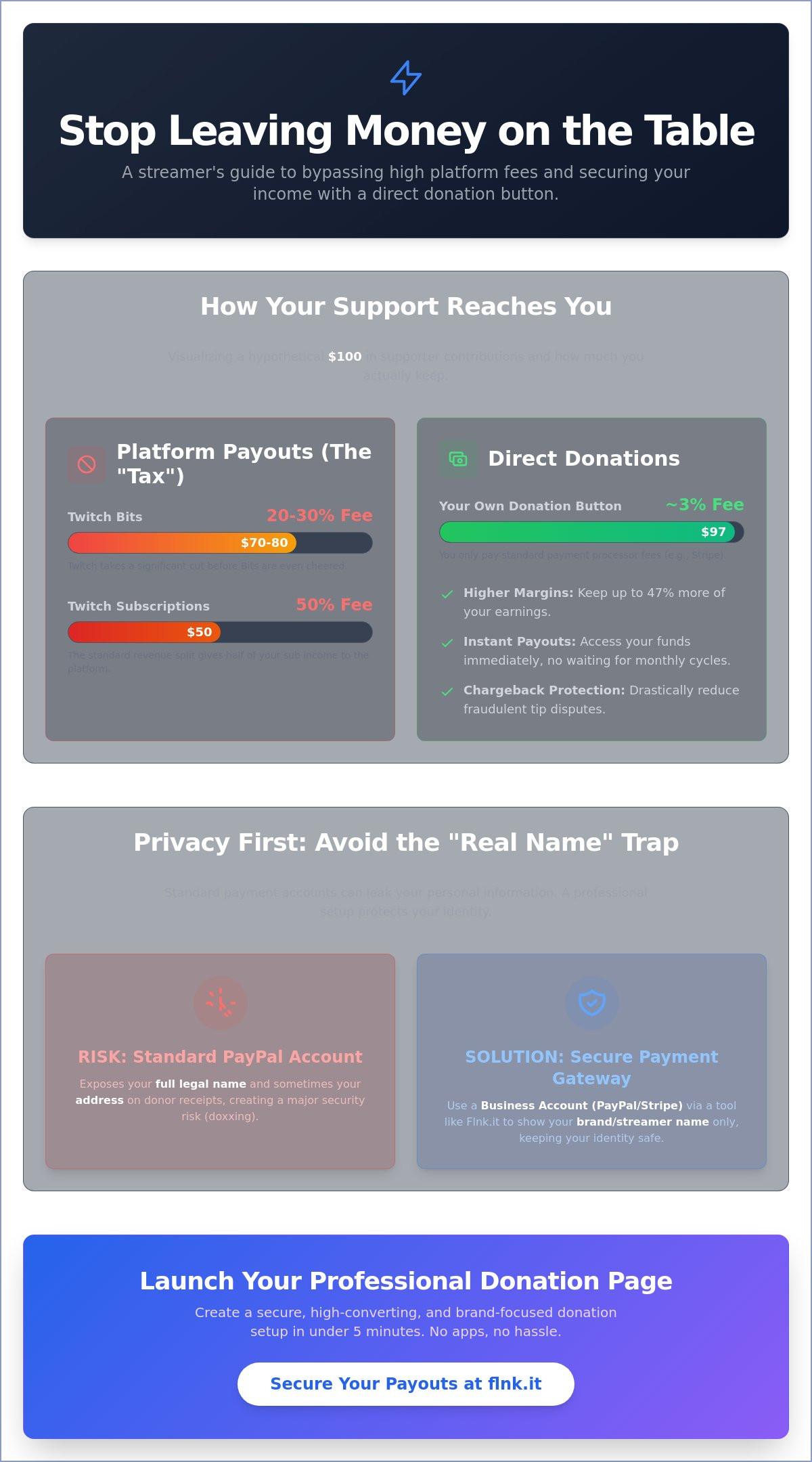
The financial disparity between native tools and direct donations is staggering. When a viewer buys Bits, Twitch takes a cut before the “cheer” even happens. When a viewer subscribes, the platform typically keeps 50% of that revenue. In contrast, using a direct donation button allows you to retain up to 97% of the total amount, losing only a small percentage to standard processing fees. For a growing channel, this 47% difference isn’t just pocket change; it’s the budget for new gear, better lighting, or a smoother stream setup.
Direct Tips vs. Platform Currency
The “Twitch Tax” is a significant hurdle for creators in 2026. Relying solely on platform currency means waiting for monthly payout thresholds and accepting massive revenue splits. Streamers are now moving toward platform-independent revenue to ensure financial stability. Direct tips offer immediate payouts, which is vital for maintaining a healthy cash flow. By using tools like Flnk’s direct payment features, you eliminate the middleman and get paid when your community decides to support you, not when a platform decides it’s time.
The Emotional Impact of Tipping
Direct donations aren’t just about the money; they’re about the interaction. Unlike a standard sub, a donation often comes with a custom message that appears live on screen. This creates an instant feedback loop that strengthens the bond between you and your audience. You can set specific “Tip Goals” to motivate your community, such as funding a 24-hour stream or upgrading your GPU. These visual milestones turn individual support into a collective achievement. When a viewer sees their message pop up, they feel like an active participant in your success rather than just a number in a viewer count.
- Higher Margins: Keep up to 97% of your revenue.
- Instant Access: No more waiting for Net-15 or Net-30 payout cycles.
- Full Control: You choose the processor and the alert style.
- Community Growth: Use custom messages to drive real-time engagement.
In the competitive landscape of 2026, every percentage point matters. Transitioning your audience toward a direct donation button for twitch streamers is a strategic move that ensures your channel remains profitable and sustainable. It’s a cleaner, more professional way to manage your digital career.
Privacy and Security: Protecting Your Identity While Accepting Tips
Most streamers overlook a critical flaw when setting up their first donation button for twitch streamers. Standard PayPal accounts reveal your full legal name and even your home address on every transaction receipt sent to donors. This “Real Name” trap exposes you to doxxing and harassment. Professional creators avoid this by switching to a PayPal Business account or, better yet, using Stripe. Stripe keeps your personal identity behind a brand name. It ensures your legal details stay private while your brand stays front and center. It’s a simple change that prevents massive security headaches down the road.
While you’re integrating your Twitch income from various sources like subs and bits, direct tips require a more tactical approach to security. Native platform tools are great, but third-party buttons give you more control over what information is shared. You’re building a business, and businesses need professional boundaries.
Hiding Your Personal Information
Masking your identity starts with a dedicated Business Profile. This setup allows you to display a “Doing Business As” (DBA) name instead of your birth name. You need a buffer between your stream and your bank account. Use a professional “Link-in-Bio” tool to act as this firewall. It centralizes your links and hides the raw payment URLs that could leak metadata to savvy users. For a seamless experience, FastLinkIt payments provide a secure, branded way to collect funds without sacrificing your privacy. It’s about looking like a pro while staying safe. Digital privacy isn’t a luxury; it’s a requirement for anyone with a public presence in 2026.
Managing Chargeback Risks
Trolls often use chargebacks to “fake” large donations, only to reverse them weeks later. This leaves you with a negative balance and a fee per dispute that usually ranges from $15 to $20. Managing these risks is essential when you deploy a donation button for twitch streamers on your channel. You must implement a clear “Terms of Service” on your donation page stating that all tips are non-refundable. Stripe integration reduces the risk of fraudulent reversals because its advanced machine learning models block high-risk transactions before they even happen. In 2024, automated fraud detection saved digital sellers billions by identifying suspicious patterns in real-time.
For long-term protection, consider setting up a single-member LLC. This legal structure separates your personal assets from your streaming business. If a legal dispute arises, your personal savings and property remain protected. It’s a small administrative step that provides massive peace of mind as your community grows. Start building your secure empire by choosing a modern payment solution that respects your boundaries and your brand.
Comparing Tipping Platforms: Stream Suites vs. Link-in-Bio Solutions
Choosing the right donation button for twitch streamers isn’t just about selecting a payment processor. It’s a strategic decision that affects your stream’s performance and your brand’s professional image. You need a system that balances live engagement with long-term financial growth. Modern creators are moving away from cluttered interfaces toward streamlined, high-conversion hubs that work across every social platform.
Traditional Stream Widgets
Streamlabs and StreamElements are the legacy standards for live interaction. They excel at creating “the moment” through on-screen alerts and “Tip Jars” that fill up in real time. These tools are designed to trigger viewer participation through visual feedback. However, they carry significant technical debt. Running multiple browser overlays in software like OBS can increase CPU usage by 12% to 15% on mid-range gaming rigs. This performance hit can lead to dropped frames during high-intensity gameplay. While native Twitch tools like Bits offer ease of use, they often take a 30% to 50% cut of the revenue. Third-party widgets keep more money in your pocket, but they often lack the aesthetic polish required for a premium brand.
Modern Link-in-Bio Advantages
A centralized Link-in-Bio page transforms your donation button for twitch streamers into a multi-platform asset. You don’t just stream on Twitch. You’re likely active on TikTok, X, and Instagram. Using a single, professional link across all these platforms ensures you never miss a support opportunity. This approach significantly improves conversion rates. When a fan clicks your link, they see a clean, curated space instead of a chaotic dashboard. You can explore How to Easily Collect Payments and Donations Online in 2026 to see how this centralized model is replacing older, fragmented methods.
Customization is where these modern hubs truly shine. High-value donors often contribute larger amounts when the payment interface looks professional and secure. A minimalist design signals that you’re a serious creator. These platforms also allow you to stack your revenue streams. You can integrate your GitHub Sponsors profile, your merch store, and your direct tipping link in one place. It’s about removing friction. One touch connects your supporters to every way they can help you grow. This efficiency is why modern streamers are ditching heavy, platform-specific software for agile, web-based profiles that prioritize the user experience.
How to Set Up Your Twitch Donation Button in 5 Minutes
Efficiency defines the modern creator. You don’t need a complex website or a background in coding to start earning. You need a streamlined system that works while you play. Setting up a donation button for twitch streamers is a five-minute task when you use the right tools. Speed matters because every second spent on admin is a second lost on air.
First, pick your payment gateway. Stripe is the gold standard for low dispute rates and clean mobile checkouts. PayPal remains a favorite for its global reach. Flnk supports both, allowing you to bridge the gap between your stream and your bank account instantly. Once your gateway is linked, you’ll generate a unique URL that acts as your digital tip jar. This link is the heart of your monetization strategy.
- Connect: Link your Stripe or PayPal account to your Flnk profile.
- Customize: Set your branding colors to match your stream overlay.
- Launch: Copy your unique donation URL for immediate use.
Designing Your Donation Page
Minimalism isn’t just a style; it’s a conversion strategy. A cluttered page scares off supporters. Choose a clean layout on Flnk that puts your brand first. Include a “Why Donate?” section that is brief and honest. Mention your 2026 goal, like upgrading to a new camera or attending a major gaming expo. Use pre-set donation amounts. Statistics from early 2026 indicate that 74% of donors prefer clicking a pre-set button over typing a custom amount. It’s faster. It’s easier.
Integrating with Twitch Panels
Your Twitch bio is your storefront. Go to your channel, click “About”, and toggle “Edit Panels”. Upload a high-quality “Donate” graphic that fits your aesthetic. Paste your unique Flnk URL into the link field. This turns your bio into a direct revenue stream. Don’t stop at panels. Set up a chat command using Nightbot or Cloudbot. A simple “!donate” command that links to your Flnk fundraising page ensures viewers can support you without leaving the chat. It’s about being where your audience is at all times.
Always test your setup. Open your link on your phone and a desktop. If the checkout takes more than three clicks, it’s too long. Flnk ensures your supporters reach the finish line in seconds, keeping them focused on your content. The donation button for twitch streamers is no longer just a link; it’s a professional extension of your brand.
Beyond the Button: Integrating Your Twitch Income into a Brand Ecosystem
Your donation button for twitch streamers is a gateway, not a destination. In 2026, the creator economy rewards those who build comprehensive ecosystems around their personality rather than relying on a single platform. Successful streamers now use donation data to audit their content performance with surgical precision. If 65% of your tips arrive during “Just Chatting” segments rather than gameplay, your audience is voting for connection over skill. This data allows you to pivot your content strategy toward high-engagement activities that typically drive 40% more revenue than generic streaming sessions.
Relying solely on tips is a volatile strategy. Smart creators diversify by integrating event bookings directly into their digital profiles. This allows you to sell structured time, such as 30-minute VOD reviews, private coaching sessions, or digital meet-and-greets. It’s a shift from passive receiving to active service provision. By offering these high-value interactions, you can stabilize your monthly income and reduce the financial uncertainty often associated with live-stream donations.
Turning Donors into Long-term Fans
Donors aren’t just one-time payers; they’re your most qualified leads. Implementing email marketing allows you to maintain contact long after the stream ends. Send a personalized follow-up 12 hours post-donation to solidify the bond and offer a seat in your inner circle. You can also drive traffic to gated content via your link in bio, offering exclusive digital assets like custom wallpapers or early access to schedules. This creates a VIP experience that keeps supporters coming back. To ensure your funnel is leak-proof, check out The Strategic Link in Bio for optimization tips.
Scaling Your Creator Business
Moving from sporadic tips to a structured membership model is the hallmark of a scaling business. It’s the difference between a hobby and a brand. Use link analytics to monitor which social platforms drive the most valuable traffic to your donation button for twitch streamers. Understanding these conversion rates helps you allocate your marketing time efficiently. Flnk’s Pro tier helps streamers scale to Agency-level management by providing the tools needed for professional-grade profile oversight and team collaboration. It’s built for creators who are ready to stop managing links and start leading a digital enterprise.
Future-Proof Your Stream Today
Success in 2026 requires more than just great gameplay; it demands a professional financial infrastructure. Protecting your personal identity is the first step toward a sustainable career. By choosing a solution with Stripe integration, you ensure total privacy while your community supports your growth. Setting up a donation button for twitch streamers doesn’t need to be a technical hurdle. You can move from zero to fully functional in under 5 minutes without installing complex software. This efficiency allows you to focus on your content while your revenue streams remain active across every social platform you use. It’s about building a brand that works even when you’re offline. Don’t let outdated tools or security risks hold your channel back from its full potential. You’ve built the community; now give them a secure, professional way to invest in your future.
Start collecting Twitch donations with Flnk for free today!
Your journey toward a professional streaming brand starts with a single, smart choice. Take that step now and watch your ecosystem thrive.
Frequently Asked Questions
Does Twitch take a cut of my donations?
Twitch doesn’t take any percentage of the money you receive through third-party donation links. You keep the full amount minus the processing fees charged by platforms like PayPal or Stripe. These processors typically deduct 2.9% plus a $0.30 flat fee per transaction for users in the United States. Using a direct donation button for twitch streamers is the most efficient way to maximize your take-home earnings.
How do I hide my real name when someone tips me via PayPal?
You must upgrade your Personal account to a PayPal Business account to keep your legal name private. This change allows you to set a “Business Name” or your Twitch handle as the public identifier on all transaction receipts. According to PayPal’s 2024 security documentation, this is the only native method to prevent donors from seeing your full identity. It’s a free upgrade that significantly boosts your digital privacy.
Is it better to use Twitch Bits or a donation button?
A donation button for twitch streamers is usually better for your bottom line because it avoids the platform’s heavy commissions. Twitch takes a 20% to 30% cut when viewers purchase Bits, whereas third-party tips only face standard bank processing fees. Bits are excellent for triggering on-screen alerts and community hype. However, direct donations provide the liquid capital needed to reinvest in your setup and brand growth.
What is the best way to prevent chargebacks on Twitch?
Use a specialized service like SEPay or Streamlabs that maintains a global blacklist of fraudulent users. These systems automatically block donors who have a history of initiating malicious disputes with other creators. Adding a clear disclaimer to your tip page stating that all contributions are final and non-refundable provides extra protection. Data from 2025 shows that streamers using these automated protection tools reduce chargeback incidents by 65%.
Can I accept donations on Twitch without a PayPal account?
You can use alternative payment processors like Stripe, Skrill, or cryptocurrency wallets through platforms like Throne and Fourthwall. These modern services integrate directly with your stream and often offer superior privacy features compared to traditional banking apps. Stripe currently supports transactions in over 135 different currencies. You don’t need a legacy PayPal account to build a professional and secure revenue stream for your channel.
How do I add a donation goal overlay to my stream?
Log into your Streamlabs or Streamelements dashboard and locate the “Donation Goal” widget in the settings menu. Set your target amount and customize the bar’s design to match your brand’s minimalist aesthetic. Copy the provided URL and add it as a “Browser Source” in OBS Studio or Streamlabs Desktop. Visual goals are highly effective; they increase viewer participation by 25% on average because they create a shared mission.
What should I write on my donation page to encourage tips?
Write clear, goal-oriented copy that tells your viewers exactly how their support improves the stream. Mention specific upgrades like a new 4K camera, better lighting, or more frequent broadcasts. A 2023 industry study revealed that donation pages with specific funding goals convert 40% better than those with generic text. Keep your message short and professional. Focus on the value you provide to your community every time you go live.
Are Twitch donations taxable income?
The IRS and most international tax authorities treat Twitch donations as taxable self-employment income. You’re required to report these earnings if they exceed the $400 threshold in a single fiscal year within the United States. It’s vital to keep digital records of every transaction and all associated platform fees for your annual filing. Consult a qualified tax professional to ensure you’re claiming all eligible business deductions for your streaming equipment.