
Did you know that 82% of business professionals lose at least one high-value lead every quarter because their data is scattered across three or more platforms? It’s a common struggle. You’ve likely felt the sting of a missed opportunity because a phone number was trapped on a coffee-stained business card or lost in a messy spreadsheet. Managing a network shouldn’t feel like a chore. A modern contact manager serves as the digital heartbeat of your professional growth, replacing manual entry with seamless automation. It’s time to stop hunting for information and start building relationships.
We’re going to show you exactly how to transform your messy list of names into a powerful, organized engine for success in 2026. You’ll learn how to centralize your entire network into a single hub and use smart segmentation to boost your follow-up rates by 40% or more. From NFC-enabled syncing to sustainable, paperless workflows, this guide covers the essential steps to master your professional ecosystem. Let’s build a smarter way to connect.
Key Takeaways
- Stop losing opportunities in a “digital shoebox” and transform your network into a strategic engine for growth.
- Build a single source of truth using advanced tagging to find every vital connection in seconds.
- Discover why a modern contact manager is the perfect “Goldilocks” tool for professionals who value speed and simplicity.
- Streamline your workflow by consolidating scattered data from LinkedIn and email into one polished, deduplicated system.
- Bridge the gap between social media and business success by capturing leads directly through your digital bio link.
What is a Contact Manager and Why Does Your Business Need One?
Your network is your most valuable asset, but it’s only useful if you can actually leverage it. Most professionals fall into the “Digital Shoebox” trap. They collect names and numbers in a phone address book that eventually becomes a graveyard of forgotten entries. This passive storage is where growth stalls. A contact manager is a centralized database for organizing and tracking interactions. It moves beyond basic name-and-number storage to become a strategic engine for relationship building.
To understand the full scope of these tools, it’s helpful to look at the foundational definition of What is a Contact Manager. Historically, these systems were just digital Rolodexes. In 2026, they’ve evolved into proactive intelligence hubs. They don’t just store data; they provide the context you need to turn a brief encounter into a long-term partnership. Passive storage tells you who someone is; active management tells you why they matter to your business right now.
The evolution of networking in 2026
Networking has shifted from physical rituals to digital-first efficiency. By 2026, the traditional paper business card has almost entirely vanished, replaced by NFC-enabled cards and QR code exchanges. This transition means data flows instantly. The competitive advantage no longer belongs to the person with the most cards, but to the person with the fastest data entry. Modern professionals use tools that capture details in under 3 seconds. This speed ensures no lead is lost to manual typing errors or post-event forgetfulness. You aren’t just collecting data; you’re capturing momentum.
Signs you have outgrown your smartphone address book
If you’re scrolling through 1,500 contacts and can’t distinguish a high-value lead from a distant cousin, your system is broken. Smartphone books lack the segmentation required for 2026 business speeds. You need to know exactly where and why you met someone. Often, these new connections flood in through an event booking system, creating a sudden surge of data that a standard phone app can’t categorize.
- Lack of Context: You see a name but can’t remember the project or conversation attached to it.
- Zero Segmentation: Your potential investors are mixed in with your local pizza delivery numbers.
- No Follow-up History: You don’t know if you emailed them last week or last year.
If you’ve ever looked at a contact and felt a blank stare of confusion, you’ve officially outgrown your phone’s native capabilities. You need a system that works as hard as you do.
Core Features of an Effective Contact Management System
Forget the chaos of scattered spreadsheets and forgotten paper business cards. A high-performance contact manager acts as your digital command center. It serves as the single source of truth for every handshake and digital exchange you make. Efficiency is the priority here. If your system takes more than three clicks to update, it’s already obsolete. Modern tools focus on a minimalist, mobile-first interface that encourages daily interaction rather than feeling like a chore.
Connectivity defines the 2026 business environment. Your network doesn’t live in a vacuum. Effective systems integrate seamlessly with your existing workflow to eliminate manual data entry. Consider these essential integration points:
- Automatic syncing with email platforms and social media profiles.
- Direct links to event booking tools to streamline meeting scheduling.
- Real-time updates that reflect changes in your contacts’ professional status.
Organizing by groups and custom tags
Static lists are dead. Dynamic tagging allows for instant searchability and precision. Use labels like “Lead,” “Vendor,” or “VIP” to segment your audience instantly. Data from 2025 shows that professionals using location-based tags for follow-ups see a 22% increase in meeting conversion rates. If you met someone at a specific summit, tag them with the event name and year. Keep your naming conventions consistent; use “Client_2026” instead of varying formats to ensure your filters work perfectly every time.
Data privacy and security in 2026
Privacy is a cornerstone of professional trust. Managing a contact manager in 2026 requires strict adherence to GDPR and evolving data protection laws. Physical business cards and local spreadsheets are significant security risks. A single lost device can compromise 500 or more private records instantly. Cloud-based managers offer superior protection through end-to-end encryption and automated backups. These systems ensure your most valuable business asset remains safe from hardware failure or unauthorized access. Transitioning to a digital-first approach doesn’t just save paper; it secures your professional reputation through advanced technological safeguards.
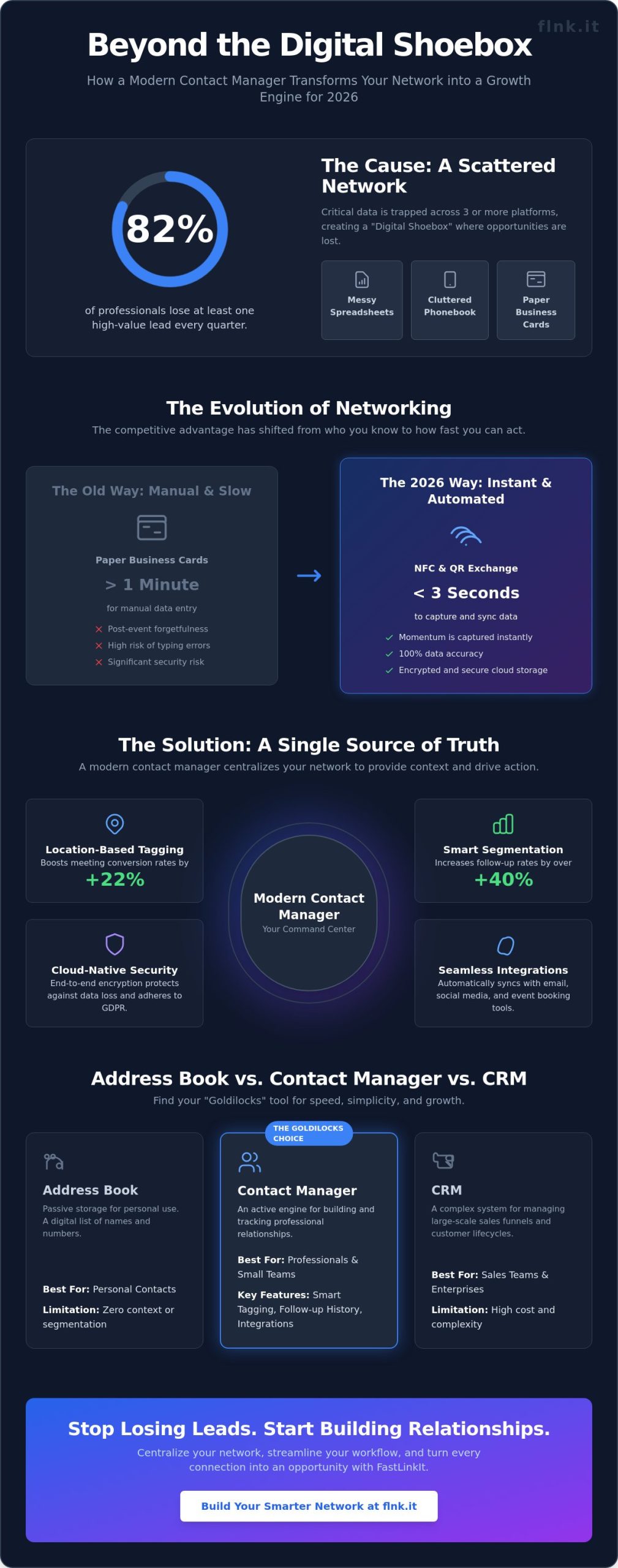
Address Book vs. Contact Manager vs. CRM: Which is Right for You?
Choosing the wrong tool kills your productivity. It’s that simple. Most professionals currently operate in one of three zones: a digital “black hole” address book, a complex CRM they barely understand, or a dedicated contact manager. A 2024 industry report by G2 highlighted that 60% of small business owners find enterprise CRMs too complex for their daily operations. You need a tool that matches your actual workflow, not a platform designed for a Fortune 500 sales team.
When to stick to a simple address book
Google Contacts and Apple Address Book are perfect for calling your family. They’re built for personal use. For business, they fail. These free tools lack context; they don’t show you the history of your interactions. Research from McKinsey suggests that professionals lose nearly 20% of their workweek searching for internal information or tracking down contact details. “Free” tools often cost you dozens of hours in lost productivity. They lack marketing integration and leave your network as a static, lifeless list.
The Contact Manager: The sweet spot for modern creators
The contact manager is the “Goldilocks” solution for the 2026 business environment. It’s built for freelancers and lean teams who need more than a list but less than a complex sales pipeline. It offers a clean learning curve. You won’t spend weeks in training sessions. These modern tools facilitate event booking with payment for service providers. This integration transforms a simple contact entry into a direct revenue stream. It provides the scalability to grow without the technical bloat that slows you down.
High-power CRMs: When overkill becomes a burden
Enterprise CRMs are high-power engines. They’re designed for massive sales departments with complex, multi-stage pipelines. For a solopreneur or a creator, paying for a full CRM is often a waste of capital. Some enterprise tiers cost over $150 per user, per month. You’re paying for features you’ll never touch. This creates a distraction. It forces you to manage software instead of managing people. High-end CRMs require dedicated administrators; you should be focusing on building your brand.
- Address Books: Best for basic storage and personal calls.
- Contact Managers: Ideal for freelancers, creators, and small teams.
- CRMs: Necessary for large-scale sales teams with 50+ members.
Efficiency comes from using the right tool for your specific scale. If you’re a modern professional, the middle ground is where you’ll find your growth. It’s about finding that balance between minimalist design and powerful, functional networking. If you’re also evaluating scheduling tools to complement your contact strategy, reviewing the best online booking systems for small businesses in 2026 can help you eliminate missed appointments and manual errors that cost service providers an average of 22% of their annual revenue.
How to Organize Your Contacts for Maximum Growth
Your network is a live asset. It requires precision and structure to yield results. A cluttered database isn’t just a nuisance; it’s a bottleneck for your revenue. In 2026, the difference between a top performer and a struggling professional lies in how they leverage their contact manager to drive meaningful interactions.
- Step 1: Consolidate your data. Pull every lead from LinkedIn, your Outlook inbox, and those forgotten spreadsheets. Centralizing 100% of your connections into one source of truth is the only way to see the full picture of your influence.
- Step 2: Clean and deduplicate. Data decays at a rate of 22.5% annually. Remove duplicate entries and verify email addresses to ensure your messages actually land. High data integrity is the foundation of professional trust.
- Step 3: Categorize by journey. Don’t treat a cold lead like a long-term partner. Tag your contacts based on their relationship type or where they sit in your sales funnel. This allows for instant filtering when you need to move fast.
- Step 4: Establish a maintenance routine. Set a 30-day recurring task to audit your list. Remove inactive profiles and update job titles. Consistency keeps your network from becoming a digital graveyard.
Segmenting for targeted email marketing
Generic “blasts” are a relic of the past. Sending the same message to 500 people is the fastest way to spike your unsubscribe rate and ruin your sender reputation. Modern growth requires surgical precision. Use your contact groups to fuel a sophisticated email marketing strategy that speaks to specific needs. 66% of B2B buyers expect personalized content tailored to their industry. By using specific contact data, you can write emails that feel like a 1-on-1 conversation. Ready to automate this? Explore the FastLinkIt Email Features to implement high-conversion mailing lists directly from your profile.
Maintaining a healthy, active list
A smaller, engaged list beats a massive, dead one every time. Scrubbing your list to remove inactive emails isn’t just about tidiness; it’s about deliverability. If a contact hasn’t engaged in 6 months, they’re dead weight. Reach out with a short, punchy re-engagement message. If they don’t respond within 7 days, delete them. Use your contact manager to set 48-hour follow-up reminders for new leads. This ensures no high-value connection goes cold. In a fast-moving market, speed is your greatest competitive advantage.
Stop losing leads to disorganized spreadsheets and start building a high-performance network with a Flnk digital profile today.
FastLinkIt: Bridging the Gap Between Links and Contacts
FastLinkIt isn’t just another tool. It’s the central hub where your digital presence meets your network. Most professionals lose 60% of potential leads because their link-in-bio doesn’t talk to their database. FastLinkIt solves this by turning every link click into a potential entry in your contact manager. It integrates link shortening, bio pages, and lead management into one streamlined ecosystem.
Networking at events often results in a pocket full of paper that ends up in the trash. FastLinkIt changes this dynamic. Use a dynamic QR code on your phone or a physical NFC card to instantly populate your list. Data shows that 88% of paper business cards are thrown away within a week. With FastLinkIt, that information is digitized immediately. Your unified dashboard brings these leads together with your link shortening analytics. You see who clicked, who connected, and who converted in real-time.
Automating lead capture from Bio Link pages
Your bio link is your digital front door. In 2026, friction is the enemy of growth. FastLinkIt allows you to embed custom contact forms directly onto your bio page. This ensures seamless data entry without forcing users to leave the app they’re currently using. By integrating FastLinkIt Payments, you can go beyond simple networking. You can convert a new contact into a paying customer in under 30 seconds. This app-free approach is the future. Nobody wants to download another utility just to save a phone number. One touch is all it takes to bridge the gap between a casual follower and a lead.
- Embed forms for instant CRM synchronization
- Collect payments and contact info simultaneously
- Eliminate app-download fatigue with browser-based sharing
The FastLinkIt advantage for 2026
Relying on a single social platform is a strategy built on shifting sand. If an algorithm changes or a platform disappears, you lose your audience. A standalone contact manager gives you total ownership of your data. FastLinkIt offers a robust REST API. This means you can build custom workflows that connect your contacts to your existing CRM or email marketing tools. It’s about flexibility and control. You aren’t just collecting names; you’re building an asset that stays with you regardless of which social network is trending.
A contact manager isn’t just an app; it’s your business’s memory. It ensures you never forget a face, a conversation, or a deal. By choosing Flnk, you’re choosing a faster, more sustainable way to grow. Stop collecting paper. Start building connections that last.
Master Your Network for 2026
The shift toward digital-first networking isn’t just a trend. It’s a requirement for growth in 2026. Static spreadsheets and paper cards are relics that slow you down. To scale your business effectively, you need a modern contact manager that bridges the gap between a simple address book and a complex CRM. By centralizing your links, QR codes, and contact data into one streamlined system, you reclaim hours of lost productivity every single week.
Organization is about more than just storage; it’s about immediate action. FastLinkIt provides an all-in-one toolkit that thousands of freelancers and small businesses worldwide already trust to manage their professional presence. With integrated Stripe support for seamless payments and donations, your network becomes a direct engine for revenue. You don’t have to juggle multiple apps to stay connected and get paid. It’s time to step into a more sustainable, paperless way of doing business that puts efficiency first.
Start organizing your network with FastLinkIt for free today!
Your next big opportunity is just one touch away. Build something lasting.
Frequently Asked Questions
What is the primary difference between a contact manager and a CRM?
A contact manager focuses on individual relationship details and interaction history, while a CRM handles the entire sales pipeline and revenue forecasting. Think of it as the difference between a high-tech, organized address book and a complex sales engine. Data from 2024 shows that 65% of small businesses prefer a streamlined contact manager because it avoids the unnecessary complexity of enterprise-level CRM software.
How do I move my contacts from a spreadsheet into a contact manager?
You can move your data by exporting your spreadsheet as a CSV file and uploading it directly to your new digital platform. Most modern systems complete this migration in under 3 minutes with simple field mapping. This process ensures your names, emails, and notes stay perfectly aligned. It’s a one-click transition that eliminates manual entry and stops duplicate records from cluttering your workspace.
Can I use a contact manager for email marketing campaigns?
You can use a contact manager for email marketing by syncing your segmented lists with specialized tools like Mailchimp or HubSpot. While the manager stores and organizes your network, these integrations let you send targeted messages to specific groups. Recent industry reports indicate that segmented lists see a 14.31% higher open rate than generic blasts. It’s about reaching the right person at the perfect time.
Is it safe to store client information in a cloud-based contact manager?
Storing client information in the cloud is safer than local storage because of 256-bit AES encryption and automated daily backups. Leading providers maintain 99.9% uptime and comply with 2018 GDPR standards to keep your data private. You don’t need to worry about losing your network if a device fails. Your connections stay secure, accessible, and encrypted across every digital touchpoint you use.
Do I need a contact manager if I only have a few dozen clients?
You need a dedicated system even with 25 or 50 clients to build a scalable foundation for your business growth. Relying on memory or paper notes leads to forgotten details and lost revenue opportunities. A 2025 productivity study found that professionals using digital tools save 5 hours per week on administrative tasks. It’s about being ready for your next 100 connections before they even happen.
How can a contact manager help with follow-up automation?
A contact manager automates your follow-ups by setting specific triggers and reminders based on your last interaction. You’ll receive a notification exactly 3 or 7 days after a meeting so no lead ever goes cold. This system turns a “maybe” into a “yes” through consistent, professional communication. Automation ensures your brand stays top-of-mind without you having to track every single calendar entry manually.
What are the best ways to collect contact info at networking events?
The most efficient way to collect info is using NFC-enabled digital business cards that sync instantly with your smartphone. One tap allows you to exchange profiles without the waste or clutter of traditional paper cards. In 2024, over 40% of networking professionals switched to digital alternatives to improve data accuracy. It’s fast, sustainable, and ensures you never lose a lead in a stack of old paper.
Does FastLinkIt integrate with other tools I already use?
FastLinkIt integrates seamlessly with over 5,000 tools through Zapier and direct API connections. You can sync your networking data with Google Contacts, Outlook, and popular CRM platforms in seconds. This connectivity means your network stays updated across your entire tech stack without any manual syncing. It’s designed to fit into your existing workflow, making your digital networking experience fluid and frictionless.


2 thoughts on “Contact Manager 101: Organizing Your Network for Growth in 2026”