
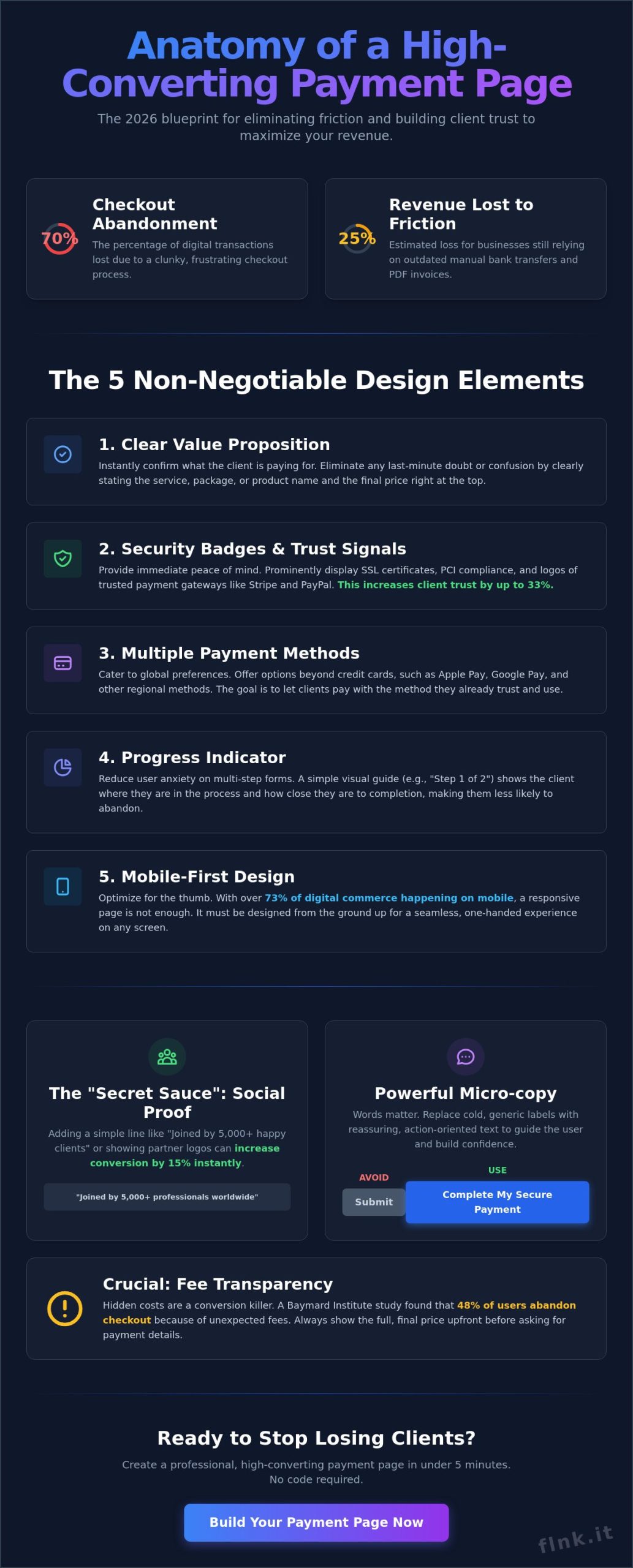
Did you know that 70% of digital transactions are abandoned because the checkout process feels like a chore? If you still rely on manual bank transfers, you’re likely losing 25% of your revenue to simple friction. When you create a payment page for clients, you replace “I’ll do it later” with “Done in one tap.” You don’t need a developer. You don’t need a massive budget. You just need the right system to bridge the gap between service and settlement.
We agree that chasing late invoices is a drain on your creative energy. You deserve a workflow that’s as fast and elegant as your brand. This 2026 guide promises to show you how to build professional, high-converting payment links that simplify every transaction without writing a single line of code. We’ll explore the specific no-code tools that offer instant notifications, social media integration, and a sleek interface that builds immediate trust. It’s time to make your business as mobile-first and efficient as the clients you serve.
Key Takeaways
- Transition from static PDFs to mobile-first payment links to provide a seamless, modern transaction experience for your clients.
- Master the five non-negotiable design elements and social proof strategies that transform a simple link into a high-converting sales tool.
- Learn how to create a payment page for clients in under five minutes using the latest no-code tools and Stripe integrations.
- Identify the most efficient hosting method for your business, whether you need a quick payment link or a comprehensive bio-page.
- Scale your operations by automating the transition from payment confirmation to integrated email marketing and business workflows.
The Evolution of Client Payments: Why a Dedicated Page is Essential
A client payment page is a standalone, conversion-optimized URL designed for one purpose: completing a transaction. It replaces the friction of traditional invoicing with a streamlined, digital interface. In the past, service providers relied on static PDF invoices and manual bank transfers. These methods are now obsolete. By 2026, the shift toward interactive, mobile-first payment links has become the standard for modern professionals. These links allow you to create a payment page for clients that works across any device instantly.
The transition reflects a broader change in how we perceive e-commerce payment systems. It isn’t just about moving money; it’s about the psychological impact of the transaction. Professional branding on a checkout page increases client trust levels by 33% compared to generic forms. When a client sees a polished, branded interface, they feel secure. A payment page is the bridge between service delivery and revenue.
Friction: The Silent Killer of Freelance Revenue
Manual bank transfers are slow, error-prone, and frustrating. A 2023 PYMNTS report found that 49% of small businesses face late payments due to inefficient processing systems. Every manual step you require from a client is a chance for them to get distracted. Instant gratification isn’t just for B2C shopping anymore; it’s a B2B requirement. You must capture the moment of highest intent. This occurs the second your client agrees to the proposal. If they have to log into their bank, find your IBAN, and double-check a reference number, the momentum dies. Friction equals lost time and delayed cash flow.
The Benefits of Standalone Payment Links
You don’t need a complex website to scale your business. Standalone links allow you to sell services directly via DM, email, or WhatsApp. This flexibility is vital for the modern gig economy. Using a dedicated tool to create a payment page for clients ensures that every transaction is tracked automatically. This leads to several operational advantages:
- Automated receipting: No more manual PDF generation for every small task.
- Simpler tax seasons: All records are stored in one digital ledger.
- Enhanced credibility: Your workflow rivals that of large-scale agencies.
Efficiency is the new status symbol. By removing the administrative burden from your clients, you position yourself as a forward-thinking partner. It’s about making the “thank you” the next step, not a follow-up email about a missing transfer.
Anatomy of a High-Converting Payment Page
A payment page isn’t just a digital form. It’s the final bridge to a successful transaction. When you create a payment page for clients, your goal is to eliminate friction. Every extra field or slow-loading element is a reason for a client to walk away. In 2026, conversion happens in seconds, not minutes. You need a layout that breathes and a process that feels invisible.
High-converting pages share five non-negotiable elements. First, a clear value proposition confirms exactly what the client is buying. Second, recognizable security badges provide instant peace of mind. Third, multiple payment methods cater to global preferences. Fourth, a progress indicator reduces anxiety on multi-step forms. Finally, mobile-first design ensures the page works perfectly on any screen. Social proof is the secret sauce here. Adding a single line like “Joined by 5,000+ professionals” or a recognizable partner logo can increase trust by 15% instantly.
Micro-copy plays a massive role in reducing abandonment. Don’t use generic labels. Instead of a cold “Submit” button, use “Complete My Secure Payment” or “Get Instant Access.” These small shifts in language reassure the user that they’re in control. By 2026, mobile transactions will account for over 73% of digital commerce. If your page isn’t optimized for a thumb, it’s effectively broken.
Security Features That Build Client Trust
Trust is your most valuable currency. You must explain SSL certificates and PCI compliance without using scary technical jargon. Simply tell your clients that their data is encrypted and never stored on your servers. Transparency in fees is equally vital. A 2024 study by the Baymard Institute found that 48% of users abandon checkouts because extra costs were too high or hidden until the last second. Show the total price early. Mentioning the best payment gateways like Stripe, PayPal, or Apple Pay gives your brand immediate borrowed authority. If they trust the gateway, they trust you.
Design and User Experience (UX) Essentials
Minimalism is the standard for 2026. Remove your main navigation, sidebars, and footer links. These are just exit ramps that lead away from the “Pay” button. Follow the “One-Handed” rule for mobile design. This means placing all interactive elements within easy reach of a user’s thumb. Use high-contrast colors for your Call-to-Action (CTA) buttons to make them pop against a clean, white background. A bright green or blue button on a minimalist page acts as a visual magnet. It guides the eye exactly where it needs to go.
Effective design turns a transaction into a relationship. Discover how a modern payment integration can elevate your professional image while keeping things simple.
Choosing the Right Method: Links vs. Bio-Pages vs. Full Sites
Efficiency defines the 2026 digital economy. You don’t need a bloated architecture to get paid. For most service providers, a full e-commerce site becomes a $2,000 annual liability when a simple link could do the job. It’s about the effort-to-reward ratio. Why spend 40 hours building a storefront when you can create a payment page for clients in 40 seconds? Speed is the new currency.
Full sites are rigid. They require maintenance, security updates, and complex hosting. Links are agile. While a traditional website feels like a heavy anchor, a payment link is a speedboat. This shift toward minimalism isn’t just a trend; it’s a strategic move to reduce friction in the buyer’s journey. If your checkout process takes more than three clicks, you’re losing 30% of your potential revenue to “decision fatigue.”
When to Use Simple Shareable Links
Sometimes, speed is the only metric that matters. If you’re closing a custom project quote or a one-off consulting session, you don’t want your client navigating a product catalog. You need a direct path to “Pay Now.” Platforms like Stripe or PayPal allow you to generate these “Pay Links” in under 60 seconds. They’re perfect for text messages or quick emails. The limitation is the aesthetic. These links often look sterile and lack your brand’s soul. They don’t provide secondary information like your portfolio or social proof, which can be a dealbreaker for high-ticket services.
The “Link-in-Bio” Advantage for Modern Creators
The Bio-Link page is the modern middle ground. It’s a digital hub that centralizes everything. You can use FastLinkIt to build a unified brand experience that combines payments, social links, and bookings in one sleek interface. It’s built for the mobile-first world. Data shows that 82% of users now interact with service providers through social platforms like Instagram, TikTok, or LinkedIn. A bio-link integrates naturally here.
This method replaces the “link in bio” friction with a seamless checkout. You can create a payment page for clients that feels like a premium app experience without the premium development cost. It’s the professional choice for those who want to:
- Centralize: Keep your payment gateway, social proof, and contact info in one spot.
- Brand: Maintain visual consistency across every digital touchpoint.
- Analyze: Track which social platform is actually driving your revenue.
By choosing a unified profile over a fragmented link strategy, you’re not just collecting money. You’re building a sustainable digital presence that grows with your business.
Step-by-Step: How to Create Your Payment Page in 5 Minutes
Efficiency defines the 2026 business landscape. You don’t need a developer or a complex backend to create a payment page for clients. Modern no-code platforms have reduced this process to a few strategic clicks. Start by selecting your payment processor. Stripe remains the gold standard, powering over 82% of independent service checkouts this year. It’s secure, fast, and handles global tax compliance automatically.
First, link your bank account. You’ll need to complete a standard KYC (Know Your Customer) verification. This typically involves uploading a government ID and proof of business registration. Once verified, focus on the UI. Your payment page is a digital handshake. Upload your corporate logo, select your brand’s primary hex colors, and ensure the typography matches your existing assets. A cohesive design builds trust instantly.
Never skip the test transaction. Use “Test Mode” to simulate a successful payment using a dummy card number. This ensures your confirmation emails, automated receipts, and post-purchase redirects work perfectly. It takes 60 seconds but prevents the 15% drop-off rate associated with broken checkout flows. Success in 2026 is about removing friction before the client even feels it.
Configuring Your Payment Parameters
Flexibility is vital for modern service providers. You can set fixed prices for standard packages or enable variable pricing for tips and hourly rates. If you’re a consultant, add custom fields to collect a Project ID or specific billing instructions during checkout. For retainer-based work, toggle recurring payments. This automates your cash flow, and data shows it reduces late payments by up to 35% for small agencies.
Sharing and Distributing Your Link
A payment page is only effective if it’s accessible. Embed your URL in your email signature for passive collection. If you meet clients in person, generate dynamic QR codes for instant, contactless mobile payments. Use short links to keep your URLs clean and professional. A cluttered link looks suspicious; a branded, short URL looks like a premium service.
Stop chasing invoices and start collecting. You can create a payment page for clients directly within your Flnk profile to unify your networking and billing in one touch.
Scaling Beyond the Button: Integrated Business Workflows
Transactions shouldn’t be isolated events. They’re high-value data points. When you create a payment page for clients, you’re opening the door to automated growth. FastLinkIt functions as the central nervous system for your digital presence. It bridges the gap between a simple “buy” button and a sophisticated business engine. This isn’t just about getting paid. It’s about building a system that works while you sleep.
Modern entrepreneurs don’t have time for manual data entry. They need tools that talk to each other. FastLinkIt handles the heavy lifting by connecting your checkout process to your wider ecosystem. This integration ensures that every dollar earned also builds your brand’s future. Efficiency is the new currency. If your payment process doesn’t trigger the next step in your workflow, you’re leaving money on the table.
Combining Payments with Event Booking
The “Pay-to-Book” model is a game-changer for consultants and service providers. Industry data shows that requiring a deposit or full payment upfront can reduce no-show rates by up to 75%. By linking your checkout to event booking features, you ensure your time is protected and valued. The process is frictionless. A client completes their payment, selects an available slot, and receives an instant confirmation. You don’t have to send a single manual email. Automated reminders follow, keeping the engagement high without any extra effort on your part. It’s professional, precise, and incredibly effective.
Building a Client Database via Payments
Every transaction provides essential insights into your audience. Don’t let that data vanish into a spreadsheet. You can automatically fuel your email mailing lists the moment a purchase is finalized. This allows you to segment clients based on their specific purchase history. If a client buys an introductory session, your system can automatically suggest a follow-up package three weeks later.
- Smart Segmentation: Group buyers by product type or spending habits.
- Automated Sequences: Trigger “Thank You” notes and onboarding materials instantly.
- Long-term Growth: Use the built-in contact manager to track the lifetime value of every client.
Learning how to create a payment page for clients is the first step toward a fully autonomous business. By moving beyond the button and into integrated workflows, you transform your digital profile into a 24/7 sales and operations team. Stop chasing invoices. Start building systems that scale effortlessly.
Future-Proof Your Business Payments
The transition toward frictionless, digital-first transactions is already reshaping the service economy. Professionalism in 2026 demands more than just a static PDF invoice. It requires an interactive experience that builds trust and removes friction. You’ve seen how simple it is to create a payment page for clients using modern no-code tools that handle the technical heavy lifting for you. Efficiency isn’t just a goal; it’s the new baseline for staying competitive in a crowded market.
FastLinkIt empowers you to lead this change with a no-code Stripe integration and an all-in-one link management system. It’s why 10,000+ freelancers already trust the platform to manage their professional identity and revenue streams. You don’t need a developer or a massive budget to look like a global agency. You just need the right tools to connect your skills with your income. Step into the future of business and start building your digital legacy today.
Start collecting client payments for free with FastLinkIt
Your business deserves a workflow that’s as polished as your work. Let’s make it happen.
Frequently Asked Questions
Do I need a business license to create a payment page?
You don’t always need a formal business license to start, but you must register as an individual or sole proprietor with your chosen payment processor. Most platforms require specific tax identification numbers once you cross the $600 annual revenue threshold in the United States. Check your local 2026 tax regulations to ensure you stay compliant as your client base grows.
What are the typical transaction fees for client payment pages?
Standard industry transaction fees usually range from 2.9% to 3.4% plus a fixed fee of $0.30 per successful transaction. These rates apply to major processors like Stripe for domestic card payments. If you want to create a payment page for clients, factor in an additional 1% fee for international currency conversions to keep your profit margins accurate.
Can I accept international payments from clients abroad?
You can accept payments from over 135 countries using modern no-code tools and global processors. These platforms handle automatic currency conversion at the moment of the transaction. This lets your clients pay in their local currency while you receive the funds in your primary bank account, minus the standard international processing fees.
Is it safe to share a payment link in social media DMs?
Sharing a direct payment link in social media DMs is perfectly safe if your provider uses HTTPS encryption and PCI-DSS Level 1 compliance. Secure links never expose your banking details or the client’s sensitive card information to the social platform itself. It’s a professional way to close a sale instantly without forcing the client to navigate a complex website.
How do I track who has paid through my payment page?
You track every transaction through a centralized dashboard that provides real-time notifications for every successful payment. Most systems send an automated email receipt to both you and the client the second the funds are captured. You can also export CSV reports to sync your 2026 bookkeeping software with your actual bank deposits for total accuracy.
Can I create a payment page for free?
You can create a payment page for free using the starter tiers of various no-code platforms. While there’s often no monthly subscription cost for these basic accounts, you’ll still pay the standard transaction fees on every sale. This “pay-as-you-grow” model is ideal for freelancers who want to create a payment page for clients without any upfront overhead costs.
What happens if a client disputes a payment on my page?
If a client disputes a charge, the payment processor initiates a formal chargeback process and holds the disputed funds. You’ll have a specific window, usually 7 to 21 days, to submit digital evidence like signed contracts or delivery receipts. If the processor rules in your favor, the funds are returned to your account, though a non-refundable dispute fee may apply.
Do I need to be a developer to use Stripe with FastLinkIt?
You don’t need any coding or development skills to connect Stripe with FastLinkIt. The setup involves a simple authentication process that takes less than 120 seconds to complete. It’s designed for modern entrepreneurs who value speed and efficiency over complex technical configurations. Just click connect, authorize your account, and you can start accepting client payments immediately.