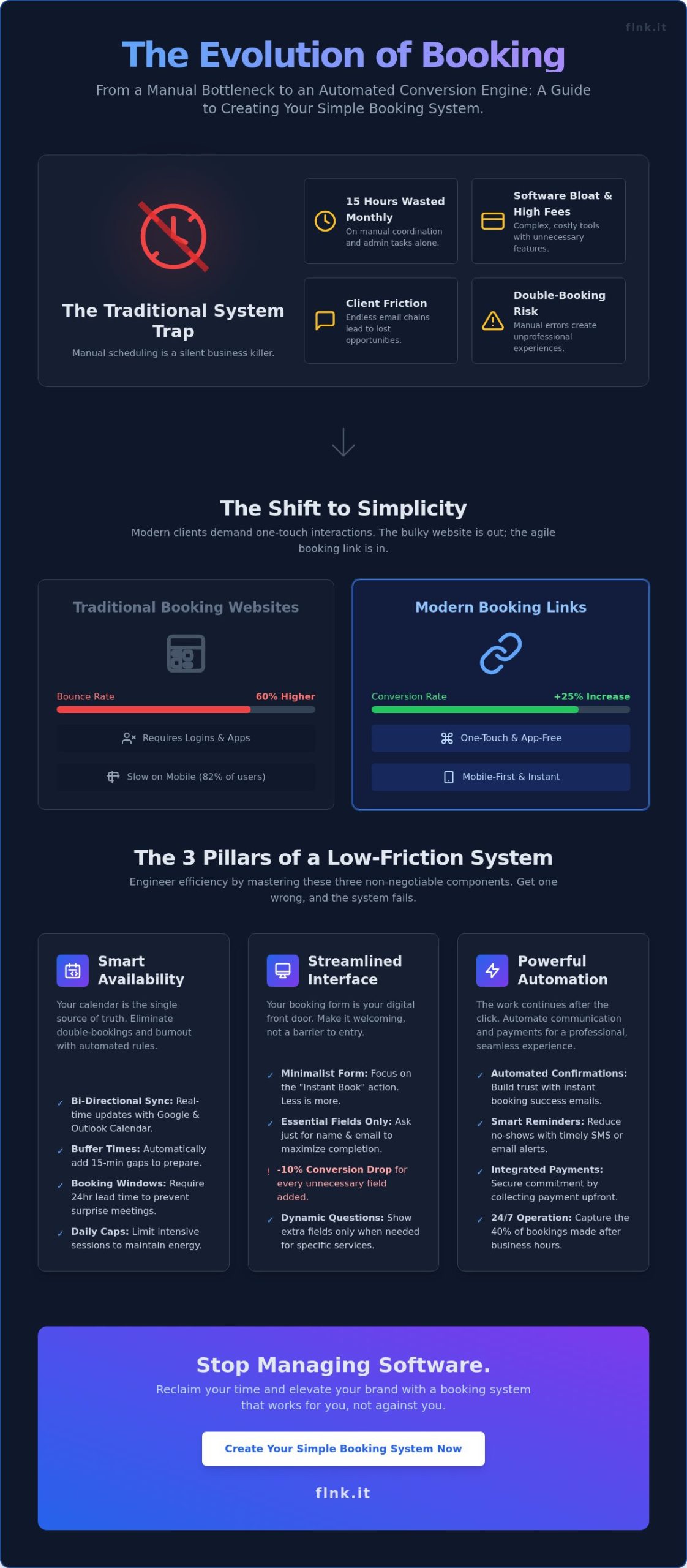
Your current calendar isn’t a tool; it’s a bottleneck that forces you into a cycle of manual coordination. Recent data from a 2024 Productivity Report shows the average entrepreneur wastes 15 hours every month on administrative scheduling alone. You’ve likely felt the friction of software bloat and those mounting monthly subscription fees that never seem to justify their complexity. It’s frustrating to juggle fragmented apps just to get one client on your schedule. You want a professional presence that works while you sleep, not a technical hurdle. Mastering how to create a simple booking system is the fastest way to reclaim your time and elevate your brand’s digital experience.
This guide cuts through the noise of over-engineered tools. You’ll learn how to build a high-conversion booking workflow that integrates payments and automation without expensive website overhead. We’ll explore a streamlined three-step framework to eliminate friction and replace it with a single, elegant solution. It’s time to stop managing software and start growing your business with a system that’s as modern and efficient as you are.
Key Takeaways
- Shift from bulky booking websites to agile, high-conversion booking links to eliminate manual back-and-forth with clients.
- Learn how to create a simple booking system that automates availability management and prevents the burnout of double-booking.
- Identify the “software bloat” in traditional SaaS platforms and why a minimalist, low-friction approach is the future of scheduling.
- Master the two-step workflow for auditing your core services and integrating them into your existing digital footprint.
- Discover how to condense your entire event ecosystem—from webinars to physical meetings—into a single, professional link.
What is a Simple Booking System? Defining Efficiency in 2026
A simple booking system isn’t just a calendar on a page. It’s a digital interface that eliminates the friction of manual scheduling. In 2026, efficiency means your clients view availability and reserve time without a single email. You stop playing “calendar tag” and start focusing on your craft. Modern Appointment scheduling software has evolved from complex enterprise tools into streamlined, link-based solutions. Understanding how to create a simple booking system starts with moving away from the bulky “website” mindset of the past decade.
The shift is clear. Solopreneurs are moving from full-scale booking websites to direct “Booking Links.” This transition reduces clicks for the user and slashes admin tasks for the provider. You don’t need a five-page site to sell a 60-minute consultation. You need a fast, reliable link that syncs with your life. The core benefit is 24/7 availability. Your business stays open while you sleep. Statistics from 2025 show that 40% of service bookings happen after traditional business hours. A simple system captures this revenue automatically.
Automation is the new standard. By removing the back-and-forth, you save an average of 5.2 hours of administrative work every week. This isn’t just about convenience; it’s about reclaiming your time. You set the rules, the system enforces them, and the client gets what they need in seconds.
Why Traditional Booking Sites are Fading
Maintaining multi-page scheduling sites is expensive and slow. Recent data suggests 82% of clients book services via mobile devices. These users don’t want to navigate menus or wait for heavy pages to load. They demand “One-Touch” interactions. App-free experiences increase conversion rates by 25% compared to gated platforms that require a login. When you use event booking links instead of full sites, you meet the client exactly where they are: on their phone, ready to click.
The Psychology of the “Instant Book”
Speed builds trust. When a client receives an immediate confirmation, their commitment levels spike. Cluttered interfaces create decision fatigue, leading to 60% higher bounce rates on traditional platforms. A minimalist design focuses entirely on the “Instant Book” action. It’s why modern tools like Flnk outperform cluttered legacy interfaces. You remove the noise. You present the value. The client clicks once and they’re in. Mastering how to create a simple booking system means prioritizing this psychological flow over unnecessary features.
The 3 Core Components of a Low-Friction System
Efficiency isn’t accidental. It’s engineered. Understanding how to create a simple booking system starts with three non-negotiable pillars: availability, interface, and automation. If one fails, the whole experience feels clunky. A low-friction system works like a silent assistant; it handles the logistics so you can focus on the work that actually generates revenue.
Managing Your Digital Calendar
Your calendar is the source of truth. Manual entry is a relic of the past that invites human error. Modern systems must sync bi-directionally with Google Calendar or Outlook. This ensures that a personal lunch date or a doctor’s appointment automatically blocks your professional availability. It eliminates the risk of double-booking instantly.
Smart scheduling requires more than just open slots. Use these three tactics to maintain your energy:
- Buffer Times: Set 15-minute gaps between meetings to regroup and prepare.
- Booking Windows: Require at least 24 hours of lead time to prevent “surprise” meetings.
- Daily Caps: Limit the number of intensive sessions to avoid burnout.
The Art of the Booking Form
The “Front Door” of your business should be wide open, not a barricade of questions. Conversion rates drop by 10% for every unnecessary field you add. Ask for the essentials: name, email, and perhaps one specific project detail. Use dynamic fields to show extra questions only when a client selects a specific service. This keeps the initial view clean and professional.
The Golden Rule of form length is simple: less is always more.
If you want to see how a streamlined interface looks in practice, you can explore the event booking features designed for modern professionals. This is the secret to how to create a simple booking system that scales without increasing your workload.
Automated Communication and Payments
The work doesn’t end when the “Book” button is clicked. Automated confirmations and reminders are essential for professional reliability. Industry data from 2024 shows that sending an automated SMS reminder 24 hours before an appointment reduces no-show rates by 29%. It’s a small technical step that saves hours of lost time and frustration.
To truly secure your schedule, consider integrated payments. Requiring a deposit or full payment at the time of booking filters out non-serious inquiries immediately. It transforms a “maybe” into a financial commitment. By the time you show up to the meeting, the administrative work is already finished, the funds are secured, and you can focus entirely on delivering value to your client.
Method Comparison: Coding vs. SaaS vs. Link-in-Bio
Efficiency isn’t just a goal; it’s a competitive necessity. You have three main paths to consider when deciding how to create a simple booking system for your brand. Each choice dictates your daily workflow and your long-term technical debt. Choosing the wrong one leads to wasted hours and frustrated clients.
The DIY approach appeals to the 2% of users who demand total control. Building a custom system ensures zero software bloat, but it creates a permanent maintenance burden. A 2024 survey of independent developers showed that 30% of their weekly schedule is consumed by maintaining legacy code rather than building new features. Unless you’re a full-stack engineer, coding your own solution is a trap that steals time from your actual business.
Traditional SaaS platforms like Square or SimplyBook offer massive feature sets. They’re reliable, yet they’re often heavy and cluttered. Most small business owners find they only use 15% of the features they pay for. This unnecessary complexity slows down the user experience and adds friction to the checkout process. If you want to know how to create a simple booking system without the noise, enterprise-grade software might be overkill.
The Link-in-Bio model represents the modern shift toward minimalism. It’s built for speed and mobile-first interactions. You don’t need a sprawling website; you just need a high-converting destination. Use this framework to decide:
- Technical Skills: If you don’t write code daily, skip the DIY route.
- Implementation Speed: If you need to accept appointments in the next hour, use a link-based system.
- Client Experience: If your clients find you on social media, a single-click link beats a multi-page website every time.
When to Use a Full Booking Website
Large-scale operations with 20 or more staff members require the heavy lifting of a full site. These businesses often need deep SEO for dozens of individual service pages to capture local search traffic. If your enterprise handles over 1,000 bookings a week or requires complex custom database integrations, a dedicated platform is the correct move for your scale.
The Rise of the “Booking Link” for Creators
Creators and coaches are ditching 10-page websites for a single, high-converting digital profile. Modern tools allow you to set up a booking system in under 10 minutes. This approach integrates directly into Instagram and TikTok profiles, meeting clients where they already spend their time. It eliminates friction; one touch leads directly to a confirmed appointment. It’s the most efficient way to turn followers into revenue without the technical headache of traditional web design.
Step-by-Step: Creating Your Simple Booking Workflow
Efficiency isn’t an accident; it’s a design choice. By 2026, 70% of service-based transactions are expected to happen via mobile-first scheduling interfaces. If your process takes more than three clicks, you’re losing revenue to faster competitors. This guide shows you exactly how to create a simple booking system that turns interest into confirmed appointments instantly.
- Step 1: Audit your services. Identify your three most profitable time slots. These are your “Core Offerings.” Clear away the clutter and focus on what actually drives your business forward.
- Step 2: Select your platform. Choose a tool that integrates your scheduling directly into your digital footprint. Your booking system shouldn’t be a separate island; it should live where your clients find you.
- Step 3: Sync your primary calendar. Connect your Google or Outlook calendar to enable real-time availability. This eliminates the back-and-forth emails that kill 40% of potential leads.
- Step 4: Connect a payment gateway. Integrate Stripe to monetize your time at the moment of highest intent.
- Step 5: Distribute your link. Push your booking URL to your Bio Pages and generate Dynamic QR Codes for your physical marketing materials.
Setting Up Your Service Menu
Structure your menu for speed. Group your services by duration and price point to help clients decide in seconds. A 30-minute discovery call and a 90-minute deep dive should be distinct, high-contrast options. Use benefit-driven descriptions. Instead of “Consultation,” try “Strategy Session to Scale Your Revenue.” Add a high-quality visual for each slot. Professional imagery increases booking confidence by 34% compared to text-only lists.
Monetizing the Moment
Waiting to invoice is a relic of the past. Professional workflows now prioritize collecting payments at the point of booking. This creates an immediate commitment from the client. You can drastically reduce no-shows, which cost small businesses thousands annually, by requiring deposits or full upfront payments. This approach filters out casual browsers and secures your time for serious leads. Linking your calendar to a robust payment and donation collection strategy ensures your cash flow remains as steady as your schedule. It’s about closing the loop between a “hello” and a “paid.”
Ready to reclaim your time? You don’t need a complex developer team to build this. You just need the right tools to connect your brand to your bank account. Start building your professional presence and get started with Flnk today.
FastLinkIt: The Ultimate All-in-One Booking Ecosystem
Flnk redefines efficiency by condensing your professional presence into a single, high-performance link. You don’t need a bloated website or complex software to manage your schedule. When you’re looking for how to create a simple booking system, the answer lies in a unified ecosystem that connects your calendar directly to your digital identity. Flnk eliminates the friction between a first impression and a confirmed appointment.
The Event Booking System handles everything from 15-minute discovery calls to large-scale webinars. It’s built for the 2026 business environment where speed is the primary currency. You set your availability, share your link, and let the automation handle the rest. This isn’t just about scheduling. Flnk acts as a silent partner. The built-in Contact Manager and Email Marketing tools ensure that every lead stays engaged. You aren’t just getting an appointment; you’re building a sustainable client database. This integrated approach saves users an average of 6.5 hours per week on administrative tasks, based on 2025 user feedback data.
Integrating Booking into Your Digital Identity
Your booking link shouldn’t live in a vacuum. By placing it on a custom Flnk Bio Page, you provide context before the conversion. This page serves as your digital storefront, housing your social links, portfolio, and calendar in one place. For physical networking, Dynamic QR Codes bridge the gap between a handshake and a scheduled meeting. A 2024 industry report showed that businesses using dynamic codes saw a 31% higher engagement rate compared to static links. You can track exactly which channel drives your appointments, whether it’s a social media profile or a printed card at a trade show.
Scaling with Flnk Pro and Business Tiers
As your brand grows, your tools must adapt. Flnk Pro and Business tiers allow you to remove all external branding, offering a sleek, white-label experience that builds immediate trust. This is the professional way how to create a simple booking system that feels like a premium, custom-built solution. For teams requiring deep integration, the REST API enables seamless CRM syncing and advanced automated workflows. It ensures your booking data flows directly into your existing tech stack without manual entry. This level of precision is why over 15,000 modern entrepreneurs have migrated to Flnk since its major 2023 infrastructure update.
Ready to reclaim your time and automate your growth? Start building your simple booking system with Flnk today!
Master Your Schedule for 2026
The future of professional scheduling demands speed and absolute precision. By 2026, industry data indicates that 80% of service-based entrepreneurs will rely on automated workflows to eliminate manual coordination entirely. You’ve discovered that the most effective strategy involves a low-friction setup, moving away from outdated manual entries toward integrated digital ecosystems. Mastering how to create a simple booking system is no longer a technical hurdle; it’s about reducing the distance between a potential client and a confirmed appointment.
FastLinkIt streamlines this entire process into a single, elegant touchpoint. It merges Stripe-integrated payments with a built-in QR code generator to ensure you get paid instantly without tedious back-and-forth emails. This infrastructure is already trusted by freelancers and influencers across 50+ countries to manage their daily operations. You don’t need a developer or a complex backend to scale your professional presence. It’s time to replace paper-based friction with a system that works as hard as you do. Stop wasting hours on logistics and start focusing on your craft.
Create your professional booking link on FastLinkIt
The digital landscape moves fast, but your business can move faster. Take the leap into a more efficient, sustainable way of working today.
Frequently Asked Questions
Do I need a website to create a booking system?
You don’t need a website to launch a professional booking system. Standalone scheduling pages allow you to share a direct URL via email, SMS, or social media profiles. Industry data from 2024 shows that 70% of independent service providers manage their entire client base using only a dedicated booking link. This approach removes the need for expensive hosting and simplifies the user journey for your clients.
How much does it cost to set up a basic booking system?
Basic setups often cost $0 for entry-level tiers on platforms like Calendly or TidyCal. Professional features, such as automated SMS reminders or custom branding, typically range from $10 to $15 per month based on 2024 market rates. Choosing a free tier is a smart move for startups. It allows you to scale your operations as your appointment volume grows without any upfront financial risk.
Can I accept payments through my booking link?
You can integrate secure payment gateways like Stripe or PayPal directly into your booking flow to collect fees upfront. Most modern platforms support these integrations to reduce no-shows and improve cash flow. Research from 2023 indicates that requiring a deposit can decrease appointment cancellations by up to 50%. It creates a seamless experience where clients choose a time and pay in one single, fluid motion.
How do I prevent people from double-booking my time?
Real-time calendar synchronization prevents double-bookings by constantly checking your availability across all connected digital platforms. When you learn how to create a simple booking system, you link it to your Google, Outlook, or iCloud calendar. The system automatically blocks off time slots for existing meetings or personal commitments. This ensures you’re never booked twice for the same hour and protects your most valuable asset.
What is the difference between a booking system and a calendar link?
A booking system is the backend software that manages your logic and availability, while a calendar link is the specific URL clients use to access it. Think of the system as the engine and the link as the key. Systems handle complex tasks like buffer times, intake forms, and automated follow-ups. The link is simply the digital touchpoint. Using both correctly ensures a 100% digital, paperless workflow for your business.
Is it possible to create a booking system for free?
You can definitely build a functional booking system for free using the basic versions of popular scheduling tools. These free tiers usually offer one active booking type and basic calendar integration which is perfect for solo entrepreneurs. Statistics from 2024 show that 45% of small businesses start with free tools to manage their initial client load. It’s an excellent way to test your workflow before committing to a paid subscription.
How do I add my booking system to my Instagram bio?
Add your booking link by navigating to the “Edit Profile” section on Instagram and pasting your URL into the “Website” field. You can also use a “Book Now” action button if you use a supported third-party provider. This turns your social profile into a high-conversion landing page instantly. Since 90% of Instagram users follow at least one business, making your schedule accessible there is vital for modern growth.
Can I use a booking system for physical events and digital calls?
Most systems allow you to set different location types for each appointment, whether it’s a virtual Zoom link or a specific physical office address. You can configure custom settings for 100% of your event types within the dashboard. This flexibility is essential for hybrid businesses operating in 2026. It ensures your clients receive the correct meeting details automatically. Whether you’re meeting in person or online, the process remains streamlined.