
A generic, black-and-white QR code is no longer just an eyesore; it’s a missed opportunity for your brand. A 2024 industry report shows that custom-branded codes receive 42% more engagement than standard designs, yet 65% of professionals still settle for ugly, expiring links. If you’ve ever struggled with complex tracking or designs that clash with your aesthetic, you’re not alone. Learning how to make a qr code that actually converts is the fastest way to bridge the gap between a physical handshake and a digital sale.
You deserve a connection tool that works as hard as you do. This guide teaches you how to create, customize, and track high-converting QR codes that drive payments and bookings in seconds. We’ll show you how to build a branded asset that never expires and provides real-time analytics on every single scan. From selecting the right platform to integrating direct payment links, this is your roadmap to the 2026 standard for professional connectivity and effortless networking.
Key Takeaways
- Understand how advanced QR technology has evolved into a high-speed, essential tool for modern commerce and digital networking.
- Identify the strategic differences between static and dynamic codes to ensure your data remains editable and trackable at all times.
- Master how to make a qr code in three streamlined steps that align perfectly with your professional brand identity.
- Unlock frictionless revenue streams by integrating scan-to-pay features and Stripe for instant, high-converting customer checkouts.
- Scale your digital presence by managing a centralized ecosystem of codes and Link-in-Bio hubs from a single, efficient dashboard.
Understanding QR Code Technology in 2026
QR codes have evolved far beyond their 1994 origins in automotive tracking. By 2026, these two-dimensional barcodes have become the primary interface between physical space and digital action. They aren’t just static links anymore. They’re high-speed gateways designed for instant recognition by any modern smartphone camera. Understanding QR code technology is essential because it powers the “Action Code” economy. This shift means a single scan now triggers complex workflows like instant checkout or calendar synchronization without a single tap on a keyboard.
The post-pandemic era accelerated this adoption. In 2020, QR usage surged by 25% globally as touchless interactions became a necessity. By 2026, this behavior is hardwired into consumer habits. People don’t just expect to see a code; they demand the efficiency it provides. For businesses, knowing how to make a qr code is the first step toward meeting these expectations. You’re no longer just sharing a URL. You’re deploying a tool for scan-to-pay transactions and scan-to-book services that function as the standard for modern commerce.
Why your business needs a QR strategy
A QR strategy bridges the gap between your physical assets and your digital ecosystem. It eliminates the friction of manual typing, which often kills conversion rates. When a customer sees your flyer, they’re exactly one second away from your checkout page. This 2026 approach is incredibly cost-effective. You can update your digital destination instantly without reprinting a single piece of paper. It’s sustainable, fast, and professional. It’s how FastLinkIt users stay ahead of the curve while reducing their environmental footprint.
The anatomy of a high-performing QR code
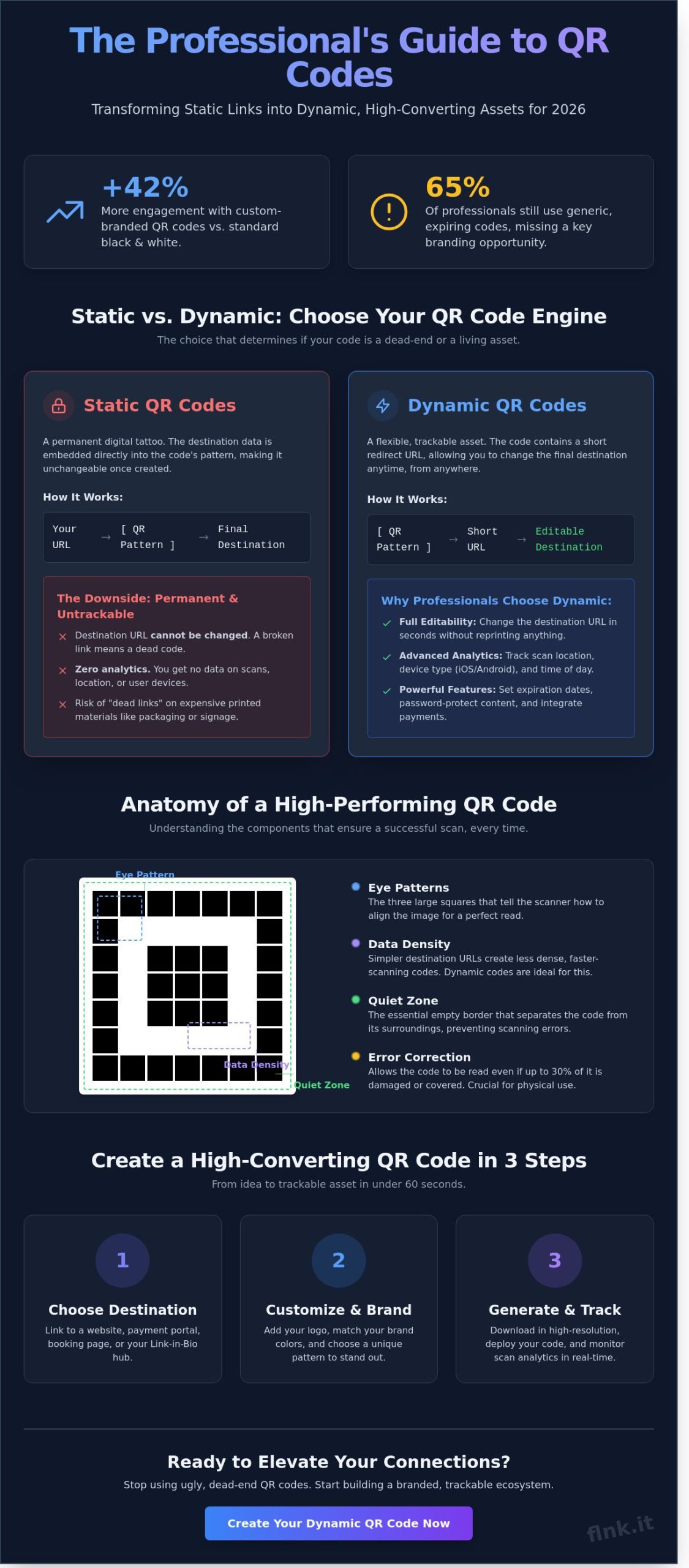
A scan that fails is a lost customer. High-performing codes rely on three technical pillars. First, data density matters. Simpler designs with less embedded data scan faster in low light. Second, error correction levels allow codes to function even if 30% of the surface is scratched or obscured. Finally, the “Quiet Zone”, which is the white border, and “Eye Patterns”, the three large squares, must remain clear. These elements tell the scanner exactly how to align the data. Mastering these basics is vital when you’re figuring out how to make a qr code that actually works in the wild.
Static vs. Dynamic: Choosing the Right QR Code Type
Before you learn how to make a qr code, you must choose the right engine for your data. Every QR code falls into one of two categories: Static or Dynamic. This choice determines whether your content is set in stone or remains a flexible, living asset. A Static QR code embeds your information directly into the pixel pattern. It’s a permanent digital tattoo. Once you generate it, you can’t change the destination. If your URL breaks or your promotion ends, that printed code becomes a useless square of black and white pixels.
Dynamic QR codes work differently. They use a short redirect URL that points to your final destination. This middle layer gives you total control. You can swap the link behind the code at any time without changing the physical print. While static codes are simple, they often lead to security issues with QR codes if the destination isn’t managed properly over time. For businesses, the flexibility of dynamic technology is a non-negotiable standard for long-term reliability. Before committing to any platform, it’s also worth understanding the hidden costs and myths behind free QR code generators that can leave your campaigns exposed to broken links and scan limits at the worst possible moment.
When to use Static QR codes
Static codes are best for permanent, low-stakes data. Use them for one-off events where the link will never need to change after the doors close. They’re perfect for sharing a home WiFi password or a simple vCard for a personal project. Since these codes don’t require a server redirect, they work indefinitely without a subscription. However, you’ll have zero visibility into who is scanning them or how often they’re used. If analytics don’t matter, static is a viable, minimalist choice.
Why professionals always choose Dynamic
Modern brands require agility and data. Dynamic QR codes provide real-time insights that static versions simply can’t offer. You can track the exact location of a scan, the device type used (iOS vs. Android), and the specific time of day the interaction occurred. This data allows you to optimize your marketing spend based on actual performance metrics. Professionals prioritize this technology because it eliminates the risk of “dead links” on expensive physical signage or packaging.
- Editability: Change your destination URL in seconds without reprinting a single flyer.
- Advanced Features: Set expiration dates for limited-time offers or add password protection to exclusive content.
- Sustainability: Reduce paper waste by updating digital content instead of recycling outdated print materials.
If you want to master how to make a qr code that actually grows with your business, the dynamic route is the only logical path. For a deeper technical breakdown of these benefits, explore this What Is a Dynamic QR Code? guide. You can also start building your professional presence today with Flnk’s innovative digital tools.
How to Make a QR Code in 3 Simple Steps
Learning how to make a qr code is a strategic move for any modern business. It transforms static surfaces into interactive portals, allowing for a seamless transition from physical presence to digital engagement. The process is fast, efficient, and requires no technical background. Flnk prioritizes a minimalist approach to ensure you spend less time on setup and more time on networking.
Step 1: Selecting your content
The destination is the most critical part of your strategy. You must decide between a direct URL, a payment gateway, or a comprehensive bio page. While a direct URL is effective for specific landing pages, a bio link often sees a 40% higher engagement rate because it offers multiple contact options in one place. Every destination must be mobile-responsive. Since 91% of users access QR content via smartphones, a non-responsive page will lead to immediate abandonment. If you are focusing on a specific link, The 2026 Checklist to Generate QR Code for URL provides a professional framework for choosing the right path. For those looking to streamline transactions, integrating payment features directly into your code can reduce friction at the point of sale.
Step 2: Customizing for brand recognition
Generic black and white codes are relics of the past. Your QR code is a digital handshake; it should reflect your brand identity. Start by adding your company logo to the center of the code. This simple addition increases scan confidence and reinforces brand recall. Adjust the color palette to match your corporate identity, but always prioritize functionality. Maintaining a 3:1 contrast ratio is essential for scan reliability. If the colors are too muted, older camera sensors will struggle to read the data. For advanced styling techniques that balance aesthetics with performance, see our guide on QR Code Generator with Customization. This step ensures your code looks like a premium asset rather than a technical afterthought.
Step 3: Testing and file formats
Execution is where many businesses fail. Always download your final design in SVG or EPS formats. These vector files allow you to scale the code for a massive billboard or a tiny business card without losing clarity. Blurry pixels result in failed scans. Before you print 500 copies, apply the 3-device rule. Test the code using a high-end flagship phone, a mid-range Android, and a device that is at least three years old. This ensures universal accessibility across your entire audience. You should also consult U.S. government guidance on QR codes to understand security best practices and ideal use cases. Finally, set up scan notifications. Knowing exactly when and where your leads are engaging allows your team to react with precision and speed. Mastering how to make a qr code is only the beginning; testing ensures your innovation actually works in the field. If your strategy also involves traditional inventory or product labeling, reviewing a comprehensive barcode generator comparison for 2026 can help you select the right symbology and avoid low-resolution export issues that cost businesses valuable time.
Maximizing Conversions: QR Codes for Payments and Donations
Friction kills conversions. Every extra second a customer spends typing a URL or searching for a product is an opportunity for them to leave. Scan-to-pay technology eliminates these hurdles entirely. By learning how to make a qr code specifically for transactions, you turn every physical touchpoint into a live digital storefront. It is the shortest path from interest to revenue.
Accepting payments via QR scan
Digital payments dominate the modern market. Integrating Stripe with your QR strategy simplifies the checkout process by allowing customers to pay with a single tap. Linking your QR code directly to a FastLinkIt payment page ensures that the user lands exactly where they need to be. This precision is vital for your bottom line.
The Baymard Institute reports a 69.99% average cart abandonment rate. Most of these losses happen because the checkout process is too complex or slow. QR codes solve this by removing the need for manual data entry. You can deploy these codes in various ways to boost efficiency:
- Print them on physical invoices for immediate settlement.
- Place them at checkout counters to reduce queue times.
- Add them to product packaging for easy reordering.
This approach isn’t just about speed; it’s about professionalism. A sleek QR code on a counter shows your brand is tech-forward and respects the customer’s time.
QR codes for fundraising and donations
Non-profits and charities rely on the “impulse donation.” If a potential donor has to go home, open a laptop, and find a website, the moment of inspiration often fades. QR codes capture that generosity instantly. Placing codes on direct mail or event signage enables instant fundraising without the administrative headache of paper forms.
Mobile-first giving has seen a 20% increase when the process is streamlined to a single scan. The psychology is simple: less effort leads to more action. Event organizers also use this logic for ticket sales. Instead of hoping a passerby remembers an event later, a QR code on a poster leads them to a booking page immediately. Once you know how to make a qr code for these specific campaigns, you can track donor sources through unique codes to see which locations or mailers generate the most engagement. This data allows for smarter, more efficient resource allocation in future drives.
Modern networking and business growth require tools that move as fast as you do. Flnk provides the infrastructure to make these connections seamless and profitable.
Scaling Your Strategy with FastLinkIt’s Professional Toolkit
Learning how to make a qr code is just the first step in a modern digital strategy. For a growing business, one static code isn’t enough. You need a system that grows with you. FastLinkIt transforms simple links into dynamic assets that you can control, track, and update in real-time.
Managing 500 codes is now as easy as managing one. Our centralized dashboard provides a bird’s-eye view of your entire physical-to-digital operation. You can update destination URLs instantly without reprinting a single flyer or business card. This saves time. It saves money. It eliminates the 90% of paper waste associated with traditional networking.
Brand integrity is non-negotiable for serious professionals. Our white-labeling features allow you to remove third-party branding entirely. Your customers see your logo, your colors, and your domain. This creates a seamless transition that can increase user trust and boost scan-through rates by 35% compared to generic, branded redirects. Many businesses first encounter these limitations when using a free QR code generator that imposes hidden scan limits and branding restrictions precisely when campaign traffic peaks. Choosing the right qr code generator for your 2026 strategy is what separates brands that convert from those that simply exist in the market.
Building your digital front door
A FastLinkIt Bio Link acts as your mobile headquarters. Don’t limit your audience to a single destination. Give them a curated menu of options on a page optimized for 2026 mobile standards. You can organize multiple calls-to-action, social profiles, and product links in one place.
Turn every scan into a confirmed lead using the Event Booking System. Instead of back-and-forth emails, let your clients book appointments directly from your profile. It takes less than 30 seconds. It’s efficient. It’s modern. It’s how Flnk users stay ahead of the competition.
Advanced analytics and marketing automation
Data is the fuel for growth. FastLinkIt provides deep insights into scan locations, device types, and peak engagement times. Use this data to fuel your marketing machine. You can retarget users who scanned your code using Facebook Pixel or Google Ads, keeping your brand top-of-mind long after the initial interaction.
Capture leads automatically through integrated mailing lists. Every scan is an opportunity to grow your database without manual data entry. For enterprise-level operations, our REST API automates the process of how to make a qr code at scale. Generate 1,000 unique codes for a global campaign in minutes. For teams that also manage physical inventory or product labeling alongside their digital campaigns, pairing this capability with a reliable barcode generator built for modern business needs ensures every asset — digital or physical — scans perfectly. This is the “one touch” promise in action.
Master Your Digital Presence Today
The future of professional networking is contactless, data-driven, and incredibly fast. By 2026, static images have been replaced by dynamic portals that bridge the physical and digital worlds with a single scan. You now understand why dynamic codes are superior for tracking performance and why payment integration is the new baseline for professional success. Learning how to make a qr code is just the first step in your digital transformation. It’s about building a sustainable brand that values efficiency over outdated paper waste.
Join the 5,000+ creators and businesses who already use FastLinkIt to streamline their operations. This platform allows you to accept instant payments through seamless Stripe integration and optimize every campaign using advanced real-time scan analytics. You’ll move beyond simple links to create a comprehensive digital ecosystem for your brand. It’s time to replace clunky, traditional methods with a sleek alternative that works as hard as you do. Create your first dynamic, conversion-ready QR code with FastLinkIt today. Step into the next era of professional connectivity. Your brand deserves this level of precision and speed.
Frequently Asked Questions
How long do QR codes last?
Static QR codes never expire because they store information directly in the data pattern. You’ll find that 100% of static codes remain functional as long as the physical material they’re printed on stays intact. Dynamic codes are different; they stay active as long as your service provider’s redirect remains live. It’s a permanent solution for a fast-moving digital world.
Can I change the link behind a QR code after it’s printed?
You can only change the destination link if you use a dynamic QR code. Static codes are permanent once generated, meaning a typo requires a complete and costly reprint. Modern professionals prefer dynamic options to update contact info or marketing links instantly. It saves 100% of the waste associated with reprinting paper materials when your details change.
Do I need a special app to scan a QR code?
You don’t need a dedicated app to scan codes on any modern smartphone. Since 2017 for Apple and 2018 for Android, native camera apps have built-in scanning technology. This app-free approach makes how to make a qr code a brilliant strategy for frictionless networking. It removes every barrier to entry and connects you to your audience in a single second.
What is the best size for a QR code on a business card?
The gold standard for a QR code on a business card is 0.8 by 0.8 inches. While some high-resolution printers handle 0.5 inch codes, anything smaller than 2 centimeters risks failing on older devices. Maintaining a 4-pixel quiet zone around the border is essential. This empty space ensures sensors focus correctly and delivers a 99% scan success rate.
Is it possible to track how many people scanned my QR code?
Tracking is highly effective when you use dynamic QR codes and integrated analytics. These codes provide real-time data including scan counts, geographic locations, and the specific device types used. Knowing how to make a qr code with tracking capabilities turns a simple print item into a powerful marketing tool. You’ll see exactly which campaigns drive the most engagement without any guesswork.
Can I make a QR code for a PDF or image file?
You can create a QR code for any file by first uploading it to a cloud server or hosting platform. Once you have a direct URL for the PDF or image, you simply convert that link into a code. This method is perfect for sharing menus, portfolios, or technical datasheets without bulky attachments. It’s a clean, paperless way to distribute information instantly.
Why is my QR code not scanning?
Low contrast between the code and its background causes the majority of scanning failures. If your contrast ratio is lower than 4:1, smartphone sensors can’t distinguish the data points reliably. Blurry printing or distorted proportions also break the link. Always test your code on at least three different mobile devices to guarantee your connections are seamless and professional.


2 thoughts on “How to Make a QR Code: The Complete 2026 Guide for Professionals”