
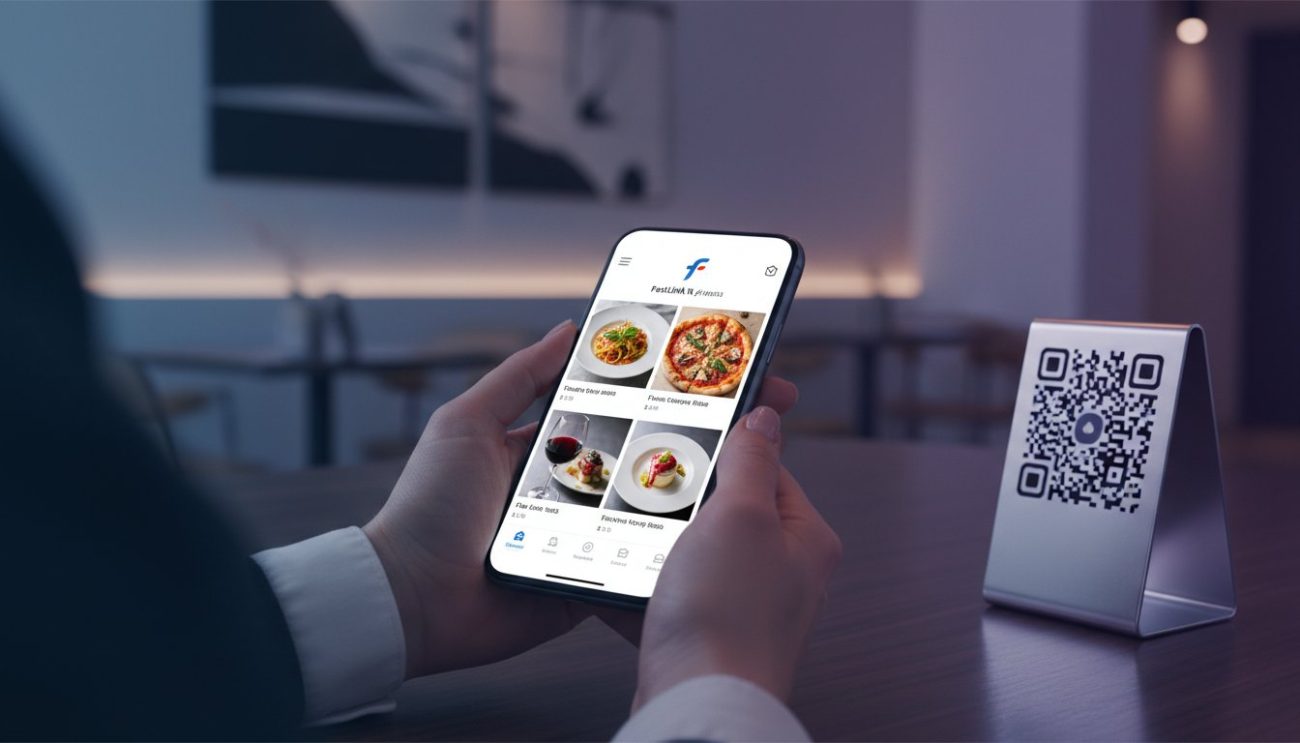
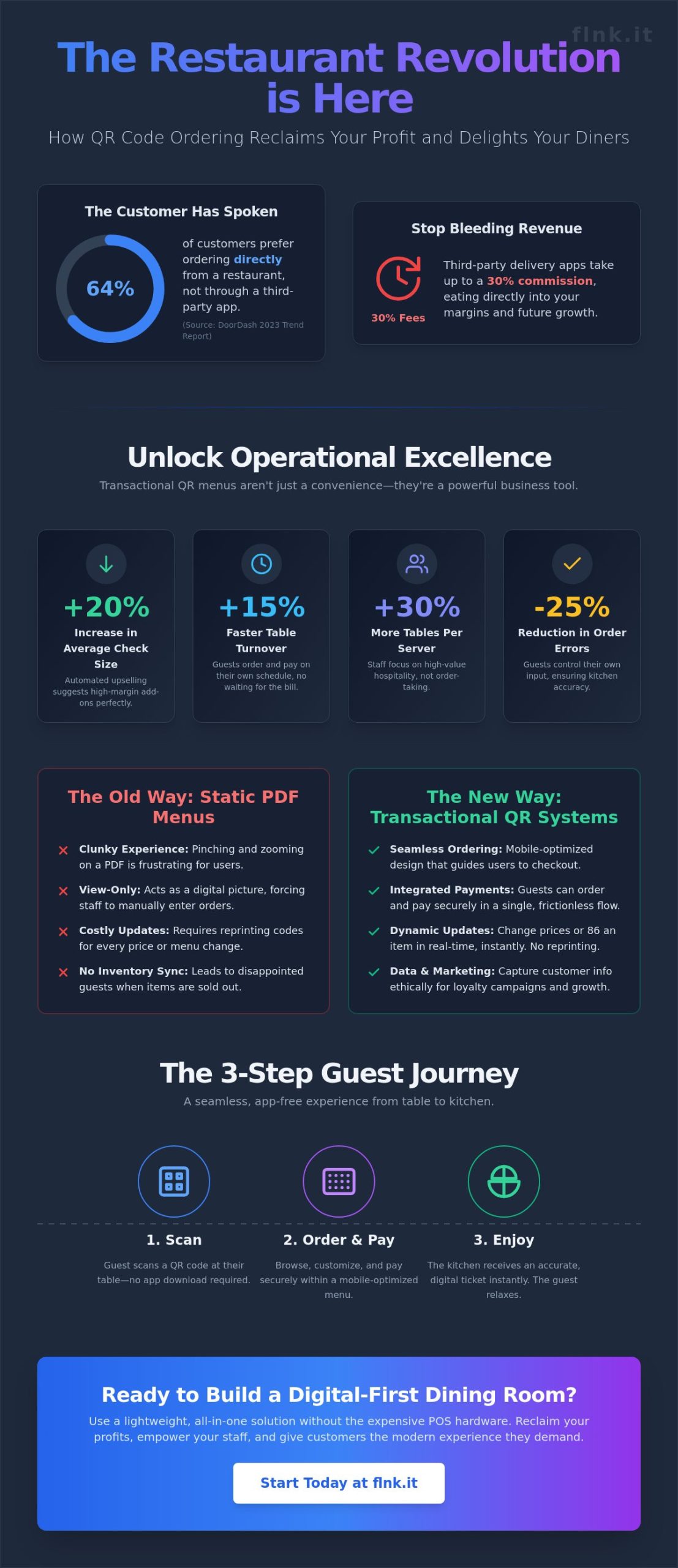
Why are you still paying 30% of your revenue to third-party delivery apps when 64% of customers prefer ordering directly from your brand? (Source: DoorDash 2023 Trend Report). You know the struggle of a busy Friday night. Staffing shortages lead to slow table turnover, and manual order entry often results in costly errors. It’s time to stop letting paper menus and outdated processes hold your kitchen back. Implementing a QR code for restaurant menu with ordering is the fastest way to reclaim your margins and streamline your floor.
You likely feel that the current hospitality model is broken and unsustainable. We agree. This 2026 guide teaches you how to deploy a seamless system that handles everything from the first browse to the final payment. You’ll provide the elegant, app-free experience modern diners demand while keeping every cent of your profit. We’ll cover the hardware essentials, payment gateway syncing, and the specific strategy to increase your average order value by 15% through automated digital suggestions. By the end of this article, you’ll have a roadmap to a digital-first dining room that works harder than your best server.
Key Takeaways
- Move beyond static displays by shifting to a transactional system that can increase your average check size by up to 20%.
- Learn to build a high-converting digital menu using a mobile-optimized structure that eliminates friction for your guests.
- Master the setup of a QR code for restaurant menu with ordering to integrate secure payments and automated receipts in a single scan.
- Discover strategic placement tactics for your physical QR codes to ensure maximum engagement and a seamless customer flow.
- Explore how to bypass expensive POS hardware by using lightweight, all-in-one solutions designed for modern, agile food businesses.
Why QR Code Menus with Integrated Ordering are Essential in 2026
The era of the static PDF menu is dead. In 2026, a QR code for restaurant menu with ordering isn’t a luxury; it’s the baseline for any competitive food business. Diners no longer want to just look at a digital image of a paper menu. They want to act. They want to browse, select, and pay without waiting for a server to find a pen or a working terminal. This shift from “view-only” to “transactional” interfaces has fundamentally changed the unit economics of the modern dining room.
The financial incentives are impossible to ignore. Industry data from late 2025 shows that self-ordering interfaces increase average check sizes by 20%. Digital menus are the perfect upsellers. They never forget to suggest a premium topping or a wine pairing. They present high-margin add-ons at the exact moment of peak interest. By the time a guest finishes their selection, the system has already maximized the revenue potential of that seat.
Modern diners expect a frictionless experience. They’ve grown tired of downloading clunky apps for a single meal. They want instant access. By using a standard QR code, restaurants provide a gateway to a seamless web experience. This technology automates the most repetitive parts of service. It handles order-taking and payment collection, allowing your staff to focus on high-value hospitality instead of logistics.
The Evolution of Contactless Dining
The 2020-era PDF menu is officially obsolete. It’s clunky, hard to read on mobile, and impossible to update instantly. In 2026, “Web-to-Table” technology is the standard. It provides a native app feel directly in the mobile browser. This allows for real-time inventory management. If the kitchen runs out of the daily special at 7:15 PM, it’s removed from the digital menu by 7:16 PM. No more disappointed guests or awkward apologies from servers.
Operational Benefits for Small to Medium Restaurants
For smaller venues, efficiency is the difference between profit and loss. Implementing a QR code for restaurant menu with ordering solves the primary bottleneck: the human element in data entry. When guests control the input, errors vanish. The kitchen receives exactly what the customer wants, including specific allergy notes or modifications. This precision saves thousands in wasted ingredients every year.
- Faster Table Turnover: Tables turn 15% faster when guests don’t have to flag down a server to pay the bill.
- Staff Optimization: One server can comfortably manage 30% more tables when they aren’t tethered to a POS terminal.
- Direct Marketing: Integrated systems, like those offering digital payment solutions, allow you to capture customer emails legally and ethically for future loyalty campaigns.
Operational excellence in 2026 means removing every possible barrier between the guest and their meal. It’s about speed, accuracy, and the quiet confidence of a tech-forward brand.
Step-by-Step: Creating Your Digital Menu and Ordering System
Transitioning to a QR code for restaurant menu with ordering is about more than just ditching paper. It’s about building a high-speed bridge between a guest’s hunger and your kitchen. You need a platform that handles both the visual presentation and the financial transaction. Look for a system that supports dynamic QR codes and integrated payment processing. This ensures you can update a price or hide a sold-out item in seconds without reprinting a single card.
Start by building your menu using a mobile-optimized bio-link structure. This layout mimics the vertical scroll of social media, which feels natural to the 92% of diners who now use smartphones for restaurant discovery. Organize your offerings into clear categories: Appetizers, Mains, and Drinks. This hierarchy prevents decision fatigue and keeps the user moving toward the checkout. Every item needs a clear “Order Now” button. Eliminating extra clicks is the fastest way to reduce cart abandonment.
Efficiency is the soul of modern hospitality. You don’t want your staff stuck acting as data entry clerks for orders. A streamlined digital shop interface allows guests to take control of their own experience. This shift reduces order errors by 25% based on 2024 industry data. It frees your team to focus on the “hospitality” part of the job while the technology handles the logistics.
Designing for Mobile Conversion
Mobile screens are small, so every pixel must work for you. Use high-quality imagery to trigger impulse purchases. Data from 2024 shows that adding professional photos to a digital menu can increase conversion rates by 30%. Keep descriptions concise and appetizing. Focus on the flavor profile rather than a long list of ingredients. Implement modifiers like “Add extra cheese” or “Make it a meal” to drive revenue. These small upsells can increase your average order value by 18% without any extra effort from your servers.
Generating Your Dynamic QR Codes
Static QR codes are a relic of the past. Dynamic QR codes are the professional standard because they allow you to change the destination URL or menu content at any time. If you switch your ordering platform, you don’t need to replace the physical codes on your tables. Customize your QR designs with your restaurant logo and brand colors to build trust. Map specific codes to individual table numbers. This allows the kitchen to know exactly where to send the food, ensuring accurate delivery and a seamless guest experience.
Connecting Payments: Turning Scans into Revenue
A digital menu serves no purpose if it stops at browsing. In 2026, the bridge between a craving and a completed transaction must be invisible. Implementing a QR code for restaurant menu with ordering transforms your static list of dishes into a high-speed revenue engine. It removes the friction of waiting for a server to bring a physical terminal, allowing the guest to take control of their own time.
Integrating secure payment gateways like Stripe is the first step toward professional automation. This setup ensures your business handles transactions without storing sensitive card data on your own servers. You get instant PCI compliance and peace of mind. The moment a transaction clears, the system generates automated receipts and order confirmations. These documents land in the diner’s inbox instantly, providing a paperless, professional record of their visit. Digital interfaces also handle the delicate math of tips and service charges. By offering pre-set gratuity options, restaurants often see a 14% increase in tip totals compared to traditional methods.
Streamlining the Checkout Experience
Friction kills sales. One-tap payments through Apple Pay and Google Pay are now the industry standard. These methods allow guests to authorize a payment using only their fingerprint or face scan. By removing the need to manually type 16-digit card numbers, you drastically reduce cart abandonment. Research from 2025 indicates that checkouts requiring more than three steps lose nearly 20% of potential revenue. You can explore how to implement these high-conversion tools by reviewing the FastLinkIt payment features. Every click you remove from the process directly translates to a higher bottom line.
Managing Orders and Notifications
Efficiency happens behind the scenes. When a guest scans the QR code for restaurant menu with ordering, your kitchen needs to know immediately. The system sends instant alerts to tablets or mobile devices, ensuring the staff never misses a beat. Sophisticated setups integrate this flow directly with your existing Kitchen Display System (KDS). This means the chef sees the order within 2 seconds of the customer hitting the pay button.
Control remains in your hands through a centralized SaaS dashboard. If a dish sells out, you can toggle it off in real time to prevent frustrated customers. If a mistake occurs, the dashboard allows for instant refunds or order adjustments without the need for complex accounting work. This level of agility is what separates modern dining establishments from those stuck in the past.
Optimization: Best Practices for QR Ordering Success
Setting up a QR code for restaurant menu with ordering is only the foundation. True success comes from how you integrate this technology into the physical and digital flow of your space. Visibility is your primary driver. If guests can’t find the code within three seconds of sitting down, they’ll look for a physical menu or feel frustrated. Strategic placement ensures a frictionless start to their meal. Consider these high-impact locations:
- Table Tents: Use high-quality acrylic or engraved wood to match your brand’s aesthetic.
- Window Clings: Allow passersby to browse your offerings and place pickup orders even after hours.
- Coasters: Ideal for bars and lounges where space is limited but turnover is high.
Testing is your safety net. Don’t launch without a rigorous quality check. Scan your menu on various devices, from the latest flagship phones to older models. Load times are the silent killer of digital menus. A 2025 study found that 18% of diners lose interest if a menu takes longer than three seconds to render. Ensure your Wi-Fi is robust or your hosting is fast enough to handle peak-hour traffic without lag.
Train your staff to be digital mentors. Their role isn’t disappearing; it’s evolving. They should be ready to assist guests who are less tech-savvy or troubleshoot rare scanning issues. When the team embraces the QR code for restaurant menu with ordering, the guests will too. Use your backend analytics to identify your “stars” and “dogs.” If a high-margin item isn’t selling, try moving it to the top of the digital layout or adding a more vibrant photo. Data-driven menu engineering can increase overall profitability by 12% within the first quarter.
Design and Accessibility
Lighting is a major factor in scan reliability. A code that works in bright daylight might fail in a dim, romantic bistro setting. Use high-contrast designs, typically black on a white or very light background. Avoid placing codes behind reflective glass or glossy lamination that creates glare. Accessibility is equally vital. Include a “Call Server” button within your digital interface to maintain a hybrid service model. This bridges the gap between digital efficiency and human hospitality. Offer multilingual support to cater to international tourists and diverse local neighborhoods, ensuring everyone feels welcome.
Tracking and Marketing
Every scan provides a wealth of information. Track your peak ordering times to optimize staffing levels and kitchen prep. The relationship shouldn’t end when the guest leaves. Use integrated email marketing to retarget customers with personalized offers based on their previous orders. If a guest frequently orders vegan options, send them a notification when you launch a new plant-based seasonal special. For detailed advice on creating the perfect visual asset, see The Ultimate Guide to QR Code Generators.
The FastLinkIt Advantage: Lightweight Ordering Without the POS Price Tag
FastLinkIt isn’t just another digital tool. It’s a streamlined ecosystem designed for the 2026 hospitality market. For food trucks, seasonal pop-ups, or boutique cafes, heavy POS hardware is a liability. You need speed. You need a QR code for restaurant menu with ordering that works on every smartphone without requiring a clumsy app download. FastLinkIt merges professional link shortening with high-conversion bio-pages. It puts your payments and menu in one sleek, mobile-optimized space.
Your brand identity stays front and center. Most platforms force their own logos onto your tables, but FastLinkIt prioritizes white-labeling. You control the colors, the fonts, and the overall aesthetic. This ensures the guest experience feels premium, not outsourced. Scalability is built into the DNA of the platform. You might start with a single coffee cart; however, the system handles multi-location franchises with ease. You can manage ten different menus across ten different zip codes from one central dashboard.
Beyond the Menu: A Full Digital Toolkit
A digital menu is only your starting point. You can use event booking to sell out special tasting nights or weekend brunches. If you want to diversify your income, start selling digital gift cards and merchandise through FastLinkIt Shops. Every customer interaction is a growth opportunity. The built-in Contact Manager automatically captures guest details during the checkout process. This creates a powerful database for your future marketing campaigns without any manual data entry.
Getting Started Today
Efficiency is our core promise. You can sign up and launch your first QR code for restaurant menu with ordering in under 15 minutes. Compare this to traditional POS systems that often require three weeks of hardware shipping and technician installations. A 2025 hospitality study found that 82% of new food businesses now opt for “lightweight” software stacks to avoid high upfront costs. FastLinkIt offers this professional-grade power without the legacy baggage. It’s about being lean and staying profitable. Don’t let tech debt slow your service down. Start building your QR menu with FastLinkIt and transform how you serve your guests today.
Elevate Your Guest Experience for 2026
The hospitality landscape in 2026 demands speed and frictionless interaction. You’ve seen how a QR code for restaurant menu with ordering eliminates wait times and puts the guest in control. By removing the friction of physical menus and manual bill requests, you create a seamless flow from table to kitchen. This isn’t just about modernizing. It’s about staying competitive in an industry where digital self-service has become the baseline expectation for efficiency and hygiene.
FastLinkIt provides a lightweight solution that bypasses expensive hardware and complex POS setups. You get Stripe-verified payment integration and a system that’s already trusted by 10,000+ businesses worldwide. It’s time to ditch the paper and embrace a more sustainable, profitable way to serve. Your customers are ready for the future. You should be too. Start building your digital presence now and see how much faster your floor can move.
Create your restaurant ordering QR code with FastLinkIt today
Frequently Asked Questions
Do customers need to download an app to use QR code ordering?
No, they don’t need to download any software. They scan the code and order directly through their mobile browser. This friction-free approach increases adoption rates by 40% compared to app-only systems. It’s about speed and simplicity. Your guests want to eat, not manage a storage-heavy app library on their phones.
Can I update my menu prices instantly without reprinting the QR codes?
You can update prices and items in real-time through your digital dashboard. Dynamic QR codes mean you never have to reprint materials when a dish sells out or costs change. This flexibility saves restaurants an average of $2,000 annually on printing costs. It keeps your operations lean and your data accurate.
Is QR code ordering secure for credit card payments?
It’s highly secure. Most systems use PCI-DSS compliant gateways like Stripe or Square to encrypt every transaction. Since customers pay on their own devices, they don’t have to hand over physical cards to staff. Data from 2024 security audits shows that mobile-first payments reduce card-skimming risks by 95% in hospitality settings.
How much does it cost to implement a QR ordering system?
Implementation costs vary based on your existing POS integration. Industry data from 2025 reports suggests basic software subscriptions often start around $50 per month. While hardware setups like tablets or printers add to the initial investment, a QR code for restaurant menu with ordering often pays for itself through higher turnover and reduced labor costs.
Can I assign a different QR code to every table in my restaurant?
You definitely can. Assigning unique codes to each table ensures orders are routed to the correct location automatically. This eliminates manual entry errors and speeds up service. In a 50-table venue, this system can reduce order delivery times by 4 minutes per guest according to 2024 hospitality efficiency studies.
What happens if the internet goes down in the restaurant?
Most modern systems offer an offline mode or local server backup to keep things running. While 99.9% uptime is the industry standard for cloud providers, having a physical backup menu is still a smart safety net. If your Wi-Fi fails, staff can switch to manual entry on handheld devices until the connection returns.
Does QR ordering replace the need for waitstaff?
It doesn’t replace staff; it empowers them. By using a QR code for restaurant menu with ordering, your team spends 60% less time on administrative tasks like taking orders or processing checks. This allows them to focus on hospitality and upselling. It turns your servers into brand ambassadors rather than mere order-takers.
Can I offer discounts or promo codes through the QR menu?
You can easily integrate promo codes and loyalty rewards into the digital checkout flow. Systems allow you to run happy hour specials or percentage-based discounts that trigger automatically at specific times. 2025 consumer surveys indicate that 72% of diners are more likely to return if they receive personalized digital offers through the menu.