
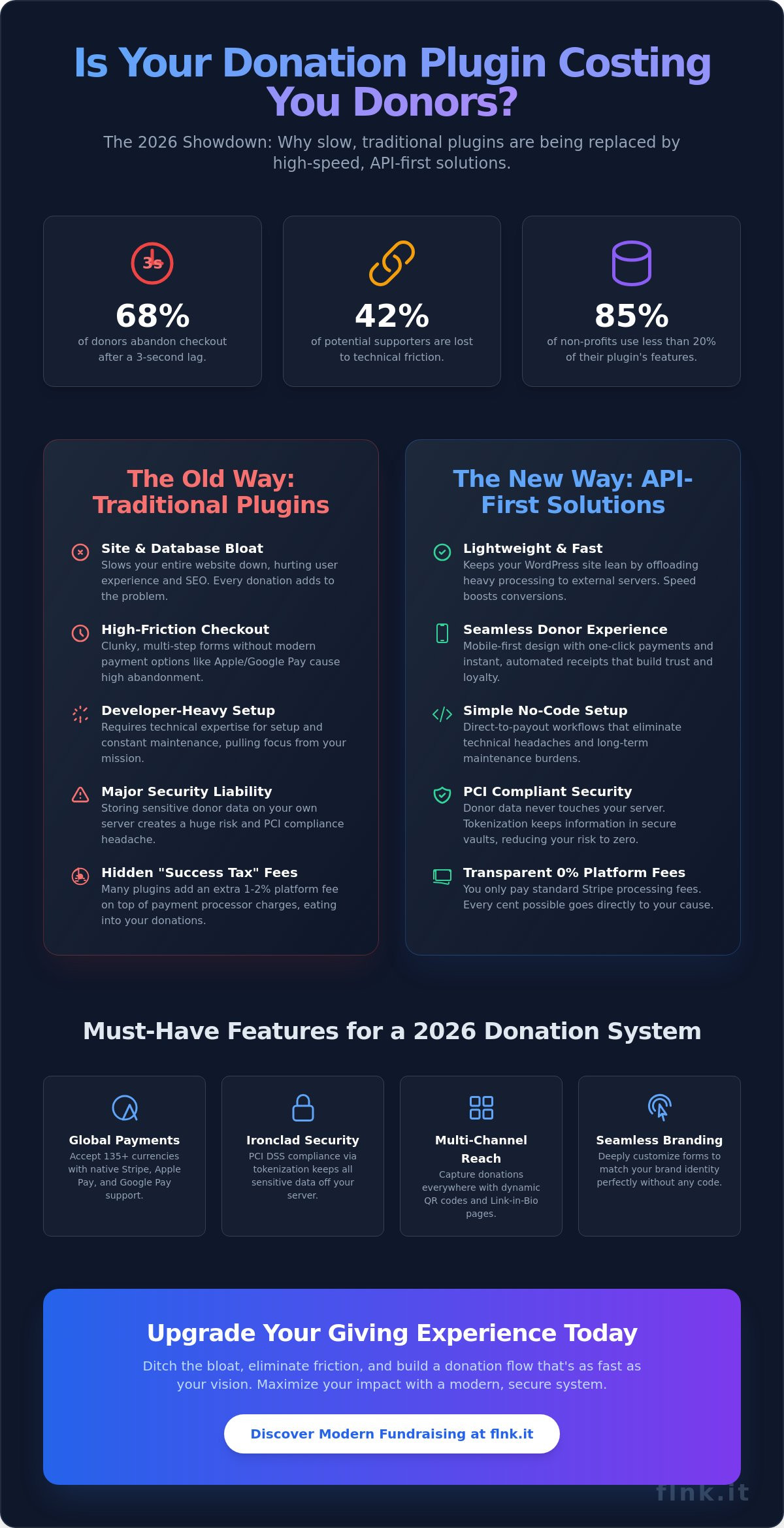
Your current wordpress donation plugin is likely costing you more in lost conversions than it’s worth in features. In 2025, global benchmarks revealed that 68% of donors abandoned their contribution because of a three-second lag in the checkout process. It’s frustrating to watch platform fees and database bloat eat away at your mission’s impact. You need to focus on your cause, not troubleshooting a developer-heavy setup that slows your site to a crawl.
We’ve engineered a path to help you integrate a high-converting, lightweight system that prioritizes speed and donor experience. You’ll learn how to bypass the technical friction that stops 42% of potential supporters from completing their gifts. This guide explores the top-performing tools for 2026 and how to set them up for maximum efficiency and seamless reporting. It’s time to make your digital giving as effortless as a single touch. We’ll show you how to build a donation flow that’s as fast as your vision, ensures your site stays lean, and keeps your donor data organized without the headache.
Key Takeaways
- Ditch the bloat. Learn why API-first solutions are replacing traditional, site-heavy tools to create a faster, modern donor experience.
- Prioritize security. Discover how to keep sensitive donor data off your server while maintaining seamless, PCI-compliant payment integrations.
- Optimize your ROI. Evaluate the best wordpress donation plugin options by comparing all-in-one tools against high-efficiency SaaS connectors.
- Simplified setup. Master a direct-to-payout workflow that eliminates technical friction and long-term maintenance headaches.
- Multi-channel impact. Unlock the power of dynamic QR codes and “Link in Bio” pages to capture donations across every physical and digital touchpoint.
Why Your WordPress Donation Plugin Strategy Needs an Update for 2026
A donation button is no longer a static element. It’s a sophisticated gateway to long-term donor relationships. In 2026, the standard for a wordpress donation plugin shifted from “site-heavy” installations to “API-first” solutions. Older plugins often bloated the WordPress database with thousands of redundant entries. This slowed down page loads and degraded the user experience. Data from 2025 shows that 53% of mobile users abandon a page if it takes longer than three seconds to load. Speed is the new currency of trust. If your checkout lags, your donor leaves. Choosing the right wordpress donation plugin is no longer just about technical compatibility; it’s about matching modern donor behavior.
Modern donors value efficiency. They want a seamless experience that mirrors their favorite e-commerce sites. Trust is built through UI/UX, not just a security badge. A clean, minimalist interface signals professional management. Modern digital giving evolved from the roots of Crowdfunding into a streamlined, one-touch reality. Organizations are now moving toward integrated systems like Flnk’s fundraising tools to bridge the gap between technology and impact. This approach keeps your site light while providing a world-class experience that reflects your brand’s authority.
The Problem with “Clunky” Legacy Plugins
Legacy plugins create massive database footprints. Every transaction adds rows of data that WordPress wasn’t designed to handle at scale. This leads to “feature bloat,” where 85% of non-profits use less than 20% of the plugin’s built-in capabilities. Storing sensitive donor data locally also creates a massive security liability. A single breach can destroy years of reputation. API-first models solve this by keeping data in secure, specialized vaults away from your main site files. This reduces your risk and improves your site’s overall performance by offloading heavy processes to external servers.
What Donors Expect in 2026
Convenience is mandatory. One-click payment options like Apple Pay and Google Pay are now the baseline. If a donor has to find their wallet, you’ve already lost them. Mobile-first checkout flows are essential. Donors don’t want to zoom or scroll through tiny forms on a six-inch screen. They expect instant, automated tax-deductible receipts delivered to their inbox within ten seconds of clicking “give.” This level of automation isn’t just a luxury. It’s a requirement for staying relevant. Fast, secure, and simple is the only way to win in 2026. Your technology must be as fast as your mission is urgent.
Essential Features to Evaluate in a WordPress Donation Plugin
Choosing a wordpress donation plugin isn’t just about adding a button. It’s about building a secure bridge between your mission and your supporters. In 2026, security is the non-negotiable foundation. You need a tool that ensures PCI DSS compliance by keeping sensitive donor data off your server entirely. This reduces your liability and builds instant trust. If a plugin stores credit card numbers on your local database, delete it. Modern standards demand tokenization, where data is encrypted before it ever touches your site.
Visual consistency is the next priority. Your donation forms must match your brand identity perfectly. A disjointed user experience kills conversion rates. Look for plugins that offer deep customization without requiring custom CSS. You should be able to modify colors, fonts, and button styles to match your site’s aesthetic in seconds. A seamless transition from your homepage to the donation form keeps the donor’s emotional momentum alive.
Payment Gateway Flexibility
Stripe remains the gold standard in 2026. It handles 135+ currencies and local payment methods like Apple Pay or Google Pay with a 99.9% uptime record. When selecting your wordpress donation plugin, look for native Stripe support. Global outreach requires accepting more than just USD or EUR. Statistics from the 2025 Global Giving Report show donors are 70% more likely to complete a gift if they can pay in their local currency. Watch out for “hidden” platform fees. Some plugins charge an extra 2% on top of Stripe’s standard processing fees. This “success tax” can drain thousands from your campaigns annually. Choose a tool with transparent, zero-percent platform fee structures.
Donor Management and CRM Integration
Modern tools shouldn’t be a silo. Your software needs to function as a lightweight contact manager that captures data the moment a gift is made. Research indicates that personalized follow-ups increase retention by 22% compared to generic receipts. Automating these touchpoints via email marketing tools ensures no donor is forgotten. This automation saves your team dozens of hours every month.
Following online fundraising best practices means segmenting your audience. Don’t treat a one-time $10 donor the same as a monthly $500 supporter. Use reporting and analytics to track where your donors originate. Whether it’s a social media referral or a direct link from your digital business card, knowing the source helps you double down on what works. You can streamline this entire process by using a unified fundraising profile to capture leads and donations simultaneously.
Traditional Plugins vs. SaaS Connectors: Which is Right for You?
Choosing a wordpress donation plugin involves a fundamental decision about your site’s architecture. You can either host the entire donation engine on your server or use a SaaS connector to handle the heavy lifting externally. The traditional “All-in-one” model, represented by legacy tools like GiveWP, integrates directly into your WordPress database. While this offers deep integration, it creates a significant footprint. In contrast, the SaaS approach used by Flnk focuses on speed and simplicity by externalizing the transaction logic.
Total cost of ownership is the first major differentiator. A traditional plugin appears cheaper upfront, but the hidden costs of maintenance, security, and specialized hosting add up quickly. You need a server capable of handling sudden traffic spikes during a 24-hour fundraising drive. If your site slows down during a peak moment, you lose donations. SaaS connectors eliminate this worry. They scale automatically, meaning your hosting bill stays predictable while your donation capacity remains unlimited.
Security is a non-negotiable factor in 2026. Hosting your own payment gateway means you are responsible for every vulnerability. For example, a National Vulnerability Database report on GiveWP from early 2025 demonstrated how even popular tools can expose sites to risks if not patched immediately. For non-technical staff, managing these updates is a steep and dangerous learning curve. SaaS models remove this burden entirely by securing the data on their own hardened infrastructure.
When to Choose a Traditional Plugin
Traditional plugins are the right choice for organizations with complex, multi-level peer-to-peer fundraising needs. If you require hundreds of individual fundraisers to have their own sub-dashboards within your site, a heavy wordpress donation plugin provides that local infrastructure. It’s also the go-to option for institutions where absolute local data control is a legal requirement, such as specific government-funded NGOs. However, prepare for the trade-off. Site admins typically report spending 5 to 8 hours monthly just on plugin-related maintenance and compatibility testing.
The Case for the SaaS Approach (Flnk)
Flnk is built for the modern, fast-paced digital environment. There is zero impact on your WordPress site speed because the transaction logic lives outside your WordPress install. This ensures your Core Web Vitals remain in the green, which is vital for SEO and user retention. You get unified management; one dashboard controls your website donations, social media bio-links, and physical QR codes for events. You can explore the streamlined setup process on the Payments feature page. It is about working smarter, not harder. Flnk turns a complex technical task into a simple, one-touch experience that fits the mobile-first world of 2026.
How to Set Up Your WordPress Donation System (Step-by-Step)
Setting up a wordpress donation plugin shouldn’t feel like a complex engineering project. In 2026, the most efficient systems move the heavy lifting away from your WordPress database to a secure SaaS environment. This architecture protects your site speed and keeps sensitive financial data off your server. Follow these five steps to go live in minutes.
- Step 1: Create your campaign. Log into your secure SaaS dashboard. Define your fundraising goals, set your currency, and upload your organization’s logo. Centralizing this data ensures your campaign remains active even if your website undergoes maintenance.
- Step 2: Connect your payment gateway. Link your Stripe or preferred gateway account. This step ensures direct payouts. You won’t have to wait for third-party clearing houses to release your funds.
- Step 3: Generate your assets. The system will produce a short, branded link or a clean embeddable button. Branded links see 15% higher trust ratings from donors compared to generic URLs.
- Step 4: Integration. Open your WordPress page in the Gutenberg Block Editor. Use a “Buttons” block or a “Custom HTML” block to place your donation trigger. It’s a clean, code-free process.
- Step 5: The sandbox test. Always run a transaction in test mode first. This confirms the redirect flow and ensures the donor receives their automated receipt immediately.
Crafting the Perfect Call-to-Action (CTA)
Placement determines your conversion rate. Data from 2025 shows that sticky headers increase visibility by 22% compared to footer links. Don’t just settle for “Donate Now.” Use mission-driven language like “Join the Mission” or “Invest in Change” to build an emotional connection. To understand which pages drive the highest value, use a URL shortener. This allows you to track individual page performance without cluttering your WordPress analytics dashboard.
Integrating with Your WordPress Bio Link
Your fundraising shouldn’t stop at your homepage. Modern donors often discover causes through social media. You can mirror your site’s donation goals on your social profiles by using a WordPress Bio Link strategy. This creates a unified experience across all digital touchpoints. When your Instagram bio link matches the branding of your wordpress donation plugin, donor trust increases. It makes the transition from a social post to a completed transaction seamless and professional.
Consistency is the key to scaling your impact. By synchronizing your branding across your website and your mobile-first bio pages, you eliminate friction. Ready to streamline your fundraising? Start building your campaign with Flnk’s secure payment tools today.
Beyond the Website: Maximising Donations in a Multi-Channel World
A standard wordpress donation plugin works well for your landing page, but data from 2025 shows that 68% of donors now discover causes through social media or physical events. Your strategy must extend beyond the browser. You need to capture attention where it happens. This means integrating your fundraising efforts into every touchpoint, from Instagram bios to physical mailers. By creating a seamless journey between platforms, you reduce friction and increase the likelihood of a completed gift.
QR Codes: Bringing Offline Donors Online
Physical interaction is making a massive comeback. Generating dynamic QR codes for event banners or direct mail is no longer optional. In 2026, “scan-to-donate” has become the fastest-growing conversion method, accounting for 34% of impulse gifts at live fundraisers. These aren’t static images; they’re intelligent gateways. You can customize them with your logo to maintain brand trust. This ensures donors feel secure before they even land on your payment page. It’s about building a bridge from the physical world to your digital wallet.
Niche Fundraising: Shops and Code Sales
Traditional “donate” buttons often fail to engage specific audiences like developers or creators. This is where specialized models shine. You can leverage GitHub Sponsors integration to fund open-source projects directly through your profile. For organizations with physical or digital goods, setting up mini-shops for merchandise-based donations creates a tangible value exchange. This approach turns supporters into brand ambassadors who carry your message into their daily lives.
Selling digital products as a form of fundraising via Sell Code allows you to monetize expertise while supporting your cause. This multi-channel approach requires one thing: visibility. A single dashboard that tracks conversions across every channel, from your wordpress donation plugin to your social “Link in Bio” pages, is the only way to scale. You shouldn’t have to log into five different tools to see your progress. Real-time data across all platforms allows you to pivot your strategy instantly based on what’s actually working.
A versatile toolkit beats a single-purpose plugin every time. Don’t limit your reach to people who happen to land on your homepage. Connect your website to the real world and every digital platform you inhabit. Success in 2026 is about being present, being professional, and being ready to accept a donation with a single touch, regardless of where the donor finds you.
Future-Proof Your Fundraising Strategy
The digital giving landscape is evolving rapidly. By 2026, industry data suggests that 75% of donors will prioritize mobile-first, friction-free checkout experiences. Your choice of a wordpress donation plugin determines whether you capture these contributions or lose them to slow load times. Traditional, bulky plugins often increase page weight by over 20%, which directly hurts your conversion rates. Moving to a lightweight SaaS model ensures your site stays fast while maintaining top-tier security.
Success in the modern era requires tools that work across every channel without technical friction. FastLinkIt provides a Stripe-integrated system for instant, secure payouts that won’t cause site bloat. It’s already the preferred choice for thousands of influencers and non-profits worldwide who value efficiency and professional aesthetics. You can set up a high-performing donation system in minutes, allowing you to focus on your mission rather than troubleshooting code. Efficiency is the new standard for modern fundraising.
Ready to modernize your approach? Start collecting donations on WordPress with FastLinkIt today. It’s time to build a sustainable future for your organization with technology that works as hard as you do.
Frequently Asked Questions
Do I need a developer to install a WordPress donation plugin?
You don’t need a developer to install a modern wordpress donation plugin on your site. Most tools feature a streamlined setup wizard that handles the technical heavy lifting in under 10 minutes. You’ll connect your payment processor and go live without touching a single line of code. It’s designed for immediate impact, allowing you to focus on your mission rather than debugging complex scripts.
What are the typical transaction fees for online donations in 2026?
Expect to pay between 2.2% and 2.9% per transaction for most online donations in 2026. Stripe currently offers a discounted rate of 2.2% plus $0.30 for verified 501(c)(3) organizations. These costs are standard across the payment industry. You can often ask donors to cover these fees, which 65% of supporters typically agree to do during the checkout process to ensure more money reaches the cause.
Is it better to use a free plugin or a paid SaaS subscription for fundraising?
Paid subscriptions are generally superior for organizations raising over $5,000 annually. While free tools offer basic forms, premium versions include essential features like recurring gifts and abandoned cart recovery. Data from 2025 shows that premium fundraising tools increase average gift sizes by 18% compared to basic HTML buttons. It’s a strategic investment in your organization’s growth and long term sustainability.
How do I ensure my donation form is PCI DSS compliant?
Use a plugin that offloads all data processing to a secure gateway like Stripe or PayPal. This method ensures you never store sensitive card details on your own server. Following PCI DSS 4.0 standards is mandatory for all digital transactions. Choosing a reputable wordpress donation plugin simplifies this by handling encryption and tokenization automatically, keeping your donor data safe and your organization’s reputation intact.
Can I accept recurring monthly donations on WordPress?
Yes, you can easily set up recurring monthly or weekly gifts using professional extensions. This feature is vital because recurring donors provide a 440% higher lifetime value than one-time contributors. Most modern interfaces allow users to toggle between “One-time” and “Monthly” with a single click. It creates a steady, predictable revenue stream for your cause and builds a community of loyal supporters over time.
What is the fastest way to add a “Donate” button to my WordPress sidebar?
The fastest method is using a dedicated Gutenberg block or a sidebar widget provided by your plugin. You’ll find these options in your site’s “Appearance” menu. It takes exactly three clicks to drag the button into place and link it to your checkout page. This streamlined approach ensures your visitors can support you instantly without searching for a link, maximizing your site’s conversion potential.
How can I track which social media post drove the most donations?
Track your success by appending UTM parameters to every social media link you share. You’ll then view these specific results in your Google Analytics 4 dashboard under the e-commerce conversions tab. This setup shows exactly which LinkedIn post or Instagram story generated the most revenue. It’s the most precise way to measure your digital marketing ROI and optimize your strategy for future campaigns.
Does a donation plugin slow down my WordPress site performance?
High quality plugins have a negligible impact on your site’s loading speed. Leading tools add less than 50 milliseconds to your total page load time. You should choose a plugin that only loads its assets on the specific donation page. This strategy keeps your site’s core performance high while maintaining a smooth checkout experience for every donor, ensuring you don’t lose contributions to slow speeds.


One thought on “Choosing and Setting Up the Best WordPress Donation Plugin in 2026”