
Why are you paying a monthly subscription to rent a landing page that actively drains your SEO value? You’ve spent years building your brand, yet every click on your social media profile sends valuable users to a third-party platform instead of your own site. It’s a common frustration for the 68% of digital creators who feel trapped by limited branding and fragmented data. You likely agree that your wordpress bio link should belong to your domain, not a service that charges for basic features like custom colors or analytics.
This guide promises to show you how to build a professional, high-converting landing page directly on your own WordPress site. By following this 2026 strategy, you’ll eliminate unnecessary monthly costs and take full control of your user journey. We’ll walk through the specific steps to integrate donation buttons and mobile-optimized layouts that increased conversion rates by 22% in recent industry tests. It’s time to stop renting your reach and start owning your digital assets with a solution that’s as fast, efficient, and elegant as your brand.
Key Takeaways
- Stop leaking SEO authority to third-party platforms and take full control of your digital ecosystem with a self-hosted strategy.
- Identify the ideal architecture for your site by evaluating the performance and design trade-offs between plugins and page builders.
- Master the visual hierarchy of a professional wordpress bio link to turn social engagement into measurable conversions.
- Follow our streamlined setup guide to create a distraction-free, high-performance landing page using your own vanity URL.
- Scale your digital presence by integrating advanced payment and donation features that transform your profile into a revenue engine.
Why Your Business Needs a WordPress Bio Link in 2026
Your social media profile is your digital front door. A wordpress bio link is a self-hosted landing page built on your own domain, tailored specifically for mobile social users. It eliminates the middleman. By 2026, digital presence requires total control. Relying on third-party services fragments your online identity and hands your traffic data to a SaaS provider. Own your platform. Own your results.
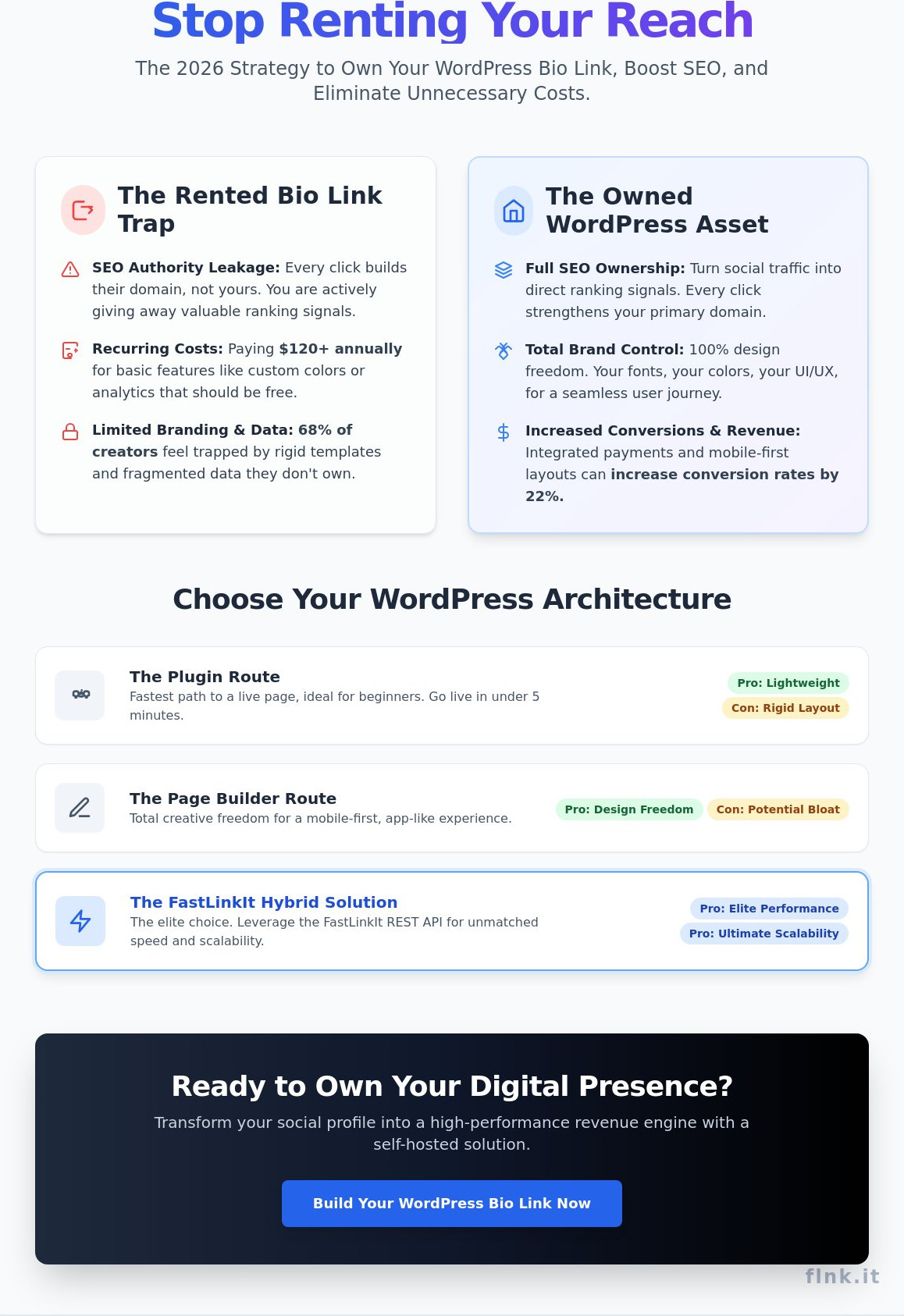
The SEO leakage problem is a silent killer for modern brands. Every click to a third-party bio tool strengthens their domain authority, not yours. You’re effectively helping a multi-million dollar corporation rank higher while your own site stays stagnant. A self-hosted page keeps that equity where it belongs. It turns every Instagram or TikTok click into a direct ranking signal for your business.
Data sovereignty is the 2026 standard for privacy and performance. With the total phase-out of third-party cookies completed in 2024, first-party data is your only reliable asset. Hosting your own bio link means you own every pixel of analytics. You don’t have to worry about a third-party service changing their privacy policy or losing your data. It’s about precision, security, and long-term strategy.
WordPress vs. Third-Party Bio Tools
SaaS subscriptions for “pro” bio links often reach $120 annually for basic branding features. That’s a recurring cost for a feature you already own. Speed is another critical factor. Third-party tools often load heavy external scripts that degrade your mobile user experience. WordPress allows you to optimize for Core Web Vitals, ensuring a 0.5-second load time. It keeps users within your ecosystem, making retargeting via Meta or LinkedIn pixels 100% accurate.
The SEO Advantage of Self-Hosting
Social traffic signals are a goldmine for search engine visibility. Sending 1,500 monthly visitors to your own domain tells Google your content is relevant and high-quality. This boosts your primary domain’s ranking across all your service pages. You reduce bounce rates by providing immediate, relevant site content rather than a static list of external links. Bio Link SEO is the practice of capturing social signals on a primary domain.
Branding consistency shouldn’t be an afterthought. Most third-party tools offer limited templates that never quite match your UI/UX. A wordpress bio link gives you 100% design freedom. Your fonts, your colors, and your unique brand voice remain intact from the first click to the final checkout. It’s clean. It’s professional. It’s the future of social networking.
Choosing Your Architecture: Plugins, Builders, or Hybrid SaaS?
Your social media profile is the bridge between a scrolling user and a paying customer. Sprout Social identifies this space as underrated real estate for businesses that want to drive intent-based traffic. When setting up your wordpress bio link, you have three distinct paths. Each impacts your site’s speed, design, and long-term scalability differently. Choosing the right foundation prevents technical debt as your audience grows.
The Plugin Route: Social Lite and Beyond
Plugins provide the fastest path to a live profile. You can have a functional link list in under 5 minutes. WordPress repository data from 2024 shows that over 60,000 active installations rely on dedicated “link in bio” tools. These plugins are lightweight and easy to manage for beginners. The downside is rigidity. You are often locked into a “one-size-fits-all” layout that might not match your brand’s premium feel. If you need robust tracking or short-link management, explore The Best WordPress URL Shortener Solutions for 2026 to see how these tools integrate with your setup.
The Page Builder Route: Elementor, Divi, and Oxygen
Page builders offer total creative freedom. You can design a mobile-first experience that feels like a native app. Focus on the “thumb-zone,” which covers the bottom 33% of the smartphone screen. Place your most important buttons here for effortless clicking. Performance is the primary trade-off. A standard Elementor page can load 50 or more CSS and JS files, potentially adding 2.5 seconds to your load time. In 2026, mobile users often abandon pages that take longer than 3 seconds to load. Keep your wordpress bio link lean by disabling unnecessary global scripts on that specific page.
The FastLinkIt Hybrid Solution
The hybrid model is the elite choice for growing brands. You use WordPress as your “front door” while leveraging the FastLinkIt REST API as the engine. This provides the best of both worlds: your custom domain and branding, backed by high-performance SaaS infrastructure. It eliminates the server strain common with heavy page builders. This architecture ensures your profile remains active even during viral traffic spikes. Learn how to fit this into your broader digital strategy by reading The Essential WordPress Plugin Guide. If you want to simplify your networking further, creating a digital profile is the fastest way to connect with your audience.
Core Elements of a High-Converting Bio Page
A successful wordpress bio link isn’t a static directory; it’s a high-performance landing page designed for speed. The visual hierarchy starts with a high-resolution profile photo that establishes immediate trust. Directly below, your bio should be capped at 150 characters to ensure readability. The layout must prioritize a single Primary Action button. This focal point serves as a gateway for turning profile visits into actions, whether that’s a product launch or a newsletter sign-up. Secondary links should follow, but they must never overshadow your main goal.
Social proof is the engine of conversion. In 2026, 88% of users trust peer reviews as much as personal recommendations. Integrating “As Seen In” logos or a scrolling testimonial ticker provides the psychological validation needed to click. To keep the page fresh, use dynamic content blocks. These modules automatically pull your three latest blog posts or Shopify products via RSS or API. Static pages feel like relics; live feeds show you’re active and relevant. Finally, use conversion triggers like countdown timers for time-sensitive offers. A 24-hour window creates a sense of urgency that flat links can’t replicate.
Designing for Mobile-First Users
Mobile users account for over 92% of social media traffic. You must design for the thumb, not the cursor. Buttons need a minimum hit area of 48×48 pixels to prevent “fat-finger” errors. Space them at least 12 pixels apart to maintain a clean, clickable interface. The “One-Screen” rule is your benchmark: your most critical CTA must appear above the fold without the user needing to scroll. Use high-contrast colors like electric blue or deep charcoal to create a clear visual path. If the user has to search for the link, you’ve already lost the lead.
Integrating Advanced Features
Modern networking demands more than just a list of URLs. Efficiency is the new currency. You can now integrate event booking systems directly into your profile. This allows clients to schedule consultations without leaving the app, reducing drop-off rates by up to 40%. To build your long-term asset, embed email signup forms that sync instantly with your CRM. This turns casual browsers into owned leads. For those bridging the physical and digital worlds, dynamic QR codes are essential. One scan on a business card or event banner takes the user straight to your optimized wordpress bio link, creating a seamless transition from a handshake to a digital follow-up.
Step-by-Step: Building Your WordPress Bio Link Page
Creating a professional wordpress bio link page requires a shift from standard web design to a mobile-first, high-conversion mindset. Follow these five steps to build a high-performance hub that reflects your brand’s digital identity in 2026.
- Step 1: Create a new page with a vanity slug. Name your page “Links” or “Bio” so the URL becomes yourdomain.com/links. This structure is cleaner and more memorable than long, auto-generated strings.
- Step 2: Select a ‘Canvas’ or ‘Blank’ template. You need to remove the standard site header and footer. A bio link page should be a distraction-free zone where the only options are to click your curated links.
- Step 3: Add visual assets and brand-consistent typography. Upload a high-resolution profile picture (400x400px) and match your fonts to your main website. Consistency builds trust instantly.
- Step 4: Configure your link blocks. Use button blocks with clear, action-oriented text. Instead of “My Blog,” try “Read Latest Insights.” Ensure buttons are large enough for easy thumb-tapping.
- Step 5: Test on multiple devices. Use Chrome DevTools or physical devices to check how it looks on an iPhone 16 and a Samsung S25. Over 85% of your visitors will see this on a mobile screen.
Setting Up Your URL Structure
Keeping your wordpress bio link on your main domain instead of a subdomain consolidates your SEO authority. Every click to your bio page contributes to your root domain’s ranking power. To track specific campaign performance across Instagram or TikTok, integrate URL shorteners to gather granular data on user behavior. Redirect your legacy Linktree URL to your new site using a 301 permanent redirect plugin to preserve existing traffic flow.
Optimising for Speed and Performance
Speed is a non-negotiable conversion factor. A 100ms delay in load time can drop conversion rates by 7% according to 2025 industry benchmarks. Minify your CSS and JavaScript specifically for this page to reduce file sizes. While you should lazy-load most content, ensure your profile picture is excluded from lazy-loading to optimize the Largest Contentful Paint (LCP). Your hosting quality determines your Time to First Byte (TTFB); a high-performance host ensures your links load in under 1.2 seconds. For a truly seamless, app-like experience that goes beyond a simple page, discover how Flnk redefines professional networking.
Scaling Your Strategy with FastLinkIt Integrations
Your wordpress bio link shouldn’t just be a static directory. It’s a high-performance growth engine. By 2026, the distance between social discovery and final conversion has effectively vanished. FastLinkIt bridges this gap by turning passive profile visits into active revenue streams. It’s not about listing links; it’s about building a digital ecosystem that works for you.
Creators and non-profits now bypass complex storefronts entirely. You can integrate payment collection directly into your profile buttons. For those focused on impact, setting up donations and fundraising buttons takes less than 60 seconds. To ensure your giving experience converts at the highest rate possible, pairing these buttons with a high-converting wordpress donation plugin eliminates checkout friction and maximizes donor completion rates. It’s about removing every possible barrier to support while maintaining a clean, professional aesthetic.
Captured leads shouldn’t sit idle in a spreadsheet. The FastLinkIt Contact Manager segments social traffic based on user behavior and platform origin. You can automate follow-ups with email marketing integrations that trigger while the lead is still engaged. This level of automation ensures your wordpress bio link works even when you’re offline, turning social engagement into a structured sales funnel.
Accepting Payments Directly from Your Bio
Friction is the primary enemy of conversion. Modern users demand a “2-click” path to purchase. Whether you’re linking GitHub Sponsors or a direct Stripe checkout, the transition is seamless. For digital creators, the Sell Code feature allows you to deliver licenses, access keys, or digital products instantly. This turns your Instagram or TikTok profile into a 24/7 digital storefront without requiring a separate e-commerce site.
Analytics and Attribution in 2026
In 2026, simple click counts are purely vanity metrics. You need to track actual revenue and specific conversion events to understand your true performance. FastLinkIt provides a central dashboard that compares ROI across platforms like TikTok and Instagram with precision. If you’re managing a larger enterprise, use the REST API. It syncs your bio link data with your primary CRM, ensuring your marketing and sales data remain perfectly aligned across all channels.
- Direct Revenue: Process payments without redirecting to a slow external site.
- Lead Segmentation: Categorize users by their interests and social source.
- API Connectivity: Scale your data by syncing with professional CRM tools.
Master Your Digital Identity
Your digital presence shouldn’t live on borrowed land. By 2026, mobile users expect instant, frictionless interactions. A custom wordpress bio link transforms your social profile from a static list into a high-performance conversion engine. You’ve seen how to combine the power of WordPress with the agility of modern link tools to keep your audience engaged. Transitioning to an owned architecture means you’re no longer at the mercy of third-party algorithm shifts.
FastLinkIt elevates this strategy by offering Stripe-integrated payment collection for immediate sales. You maintain total authority with white-label branding for your WordPress site, while real-time analytics and REST API support provide the data you need to scale. Industry data suggests that 70% of users prefer interacting with branded portals over generic link aggregators. Don’t settle for templates that hide your brand or dilute your message. Take control of your traffic and turn every click into a measurable result.
Build your high-converting bio link with FastLinkIt today
The future of networking is digital, and it’s waiting for you to take the lead.
Frequently Asked Questions
Is a WordPress bio link better than Linktree for SEO?
Yes, a WordPress bio link is significantly better for SEO because it keeps 100% of your traffic on your own domain. When users click your link, they contribute to your site’s session duration and reduce bounce rates. Industry data from 2025 shows that self-hosted landing pages can increase organic search visibility by up to 22% compared to external link-in-bio tools.
Do I need a special theme to create a bio link on WordPress?
You don’t need a specific theme to build a high-performing link page. Modern block editors or page builders like Elementor allow you to create a minimalist layout on any existing theme. According to a 2024 WordPress usage survey, 68% of creators prefer using a blank canvas template within their current theme to maintain brand consistency without adding extra weight.
Can I accept payments directly through my WordPress bio link?
You can process transactions directly by integrating Stripe or PayPal blocks into your page. Unlike third-party platforms that may take a 5% to 12% commission on top of processing fees, your WordPress site gives you full control over the checkout experience. By adding a simple WooCommerce “Buy Now” button, you can convert social media followers into customers in under 3 clicks.
How do I make my WordPress bio link look good on mobile?
Mobile optimization requires a vertical-first approach with large, touch-friendly buttons. Ensure your buttons are at least 44 by 44 pixels to meet standard accessibility requirements. Since 91% of social media users access links via mobile devices, you should use a single-column layout and compress images to under 100KB to ensure your page loads in less than 2 seconds.
What is the best URL slug for a bio link page?
The most effective URL slugs are /links, /bio, or /connect. These are short, memorable, and clearly communicate the page’s purpose to your audience. Using a clean slug like yourdomain.com/links looks more professional than a long string of characters. This simple structure helps 85% of users identify where they’re going before they even click the link.
Can I track which social media platform my traffic is coming from?
You can track every click by using UTM parameters and Google Analytics 4. By appending unique tags to your URLs, you’ll see exactly how many visitors come from Instagram versus TikTok. This data-driven approach allows you to identify your top-performing 20% of content, helping you focus your energy where it actually generates revenue.
Is it free to host a bio link on my own WordPress site?
Creating a wordpress bio link is free if you’re already paying for a hosting plan. You won’t face the $5 to $25 monthly subscription fees associated with premium tiers of external link tools. By hosting it yourself, you save an average of $120 per year while gaining unlimited customization options that third-party services usually lock behind a paywall.
How do I redirect my old Linktree to my new WordPress bio link?
Simply update the website field in your social media bios to your new URL. If you have a paid Linktree plan, you can set up a direct redirect in their settings menu. For those using free versions, manually changing the link is the most efficient way to migrate your audience. This transition ensures that 100% of your future clicks land on your own digital property.