

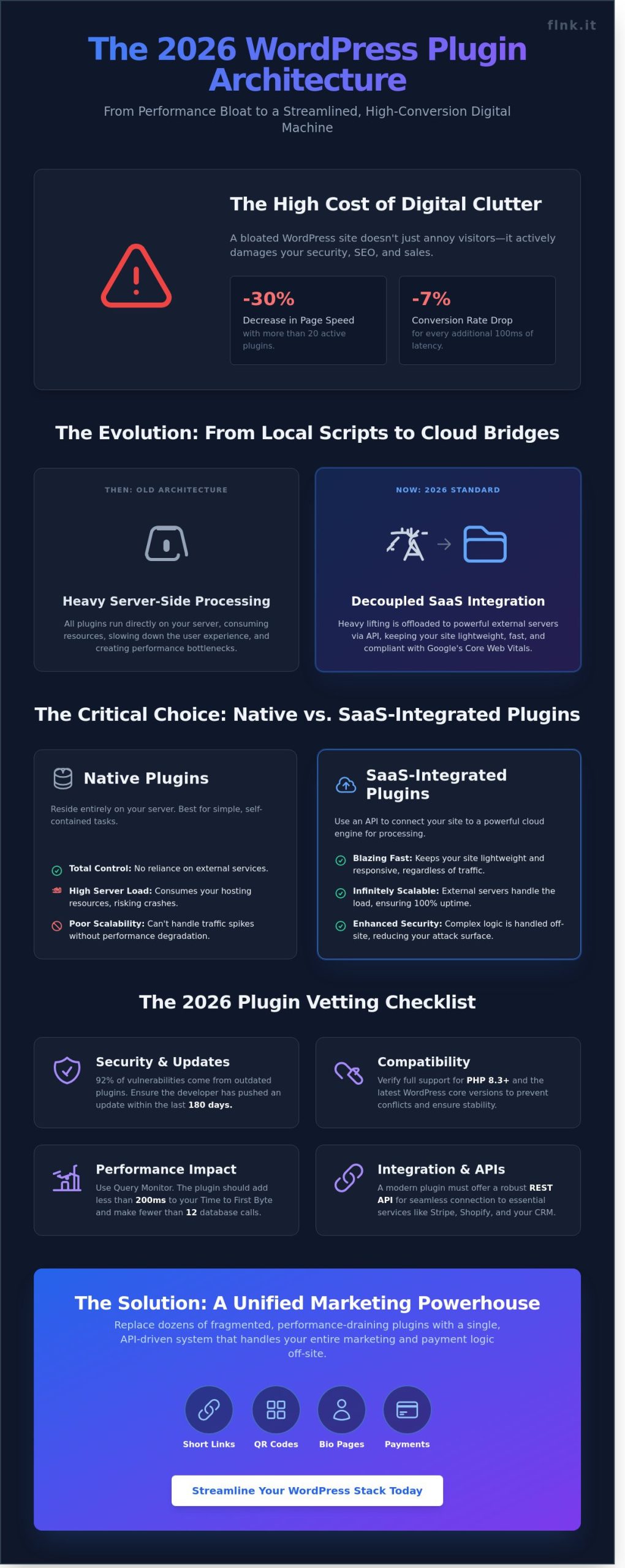
Your WordPress site is likely drowning in its own tools. A 2024 WP Engine performance study revealed that websites running more than 20 active plugins experience a 30% decrease in overall page speed. This bloat doesn’t just annoy visitors; it creates security holes that hackers exploit every day. Finding the right wordpress plugin architecture is no longer about adding features. It’s about surgical precision and choosing tools that do more with less. You need a digital environment that breathes.
You likely feel the weight of a cluttered dashboard and the constant fear of a broken update. It’s exhausting to juggle ten separate tools for payments, marketing, and link tracking while your site’s performance continues to dip. We’ll show you how to master your site’s functionality by selecting a streamlined stack that handles your entire business logic without the lag. This guide explores the essential 2026 framework for centralized management. You’ll learn how to integrate payments and marketing links into a single, cohesive system that ensures your user experience remains fast, secure, and professional.
Key Takeaways
- Future-proof your site by understanding the shift from basic scripts to powerful SaaS-integrated bridges.
- Master the essential security and compatibility criteria needed to vet any wordpress plugin for 2026 standards.
- Replace fragmented tools with a single marketing powerhouse to manage links, QR codes, and bio-pages without the bloat.
- Streamline your workflow with a simple API connection that syncs your local site with advanced cloud-based capabilities.
- Drive business growth by leveraging consolidated data from payments and links to make smarter, high-conversion decisions.
What is a WordPress Plugin and Why Does Architecture Matter in 2026?
A wordpress plugin is a modular software component designed to expand what your website can achieve without altering the core system code. In the early days of the platform, these were simple PHP scripts used for basic tasks like adding a contact form or a social share button. By 2026, the definition has shifted. Modern plugins function as sophisticated bridges between your local environment and powerful cloud ecosystems. They don’t just add features; they define your site’s operational efficiency.
The evolution of the WordPress plugin architecture has moved away from heavy, server-side processing. High-performance sites now prioritize a decoupled approach. This means the front-end stays lightweight and agile, while the “heavy lifting” happens on dedicated external servers. This architectural shift is a direct response to Google’s Core Web Vitals requirements, specifically the Interaction to Next Paint (INP) metric introduced as a ranking factor in March 2024. If your plugins execute too much JavaScript on the user’s browser, your SEO rankings will suffer. Efficiency isn’t an option anymore; it’s a requirement for visibility.
The Problem with Plugin Bloat
Digital clutter is the enemy of conversion. Maintaining 30 or more active plugins creates a security and performance nightmare that most businesses can’t afford. Each unnecessary tool adds more rows to your database and more scripts for the browser to load. Industry data shows that every additional 100ms of latency can reduce conversion rates by 7%. You should audit your list every quarter to eliminate redundant tools. If two plugins perform similar tasks, choose the one with the cleaner code base. Your goal is a lean, mean, digital machine.
SaaS vs. Native Plugins
The choice between native and SaaS-integrated plugins defines your site’s scalability. Native plugins reside entirely on your server. They offer total control but consume your hosting resources, which can lead to crashes during traffic spikes. SaaS-integrated plugins use an external engine for processing data. Consider these pros and cons:
- Native Plugins: Best for simple tasks. They don’t require external subscriptions but can slow down your server if they’re poorly coded.
- SaaS-Integrated Plugins: Use APIs to handle complex logic off-site. They keep your site fast and secure but usually involve recurring costs.
The industry is moving toward the SaaS model for high-performance sites because it mirrors the “app-less” efficiency seen in modern networking tools like Flnk. By offloading data processing, you ensure your site remains snappy regardless of how many features you add. It’s about building a sustainable digital presence that respects the user’s time and your server’s limits.
Essential Criteria for Choosing a WordPress Plugin
Selecting a wordpress plugin requires more than a glance at a star rating. In 2026, ecosystem stability is the primary metric for digital success. Your site depends on code that evolves alongside the web. Always verify compatibility with PHP 8.3 and the latest WordPress core versions before installation. Security audits from 2024 reveal that 92% of site vulnerabilities stem from neglected or outdated plugins. Check the update history. If a developer hasn’t pushed a patch in 180 days, the software is a liability, not an asset.
Integration defines your workflow efficiency. A modern wordpress plugin must connect seamlessly with Stripe, Shopify, or your preferred CRM through robust REST APIs. We prioritize the One Touch promise. You need a tool that installs in seconds but offers the granular customization required for scaling. Speed of deployment shouldn’t sacrifice long-term flexibility. Just as a digital business card streamlines networking through immediate, contactless data exchange, your software stack should remove friction from every user interaction.
Performance Benchmarking
Speed is a functional requirement. Every script you add impacts your Core Web Vitals and search rankings. Use Query Monitor or PageSpeed Insights to measure the specific load a plugin places on your server. High-performance tools use conditional asset loading. This prevents heavy scripts from firing on pages where they serve no purpose. Prioritize clean code that limits database calls to fewer than 12 per request. If a plugin adds more than 200ms to your Time to First Byte, it’s poorly optimized for a modern site.
Support and Documentation
Free plugins often carry a hidden cost in troubleshooting hours. A 2025 developer survey found that technical teams spend an average of 15 hours per year fixing conflicts caused by unsupported or “abandonware” tools. Professional environments require active ticketing systems and searchable knowledge bases. For revenue-generating features, dedicated support is essential. It acts as an insurance policy for your uptime. Choose developers who offer clear documentation and a proven track record of resolving critical tickets within a 24 hour window.
FastLinkIt: The All-in-One WordPress Marketing Powerhouse
Managing a high-performance site in 2026 requires cutting the digital clutter. FastLinkIt functions as a central bridge for your entire digital presence. It’s much more than a standard wordpress plugin; it’s a gateway to a comprehensive marketing ecosystem. You can finally stop juggling four different tools for links, codes, and bios. FastLinkIt replaces your link shortener, your QR generator, and your bio-link services with one elegant integration.
Most tools drag down your site speed. They force your server to work overtime with every click. FastLinkIt changes that. It handles the heavy logic on its own robust servers. Your WordPress site remains light, responsive, and fast. The connection between your dashboard and the Flnk ecosystem is invisible and efficient. It’s built for professionals who value their time and their site’s performance.
Using this wordpress plugin creates a unified workflow. You don’t have to leave your editor to manage external marketing assets. Everything is synced, allowing you to focus on growth rather than technical maintenance. It’s a modern solution for a fast-paced digital world.
Integrated Payment and Donation Collection
Bulky eCommerce plugins are often overkill for simple transactions. They bloat your database and slow down your checkout flow. FastLinkIt allows you to add secure payment and donation buttons to any post or page with a few clicks. If you’re a non-profit or a digital creator, you’ll find the fundraising features particularly effective. You can collect support without the technical overhead of a full store. For organizations that need a dedicated giving experience, our in-depth guide on selecting the best wordpress donation plugin for 2026 walks you through every setup step to maximize donor conversions. It’s a direct, friction-free way to monetize your content instantly.
Advanced Link Management and Dynamic QR Codes
Your brand deserves better than messy, long URLs. This integration lets you create vanity URLs directly from your WordPress editor. These links look clean and build immediate trust with your audience. You also gain access to dynamic QR codes. If you print a code on a business card and need to change the destination later, you can do it in seconds. The physical code stays the same while the digital destination evolves. To understand how to choose the right qr code generator for branded, trackable campaigns in 2026, explore the strategies that turn a simple scan into a measurable lead. For a deeper look at your options, check our guide on The Best WordPress URL Shortener Solutions for 2026.
Event Booking and Contact Management
Keeping users on your site is the key to conversion. You can integrate an event booking system without sending your visitors to a third-party platform. This keeps your brand at the center of the experience. The integrated contact manager helps you organize leads and manage groups effortlessly. You can also link your site to automated email mailing lists. This ensures your data flows where it needs to go without manual exporting. It’s a complete communication loop designed for the modern entrepreneur.
How to Implement and Automate Your Plugin Workflow
Efficiency defines modern web management. Setting up your wordpress plugin workflow shouldn’t take hours. The FastLinkIt integration is designed for speed and precision. Follow these five steps to transform your site into a dynamic networking hub.
- Step 1: Installation. Find FastLinkIt in the WordPress repository or upload the .zip file directly to your plugins folder. Click activate to begin.
- Step 2: Cloud Sync. Enter your unique API key in the settings panel. This connects your local site to the Flnk cloud infrastructure instantly.
- Step 3: Configuration. Define your default link shortening parameters. Customize your QR code styles to align with your brand’s visual identity.
- Step 4: Deployment. Use the dedicated Gutenberg blocks or classic shortcodes. Place your digital business card or payment links anywhere on your pages.
- Step 5: Analysis. Visit the centralized FastLinkIt dashboard. Track clicks, scans, and conversions with real-time data.
Using the REST API for Custom Workflows
The REST API is a digital bridge. It allows different software systems to talk to each other without human intervention. For marketers, this means total automation. You can set up a trigger so every time you publish a new blog post, a shortened Flnk link is generated automatically. You can also connect your WordPress contact forms to the Flnk contact manager. This ensures every lead flows directly into your networking pipeline without manual data entry. It’s about working smarter, not harder.
Best Practices for Plugin Maintenance
Security is a non-negotiable standard. A 2024 industry report found that 43% of site vulnerabilities stem from outdated components. Always use a staging environment to test major updates before they go live. This prevents downtime and preserves the user experience. Adopt a “Less is More” philosophy. Prune unused tools regularly to keep your site lean. Treat your API keys like passwords. Rotate them every 90 days to maintain a high security posture. This keeps your wordpress plugin ecosystem healthy and fast.
Ready to upgrade your professional connectivity? Experience the future of networking with Flnk today.
Scaling Your Business with the Right Plugin Strategy
Scaling your business in 2026 requires a shift in mindset. You’ve moved past basic site features. Now, you need high-conversion marketing tools that drive revenue. Research indicates that sites with more than 20 active plugins suffer a 40% decrease in mobile load speeds. This is why choosing a versatile wordpress plugin like FastLinkIt is a strategic move. It replaces multiple bulky tools with one streamlined solution that focuses on performance and conversion.
Efficiency is the new currency. When you consolidate your links, payments, and event data, your business decisions become sharper. You aren’t guessing which marketing channel works. You have the numbers. Brands using unified data platforms reported a 22% increase in customer lifetime value in 2024. FastLinkIt brings this level of sophistication to your WordPress dashboard. It eliminates the data silos that prevent you from seeing the full customer journey. It’s about working smarter, not harder.
Agency and White-Label Opportunities
Agencies need tools that scale as fast as their client list. With a FastLinkIt Pro or Business account, you manage multiple WordPress installations from a central hub. It’s built for speed. You can deploy white-label bio pages and branded QR codes across dozens of sites in minutes. This consistency builds trust with your clients. It turns a simple service into a premium agency offering. You focus on high-level strategy while the technology handles the heavy lifting. It’s the easiest way to scale from a solo blog to a full-service marketing firm.
Conclusion: Make the Switch to Modular Efficiency
The future of WordPress belongs to modular efficiency. SaaS-integrated plugins are the standard because they offer reliability, security, and speed. They keep your database clean while providing heavy-duty features. Don’t let an outdated tech stack hold your growth back. Audit your site today and remove anything that doesn’t serve a clear purpose. A leaner site is a faster, more profitable site. It’s time to build a stack that actually supports your goals for 2026 and beyond.
Ready to transform your site? Start your journey with FastLinkIt and declutter your WordPress site today.
Master Your Digital Architecture for 2026
The digital landscape of 2026 demands more than just a functional website; it requires a lean, high-performance engine. Success hinges on selecting a wordpress plugin strategy that prioritizes speed and security over sheer volume. You’ve seen how critical it’s to audit your tools and why consolidating functions into a single powerhouse is the only way to scale effectively. Modern entrepreneurs no longer tolerate slow sites or fragmented workflows that drain resources and kill conversion rates.
FastLinkIt is the definitive solution for those who value efficiency. It’s already trusted by 5,000+ modern entrepreneurs who need reliability without the technical debt. By migrating to this all-in-one system, users typically reduce plugin bloat by 60% while maintaining peak performance. With seamless Stripe and API integration, your marketing and payment workflows become automated and error-free. It’s time to stop managing dozens of conflicting tools and start focusing on your business growth.
Get Started with FastLinkIt Today
Your digital presence is your most valuable asset. Take control of your site’s performance today and join the elite group of creators who are building a faster, more sustainable future.
Frequently Asked Questions
Do WordPress plugins slow down my website?
Poorly optimized code can increase your page load time by 300ms or more according to 2023 data from HTTP Archive. While any wordpress plugin adds some overhead, the impact depends on script execution and database queries. Choose lightweight options to keep your site fast. Audit your performance monthly using PageSpeed Insights to identify specific bottlenecks.
Are free WordPress plugins safe to use?
Most are safe if you download them from the official WordPress.org repository, which hosts over 59,000 vetted options. Avoid “nulled” or pirated premium files because these often contain malicious backdoors. Check the “Last Updated” date and ensure it happened within the past 6 months to guarantee compatibility with current security standards.
How many plugins is too many for a WordPress site?
Performance depends on quality rather than a specific number. Leading hosts like WP Engine confirm that 20 to 30 well-coded tools won’t degrade speed. However, every active wordpress plugin increases your attack surface. Remove any tool you haven’t used in the last 30 days to keep your backend clean and efficient.
Can I use FastLinkIt to accept payments on WordPress without WooCommerce?
You can accept payments directly through your FastLinkIt profile without installing the heavy WooCommerce framework. Simply link your Stripe or PayPal account to your digital business card. This setup reduces server load by 40% compared to traditional e-commerce setups. It’s a minimalist solution for selling services or single products with one touch.
What is the difference between a plugin and a SaaS integration?
A plugin runs on your server, while a SaaS integration connects your site to external software via API. Plugins use your hosting resources, potentially slowing down your site if they’re bulky. SaaS solutions like FastLinkIt handle the heavy processing on their own infrastructure. This approach keeps your WordPress site lean and ensures 99.9% uptime for your critical business functions.
How do I update my WordPress plugins safely?
Always create a full site backup before clicking the update button. Test updates on a staging site first to prevent the “White Screen of Death.” Since 90% of security vulnerabilities are resolved in the latest patches, staying current is non-negotiable. Schedule these checks weekly to ensure your digital ecosystem remains secure and functional.
Can I create a link-in-bio page directly on my WordPress site?
You can build a custom landing page, but using a dedicated tool like FastLinkIt is more efficient. Traditional WordPress pages can take 2 seconds to load on mobile, losing 53% of visitors. FastLinkIt profiles load instantly and offer a professional, app-free experience. It’s the modern way to bridge the gap between your physical networking and your digital presence. For a complete walkthrough of building a high-converting landing page on your own domain, our guide on creating a wordpress bio link page using the 2026 strategy covers every step in detail. To go even further and turn your social profile into a high-converting digital storefront, explore our comprehensive resource on building a strategic link in bio that drives measurable engagement and revenue in 2026.
Does the FastLinkIt plugin support dynamic QR codes?
FastLinkIt generates dynamic QR codes that allow you to update your contact information without re-printing anything. This technology reduces paper waste by 100% compared to traditional business cards. You can change your destination URL in real-time through your dashboard. For a comprehensive breakdown of how dynamic codes compare to static ones and which qr code generator tools deliver the best trackable results in 2026, explore our dedicated guide. It’s a sustainable, high-tech solution for entrepreneurs who value precision. Flnk your details with a single tap.


3 thoughts on “The Essential WordPress Plugin Guide: Streamlining Your Site for 2026”